


Introduction
In today’s competitive marketplace landscape, success is no longer driven by intuition; it is driven by data, clarity, and speed of decision-making. Marketplace admins are constantly balancing supply and demand, optimizing user experience, and ensuring steady revenue growth. Without the right visibility, even the most promising platforms can struggle to scale.
This is where an Admin Analytics Dashboard becomes indispensable.
An effective dashboard does more than display numbers; it provides a centralized, real-time view of your marketplace, helping you understand what’s working, what’s not, and where opportunities lie. From tracking user behavior and listing performance to analyzing search patterns and revenue trends, it transforms scattered data into meaningful insights.
With solutions like Aykan’s built-in Admin Analytics Dashboard, this process becomes even more powerful. By combining advanced analytics, AI-driven insights, and marketplace-specific metrics, Aykan enables admins to move beyond passive reporting and take proactive, data-backed actions that drive growth.
In this article, we explore how to build and leverage admin analytics dashboards that don’t just inform but empower smarter decisions, improve performance, and unlock the full potential of your marketplace.
What is an Admin Analytics Dashboard?
An admin analytics dashboard is a centralized interface that collects, analyzes, and visualizes marketplace data such as user activity, listings, transactions, and engagement. Aykan enhances this concept by offering a fully integrated, marketplace-specific dashboard that not only displays data but also helps interpret it. This means admins don’t just see numbers, they understand what those numbers mean and what actions to take next.
Beyond basic reporting, the dashboard acts as a real-time control center for the marketplace, bringing together data from multiple touchpoints into one clear view. This eliminates manual tracking and provides instant visibility into platform performance.
A well-designed dashboard also adds context to data. Instead of just showing metrics, it helps identify underlying issues such as low conversions, poor listing performance, or unmet demand so admins can take immediate action.
With Aykan’s advanced capabilities, including search analytics, listing insights, and AI performance tracking, the dashboard becomes a decision-making engine that supports smarter strategies, better user experience, and continuous marketplace growth.
Why is an Analytics Dashboard Important?
Running a marketplace without analytics is like navigating without a map. You may move forward, but without clarity or direction.
An analytics dashboard helps admins:
- Monitor platform health in real time
- Identify growth opportunities
- Detect issues before they escalate
- Make confident, data-backed decisions
Beyond this, an analytics dashboard provides complete visibility into both demand and supply dynamics. Admins can understand what users are searching for, how listings are performing, and where gaps exist, allowing them to balance the marketplace more effectively.
It also enables faster and more proactive decision-making. Instead of reacting to problems after they impact the business, admins can spot early signals, such as declining engagement or increasing drop-offs, and take corrective action immediately.
Another key advantage is performance tracking over time. By analyzing trends across days, weeks, or months, admins can measure the impact of new features, marketing campaigns, or pricing changes, ensuring continuous improvement.
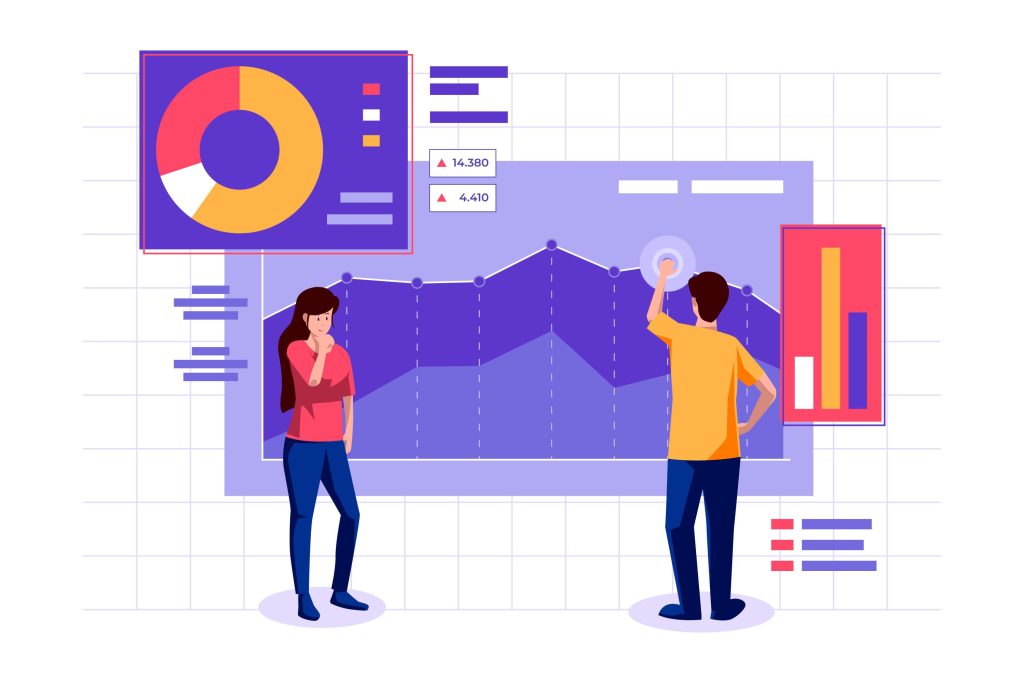
Aykan takes this further by combining real-time tracking with intelligent insights, including search analytics, listing performance, and AI-driven metrics. This ensures that every decision is not only informed but also aligned with actual user behavior and marketplace needs, leading to smarter strategies and sustainable growth.
Aykan's Key Offering: Admin Analytics Dashboard
1. Dashboard Overview
Aykan provides a centralized view of overall marketplace performance, enabling admins to quickly assess platform health, growth trends, and operational efficiency. Key KPIs are presented in a clear and structured format, allowing instant understanding without requiring technical expertise.
The dashboard is organized into dedicated tabs such as Dashboard, Search, Listing View, AI Search, AI Chat, and Users, making navigation intuitive and insights easily accessible. Each KPI is interactive and clickable, allowing admins to drill down into detailed data for deeper analysis without needing additional tools.
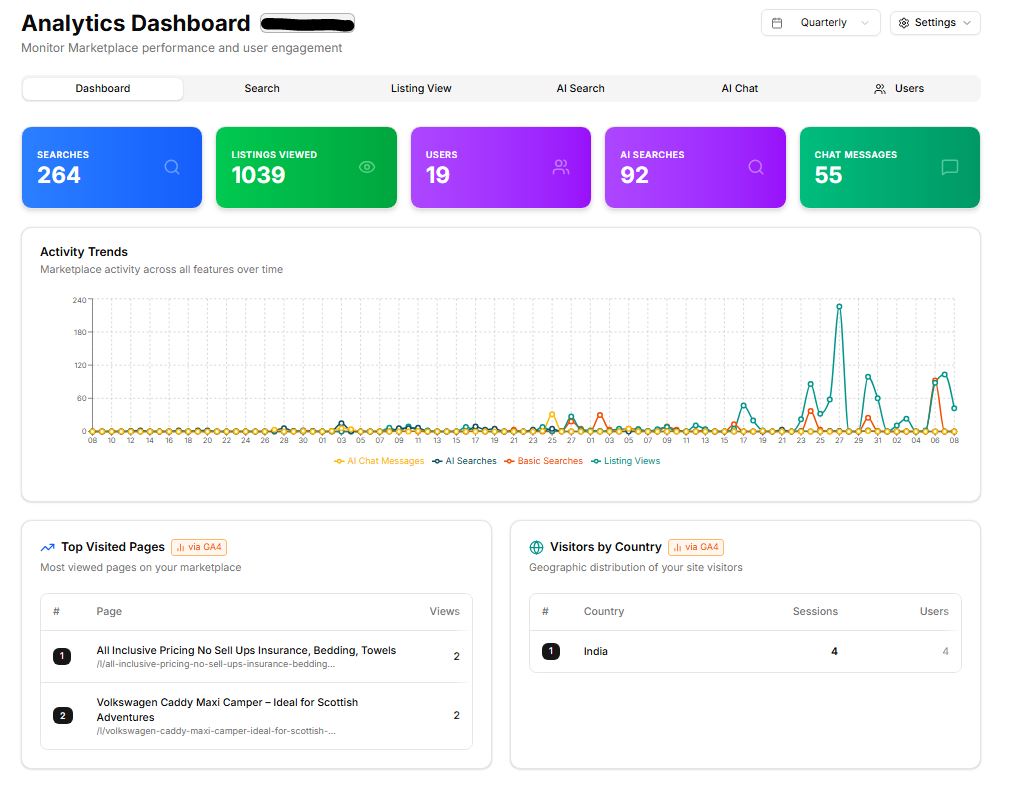
A core feature of this centralized dashboard is the activity trends visualization, which gives admins a graphical view of overall marketplace performance. This can be customized to display weekly, monthly, or quarterly data, helping track growth patterns, compare performance over time, and evaluate the impact of business decisions or campaigns.
The dashboard also highlights top-visited pages, enabling admins to understand which areas of the platform attract the most user attention. This provides valuable insight into user behavior and helps identify what users find most engaging, whether it’s specific products, services, or categories, so admins can further optimize those areas.
Additionally, admins can view visitors by country, offering a clear picture of how the marketplace is performing across different geographic regions. This is especially useful for identifying high-growth markets, tailoring marketing strategies, and expanding into new regions with confidence.
Overall, the dashboard is designed not just for monitoring but for actionable insights, empowering admins to make faster decisions, improve user experience, and continuously optimize marketplace performance.
2. Search Analytics
Understanding what users are searching for is critical for marketplace success. Aykan’s Search Analytics tracks standard search behavior across products and services, giving admins clear visibility into user intent and demand patterns.
Admins can monitor key metrics such as:
- Searches with results
- Searches without results
These insights help identify demand gaps, enabling admins to take action, such as onboarding new providers, improving listing quality, or refining categories, to better meet user needs.
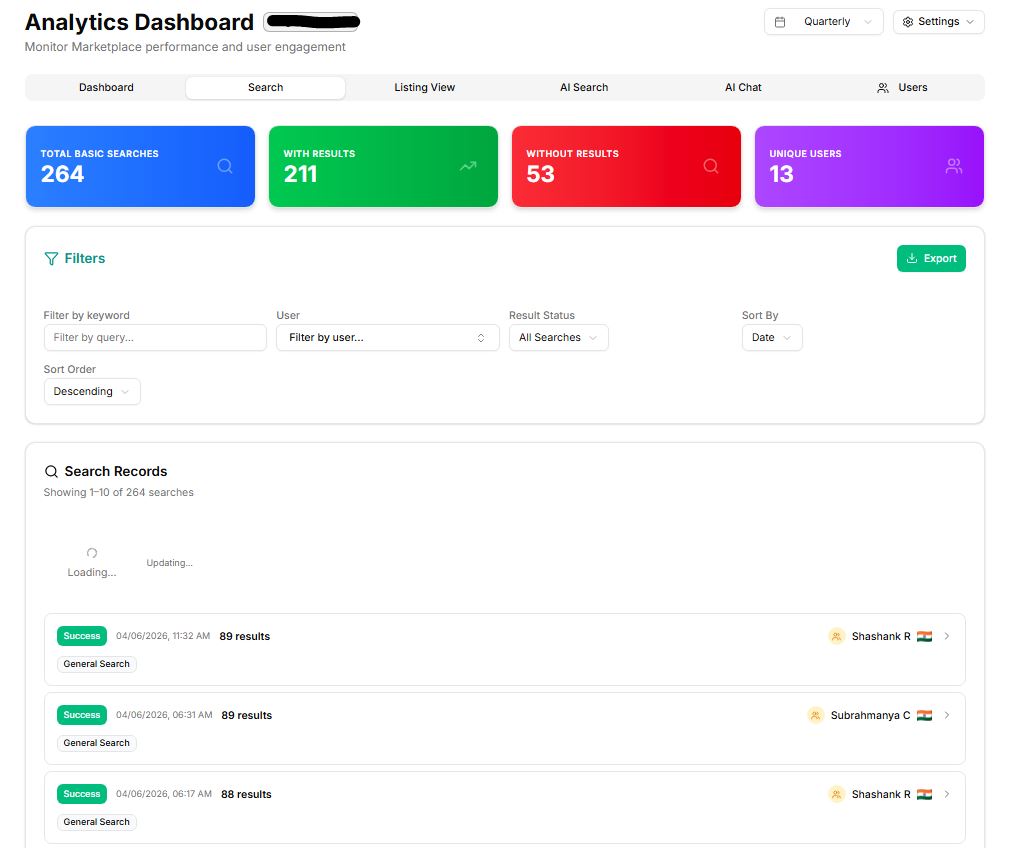
In addition, Aykan includes interactive, clickable KPIs such as Total Basic Searches, Searches with Results, Searches without Results, and Unique Users. Each KPI allows admins to drill down into detailed data for deeper analysis.
The dashboard also provides advanced filtering options, allowing admins to segment and analyze search data based on specific criteria. This makes it easier to identify patterns, track improvements over time, and focus on areas that need attention.
Another key capability is the ability to download and share search analytics data. Admins can export these insights and share them with providers or stakeholders, helping them understand user demand and make improvements to listings, ultimately reducing unmet search needs.
“Searches with results” represent user queries where relevant listings (products or services) were successfully found, indicating that the marketplace is effectively meeting user demand. On the other hand, “searches without results” highlight queries where users could not find what they were looking for, signaling potential gaps in supply or content.
3. Listing View Analytics
Aykan delivers detailed insights into listing-level performance, helping admins clearly understand what content is working and what needs improvement. This enables marketplaces to optimize listings based on actual user behavior rather than assumptions.
Key metrics include:
- Top-searched listings
- Unique listings and unique users
- Average listing views
- Time spent on listings
- User response rates
In addition, the dashboard provides interactive KPIs such as Total Views, Unique Listings, Unique Users, and Average Views per Listing. These KPIs are clickable, allowing admins to drill down into detailed performance data for each listing.
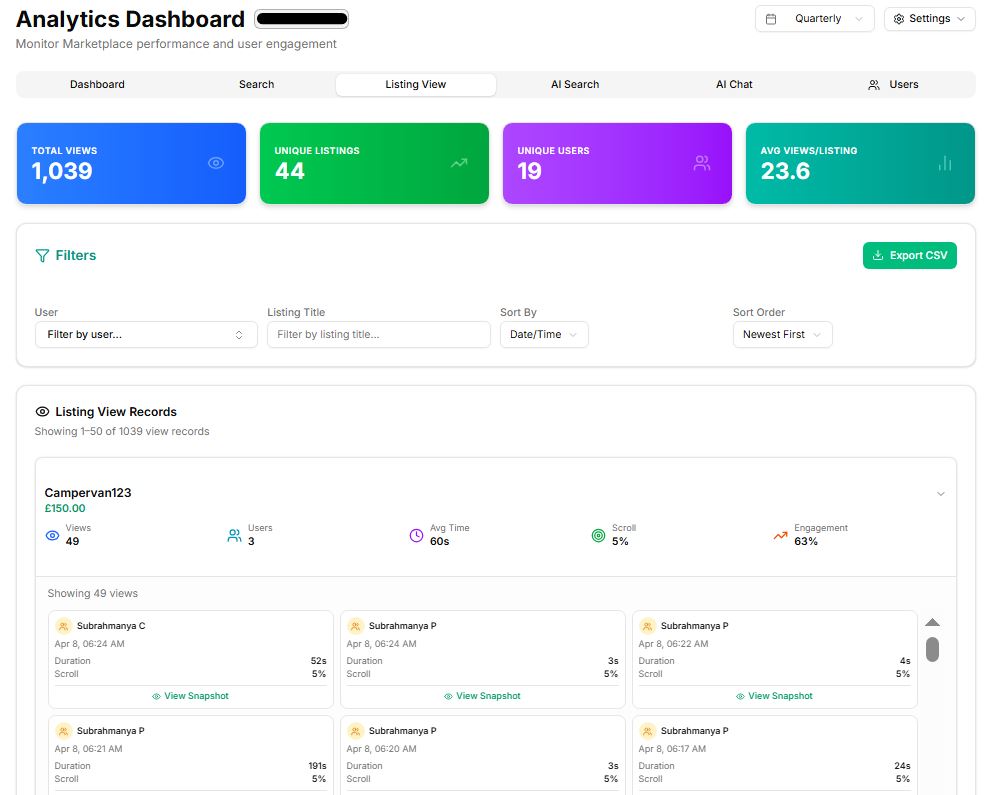
The listing view records offer a comprehensive breakdown of performance, including listing name, number of views, number of users, average time spent, scroll depth, and overall user engagement. This helps admins evaluate how effectively each listing captures and retains user attention.
A powerful feature within Aykan is the ability to view a real-time snapshot of individual listings. From this view, admins can access granular user-level data such as:
- User names and locations
- Date and time of interaction
- Duration spent on the listing
- Scroll behavior and engagement level
This level of detail provides deep insights into how users interact with specific listings, enabling admins to identify patterns such as high interest but low conversion, or strong engagement in certain regions.
The usefulness of this feature is significant. Admins can:
- Identify high-performing listings and replicate their success
- Detect underperforming listings and guide providers on improvements
- Understand user preferences and behavior in detail
- Optimize listing content, pricing, and visuals for better engagement
- Provide data-backed feedback to sellers or service providers
With advanced filtering and export capabilities, admins can further analyze trends, share insights with stakeholders, and continuously improve listing quality, ultimately driving higher engagement and better conversion rates across the marketplace.
4. AI Search Analytics
As marketplaces adopt AI-driven features, measuring their effectiveness becomes essential. Aykan’s AI Search Analytics provides clear visibility into how AI-powered search is performing and how it influences user experience and discovery.
Admins can evaluate:
- Adoption of AI-powered search
- Accuracy and relevance of results
- Overall impact on user experience and conversions
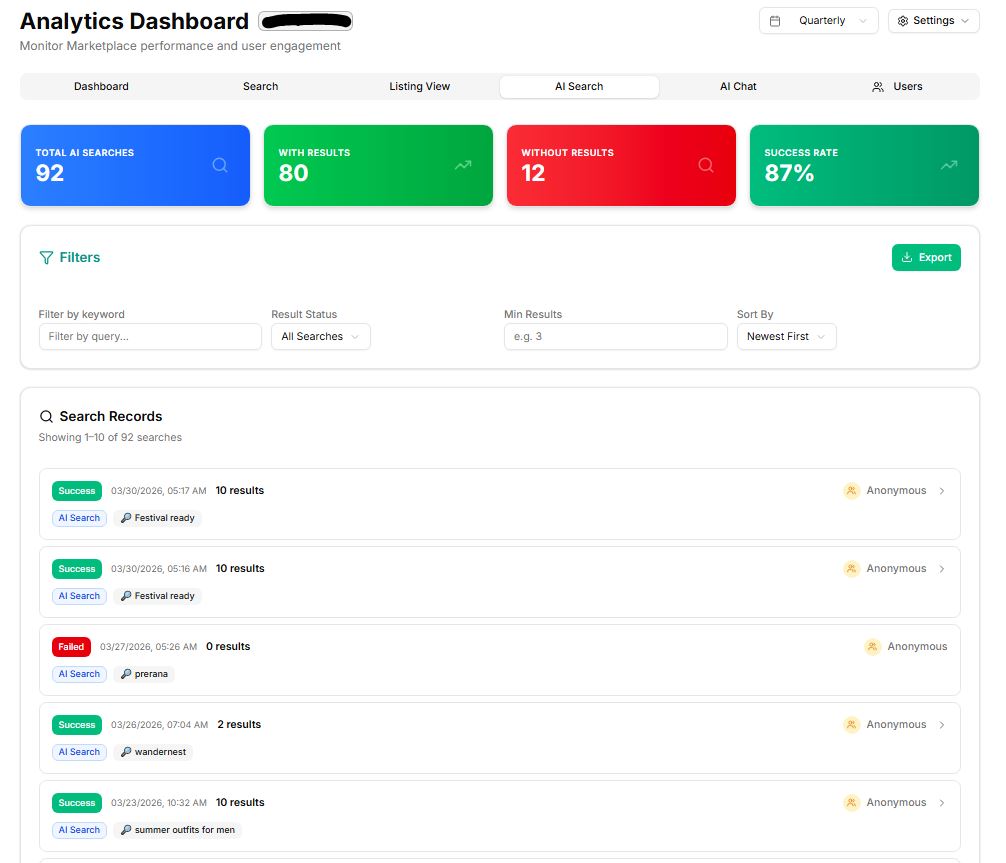
The dashboard includes key interactive KPIs such as Total AI Searches, Searches with Results, Searches without Results, and Success Rate. These metrics help admins quickly understand how effectively the AI search is responding to user queries.
“Searches with results” indicate that the AI successfully understood user intent and delivered relevant listings, while “searches without results” highlight areas where the AI may need improvement, such as better training, refined data, or enhanced listing content. The success rate provides a quick performance indicator, showing the percentage of searches that resulted in meaningful outcomes.
With these insights, admins can assess whether AI search is truly improving product or service discovery, reducing friction in the search journey, and contributing to higher engagement and conversions. It also helps identify gaps where AI performance can be optimized, ensuring a smarter and more efficient search experience for users.
5. AI Chat Analytics
Aykan also tracks the performance of AI-powered chat interactions within the marketplace, giving admins deep visibility into how conversational support is impacting user experience and operations.
Admins can analyze:
- User engagement with AI chat
- Contribution to customer support efficiency
- Impact on overall marketplace performance
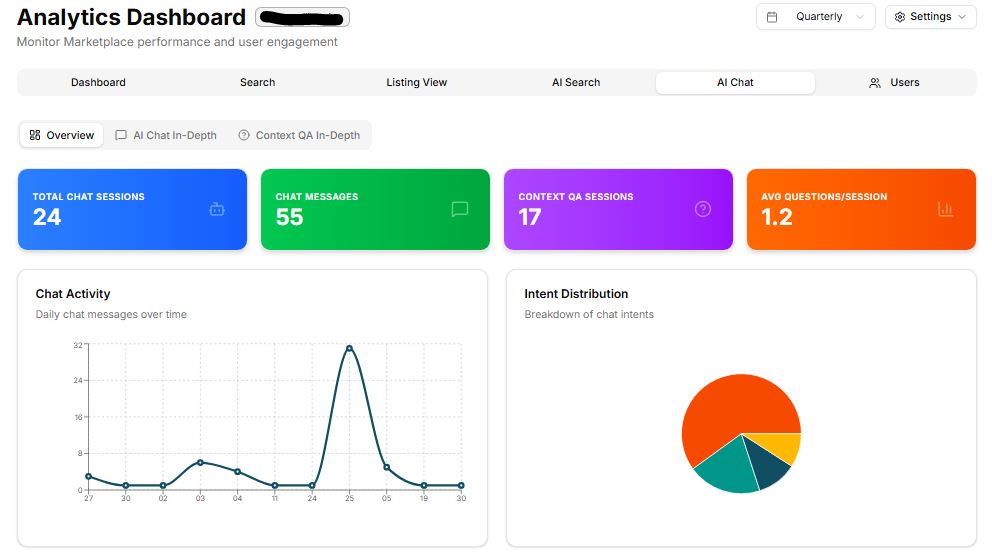
At the core of this feature is Aykan’s 24/7 AI Chat Assistant, which acts as a smart, always-available virtual assistant. It enables users to interact with the platform in a natural, conversational way, getting instant answers without relying solely on traditional support channels. This significantly improves response times and enhances the overall user experience.
The AI Chat Analytics dashboard provides detailed insights, including:
- Total chat sessions between users and providers
- Number of chat messages exchanged
- Context-based Q&A sessions
- Average questions per session
Admins also have the ability to review communication between users and providers, helping ensure quality interactions and identify potential issues or improvement areas.
To make insights more accessible, the dashboard includes graphical visualizations of chat activity and intent distribution, allowing admins to quickly understand usage patterns. It also features dedicated tabs for top chat intents, such as:
- Casual conversations
- General FAQs
- Listing-related queries
- Transaction-related discussions
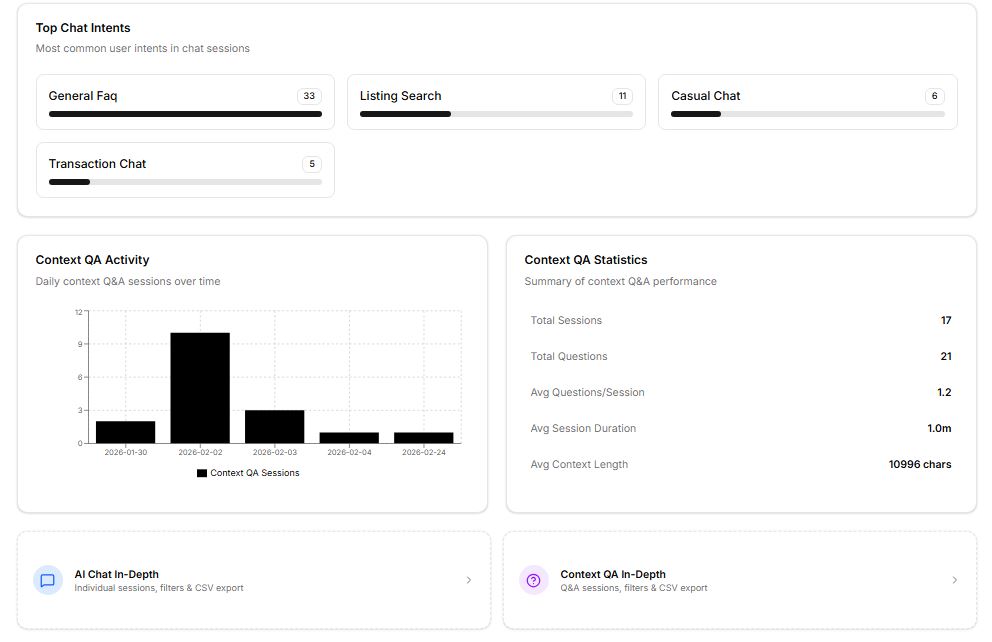
Additionally, the system provides Context Q&A Analytics, including activity charts and performance statistics such as:
- Total sessions and total questions
- Average session duration
- Average number of questions per session
- Average context length
For deeper analysis, admins can export AI chat data, including individual chat sessions and context-based Q&A data, into CSV files. This allows for further evaluation, reporting, and sharing with stakeholders.
The usefulness of this feature is substantial. Admins can:
- Evaluate how effectively AI chat is supporting users
- Reduce dependency on manual customer support
- Identify common user queries and improve FAQs or listings
- Enhance AI responses based on real interaction data
- Improve overall efficiency and user satisfaction
Overall, AI Chat Analytics helps ensure that the AI assistant is not just active, but truly valuable in driving engagement, support efficiency, and marketplace growth.
6. User Insights
Understanding your audience is key to marketplace growth. Aykan provides detailed user demographic insights, including geographic distribution and behavioral patterns, giving admins a clear picture of who their users are and how they interact with the platform.
This enables admins to:
- Optimize targeting strategies
- Personalize user experiences
- Focus on high-value regions or user segments
The dashboard allows admins to analyze user distribution across different geographic locations, helping identify strong markets as well as regions with growth potential. These insights are especially useful for planning marketing campaigns, expanding into new areas, and tailoring offerings based on regional demand.
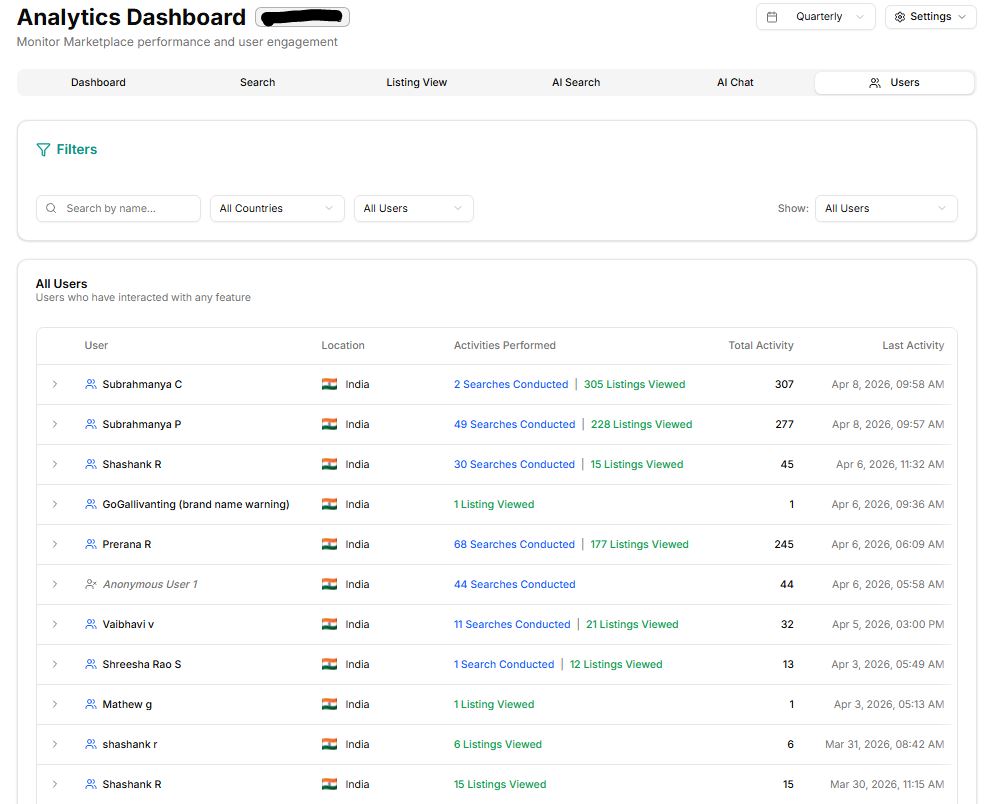
Additionally, Aykan provides the capability to download user data in CSV format, including both named and anonymized datasets for geographic analysis. This ensures flexibility in reporting while maintaining data privacy standards where required.
The usefulness of this feature is significant. Admins can:
- Identify where most users are coming from
- Understand regional engagement trends
- Align supply (listings/services) with location-based demand
- Share insights with internal teams for strategic planning
Overall, User Insights empower admins to make more targeted, data-driven decisions, ensuring that marketplace growth is aligned with actual user behavior and geographic reach.
Case Study: Transforming GoGallivanting Marketplace with AI-Powered Innovation
GoGallivanting Marketplace is a travel-focused marketplace designed to connect users with curated experiences, services, and listings. As the platform aimed to scale, the challenge was clear, how to improve discovery, streamline listing creation, and enhance user experience using modern AI capabilities.
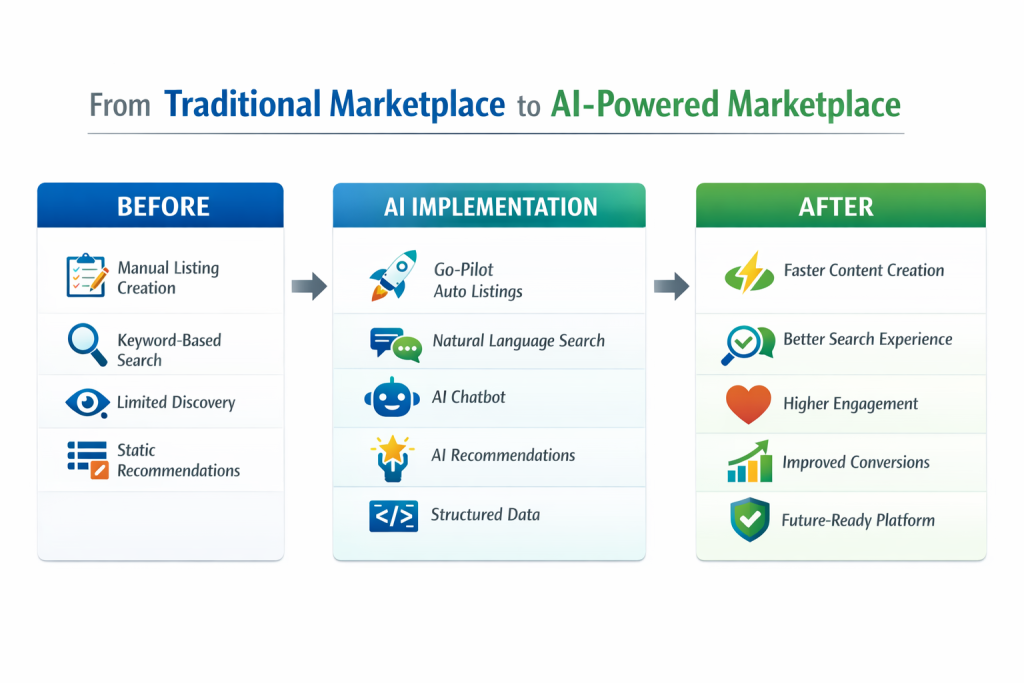
To address this, a suite of advanced AI-driven features was implemented, transforming GoGallivanting into a next-generation, intelligent marketplace that is optimized not just for users, but also for search engines, AI assistants, and future discovery channels.
What We Delivered
1. Go-Pilot (Auto Listing Creation)
Go-Pilot is a powerful AI-driven feature that allows admins or providers to simply paste three URLs. The system automatically scrapes and analyzes the content to generate fully structured listings. It creates SEO, AEO, and voice-search-optimized titles, along with rich and engaging descriptions that are ready to publish. This significantly reduces manual effort while ensuring consistent, high-quality, and optimized content at scale.
2. Schema.org Structured Data
All listings were enhanced with Schema.org structured data, making them easily discoverable and understandable by search engines, LLMs, and AI assistants. This improves indexing, increases visibility in AI-driven search environments, and ensures the platform is future-ready for conversational and voice-based discovery.
3. Smart Alt-Text Generation
A context-aware system was implemented to automatically generate alt text for images based on listing data. This improves accessibility compliance while enhancing SEO performance. It also eliminates the need for manual input, making the process more efficient and cost-effective.
4. Natural Language Search
Traditional keyword-based search was replaced with natural language search capabilities. Users can now search in plain English, expressing intent rather than relying on exact keywords. This leads to more accurate results, improves discovery, and significantly reduces friction in the search experience.
5. AI Chatbot
An intelligent AI chatbot was introduced to act as a conversational assistant across the platform. Users can compare listings, explore details, check transactions, and query policies through natural conversation. This reduces dependency on manual support while improving response times and overall user experience.
6. Intelligent Recommendations
A behavior-driven recommendation engine was implemented to provide contextual suggestions based on user activity and preferences. This increases engagement, encourages deeper exploration of the platform, and improves conversion rates by presenting relevant options at the right time.
7. AI-Powered Side-by-Side Comparison
A comparison feature was introduced to allow users to evaluate multiple listings simultaneously. With AI highlighting the most relevant differences, users can make faster and more informed decisions. This creates a streamlined comparison experience similar to a smart cart, improving clarity and confidence during the decision-making process.
Key Benefits for Marketplace Admins
Aykan’s analytics dashboard delivers powerful, real-world benefits that directly impact marketplace growth, efficiency, and performance. Here are the top 6 benefits, explained in more detail:
Data-Driven Decision Making
Admins can rely on accurate, real-time insights instead of assumptions. Every decision, whether related to pricing, UX improvements, or launching new features, is backed by data. This reduces risk and increases the chances of success, as strategies are aligned with actual user behavior and marketplace trends rather than guesswork.
Faster Issue Detection
The dashboard helps identify sudden drops in transactions, engagement, or search performance instantly. Instead of discovering problems too late, admins receive early signals and can act immediately. This proactive approach minimizes potential losses, ensures platform stability, and keeps the user experience consistent.
Identifying Demand Gaps
With search analytics, admins can clearly see what users are looking for but cannot find. These “searches without results” highlight unmet demand, allowing admins to take targeted actions such as onboarding new providers, expanding categories, or improving listing content. This directly contributes to better user satisfaction and increased conversions.
Improving Listing Performance
Detailed listing insights allow admins to identify which listings are attracting users and which are underperforming. Metrics like views, engagement time, and response rates help pinpoint areas for improvement. Admins can then guide sellers or service providers with data-backed recommendations, leading to higher-quality listings and better overall marketplace performance.
Enhancing User Experience
User behavior and engagement metrics help admins understand how users interact with the platform at every stage. By analyzing patterns such as drop-offs, time spent, and interaction flow, admins can optimize navigation, search functionality, and listing presentation. This results in a smoother user journey, improved satisfaction, and higher retention rates.
Competitor Comparison: AI-Powered vs Traditional Marketplaces
Revenue Optimization
By tracking key metrics such as GMV, conversion rates, and commissions, admins can identify exactly where revenue is being generated and where opportunities exist. Insights into top-performing categories, user segments, and high-converting listings allow for targeted strategies that increase transactions and maximize overall marketplace revenue.
Final Thoughts
An effective admin analytics dashboard is no longer a “nice-to-have”—it is a core foundation for building and scaling a successful marketplace. With increasing competition and evolving user expectations, relying on intuition alone is not enough. Admins need clear visibility, real-time insights, and the ability to act quickly.
Aykan’s built-in analytics dashboard brings all of this together by combining centralized data, advanced analytics, and AI-driven insights into a single, intuitive interface. From understanding user behavior and identifying demand gaps to optimizing listings and improving conversions, it empowers admins to make smarter, faster, and more impactful decisions.
Ultimately, the true value of a dashboard lies not in the data it shows, but in the actions it enables. When used effectively, it becomes a continuous growth engine helping marketplaces evolve, adapt, and thrive.
FAQ's
1. What is an admin analytics dashboard in a marketplace?
An admin analytics dashboard is a centralized tool that helps marketplace admins monitor performance by analyzing data such as users, listings, transactions, and engagement in one place.
2. Why is an analytics dashboard important for marketplace admins?
It provides real-time visibility into platform performance, helps identify issues early, and enables data-driven decision-making to improve growth and efficiency.
3. What makes Aykan’s analytics dashboard different?
Aykan’s dashboard is specifically built for marketplaces and includes advanced features like search analytics, listing performance insights, AI search and chat analytics, and user demographics, all in a single interface.
4. How does search analytics help improve a marketplace?
Search analytics shows what users are looking for and highlights gaps where no results are found. This helps admins add relevant listings, improve categories, and better meet user demand.
5. Can admins export and share analytics data?
Yes, Aykan allows admins to export data (such as search, listing, user, and AI chat analytics) into CSV files, making it easy to share insights with teams and providers for further improvements.
6. How often should marketplace admins use the analytics dashboard?
Admins should monitor the dashboard regularly—ideally on a daily basis for key metrics and weekly or monthly for deeper analysis. This helps track trends, measure performance, and make timely improvements based on real-time data.
7. How do AI analytics features (like AI search and chat) add value to a marketplace?
AI analytics provide deeper insights into how intelligent features are being used and how effective they are. They help admins understand user intent, improve search accuracy, enhance support through AI chat, and ensure these features contribute to better engagement and higher conversions.