


Introduction
Shipping is one of the most critical components of any product marketplace. While listing products and processing payments are often handled seamlessly, fulfillment introduces an entirely different set of operational challenges. Sellers need to calculate shipping costs, prepare packages, generate shipping labels, coordinate courier services, and ensure orders are dispatched on time. As marketplaces grow, these manual processes can quickly become difficult to manage.
This was one of the challenges faced while enhancing My Gear Loop, a Sharetribe-powered marketplace for buying and selling pre-owned sports footwear. The marketplace required a shipping experience that was simple for sellers, transparent for buyers, and scalable enough to support growing order volumes.
Rather than asking sellers to manually manage shipping after every purchase, the goal was to automate the entire fulfillment journey from listing creation to shipment generation while keeping the user experience intuitive.
To achieve this, we extended the Sharetribe marketplace with a custom shipping workflow that integrates Zapier and Shiptheory. The solution automates shipping calculations, streamlines shipment creation, and enables sellers to generate shipping labels directly from the marketplace, significantly reducing operational effort.
The Challenge
Sharetribe provides an excellent foundation for building online marketplaces, but product marketplaces often require shipping workflows that are tailored to specific business operations.
For Gear Loop, shipping needed to support standardized parcel sizes, predefined shipping rates, automated courier integration, and a fulfillment process that sellers could manage with minimal effort. The objective was not simply to display shipping costs but to create a complete operational workflow that connected listing creation, checkout, order management, and shipment generation.
Without automation, sellers would have been responsible for calculating shipping costs, logging into courier portals, manually creating shipments, generating labels, and coordinating dispatch for every order. As transaction volumes increased, these repetitive tasks would have created unnecessary operational overhead and increased the likelihood of fulfillment errors.
The challenge was to design a shipping workflow that maintained the simplicity of the Sharetribte seller experience while introducing enterprise-level fulfillment automation behind the scenes.
The Solution
To address these challenges, a custom shipping workflow was implemented on top of the Sharetribe marketplace.
Instead of asking sellers to repeatedly configure shipping information for every order, shipping details are captured during listing creation and automatically reused throughout the transaction lifecycle.
The solution combines standardized package sizes, automated shipping calculations, Zapier workflow automation, and Shiptheory integration to create a seamless fulfillment process.
From the seller’s perspective, shipping setup is quick and straightforward. Behind the scenes, however, the marketplace manages shipment creation, courier integration, and shipping label generation automatically.
How the Implementation Works
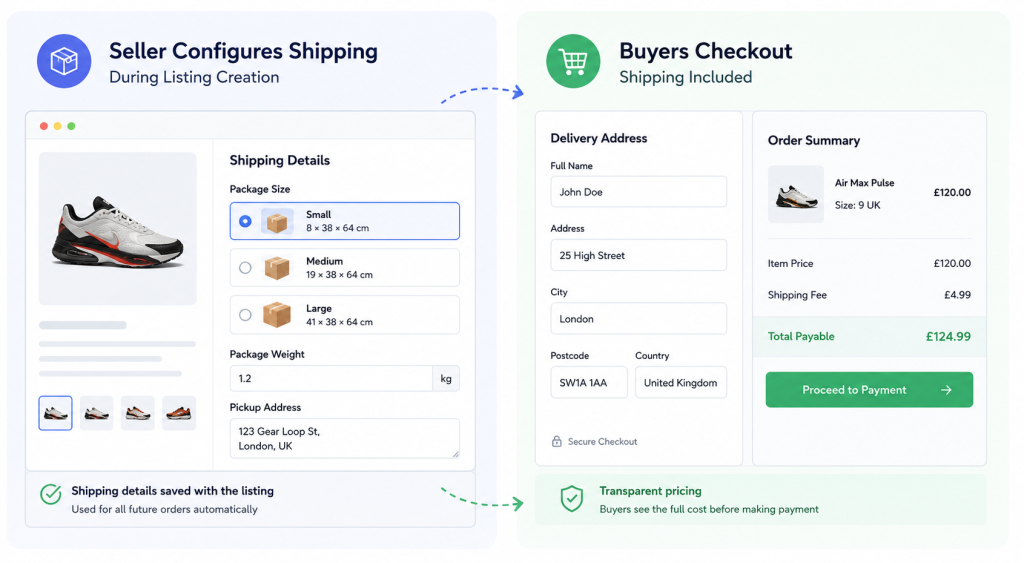
Step 1: Sellers Configure Shipping During Listing Creation
The shipping workflow begins when sellers create or edit a listing on the marketplace. As part of the listing process, sellers provide a few essential shipping details that will be used throughout the order fulfillment journey.
These details include:
- Package Size
- Small (8 × 38 × 64 cm)
- Medium (19 × 38 × 64 cm)
- Large (41 × 38 × 64 cm)
- Package Weight
- Pickup Address
Rather than asking sellers to understand courier pricing, configure shipping rules, or enter detailed logistics information for every order, the marketplace captures only the information required to automate fulfillment. This keeps the listing process simple and user-friendly while ensuring the platform has all the necessary data to manage shipping efficiently behind the scenes.
Once these shipping details are saved with the listing, they are automatically reused whenever an order is placed. Sellers do not need to re-enter shipping information for every transaction, which reduces repetitive work, minimizes the chances of manual errors, and helps maintain consistency across all orders.
Step 2: Buyers Complete Checkout with Shipping Included
When a buyer decides to purchase an item, shipping is seamlessly integrated into the checkout experience, creating a smooth and transparent purchasing journey.
During checkout, the buyer enters their delivery address, and the platform automatically calculates the applicable shipping fee based on the shipping details configured for the listing. The order summary then displays a complete breakdown of the costs, including the product price, shipping charge, and the total amount payable before payment is completed.
Displaying shipping costs upfront gives buyers complete visibility into the final purchase price, helping them make informed purchasing decisions. It also eliminates unexpected charges during the final stage of checkout, which can improve buyer confidence and reduce the likelihood of cart abandonment.
Since all required shipping information has already been captured during listing creation, the checkout process remains simple for buyers while ensuring the necessary data is available for the fulfillment workflow that follows.
Step 3: Sellers Confirm the Order is Ready to Ship
Rather than immediately creating a shipment after payment, the marketplace introduces an additional confirmation step for sellers.
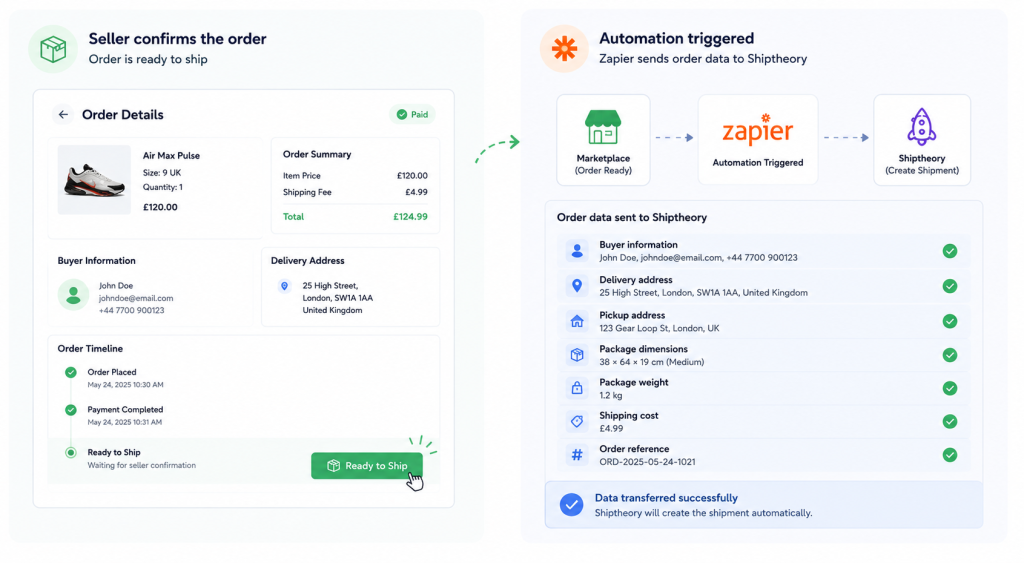
Once the order has been packaged and prepared, the seller simply clicks the Ready to Ship button available within the order management interface.
This small but important step gives sellers full control over when the fulfillment process begins. It ensures inventory has been prepared, packaging is complete, and the order is genuinely ready for collection before shipment creation is triggered.
This helps prevent failed pickups and avoids unnecessary shipping issues that can occur when shipments are created too early.
Step 4: Zapier Automatically Starts the Fulfillment Workflow
After the seller marks the order as Ready to Ship, the marketplace automatically triggers a Zapier automation workflow to begin the fulfillment process. This eliminates the need for sellers to manually transfer order information to external shipping platforms, making the workflow faster and more reliable.
Zapier acts as the integration layer between the marketplace and Shiptheory, securely passing all the shipment-related information required to create a shipment. This seamless automation ensures that data flows accurately between systems without requiring any manual intervention.
The information transferred includes:
- Buyer information
- Delivery address
- Pickup address
- Package dimensions
- Package weight
- Shipping cost
- Order reference
Once the workflow is triggered, all of this information is automatically sent to Shiptheory, preparing the shipment for the next stage of fulfillment. By automating data transfer, the marketplace significantly reduces repetitive administrative tasks, minimizes the risk of manual data entry errors, and ensures that every shipment is created using accurate and consistent information.
This integration not only improves operational efficiency for sellers but also creates a scalable fulfillment process capable of handling increasing order volumes as the marketplace continues to grow.
Step 5: Shiptheory Creates the Shipment
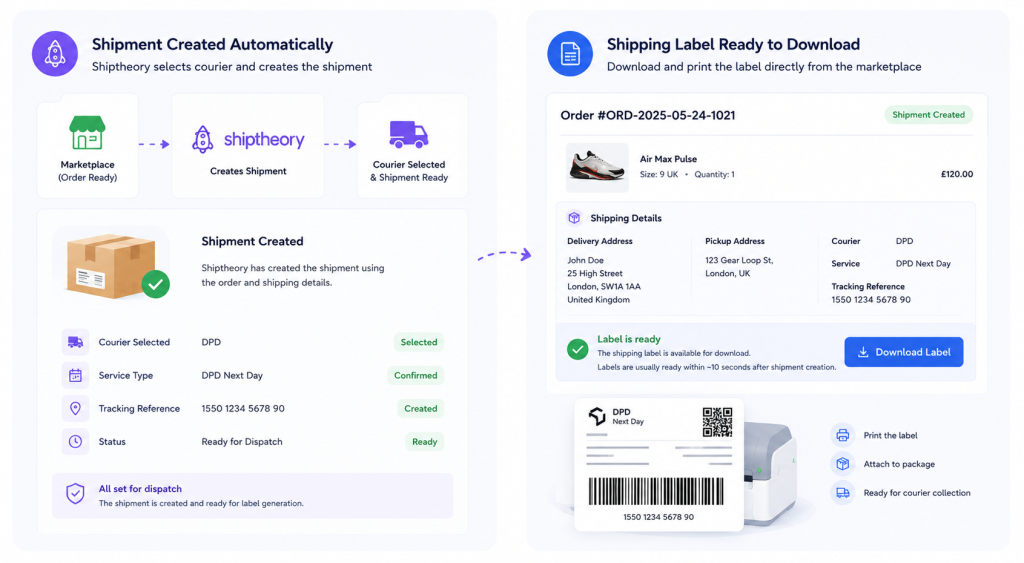
Once the shipment information is transferred successfully, Shiptheory automatically begins the fulfillment process. Using the data received from the marketplace, the platform creates the shipment and prepares it for dispatch without requiring any additional input from the seller.
Based on the package size, weight, pickup location, and delivery address, Shiptheory applies the configured shipping rules to select the appropriate courier service. This automated process removes the need for sellers to manually log into courier portals, re-enter shipment details, or create shipping requests for every order.
By automating shipment creation, the marketplace significantly reduces administrative effort while improving accuracy and consistency across the fulfillment process. Sellers can focus on preparing orders for dispatch instead of spending valuable time managing shipping operations manually.
Step 6: Shipping Labels are Generated Automatically
Once the shipment has been successfully created, sellers can download the shipping label directly from the marketplace using a dedicated Download Label button available within the order details.
To provide a seamless experience, the marketplace retrieves the shipping label directly from the Shiptheory API using a secure authentication token. This approach was implemented because Shiptheory does not return the shipping label or shipment reference as part of the Zapier response.
Since shipment creation is processed asynchronously, there may be a short delay of approximately 10 seconds before the label becomes available. This brief processing time allows Shiptheory to complete shipment creation before the label is generated.
As soon as the label is ready, sellers can download and print it directly from the marketplace, attach it to the package, and prepare the order for courier collection. By eliminating manual label creation and reducing the need to switch between multiple systems, the marketplace delivers a faster, more efficient, and more reliable fulfillment experience for sellers.
Solving the Shipping Label Challenge
One interesting implementation challenge involved shipping labels.
Although Zapier successfully created shipments inside Shiptheory, Shiptheory does not return the generated shipping label within the Zapier response.To overcome this limitation, we introduced a custom Download Label feature inside the marketplace.
When sellers click the button, the marketplace securely calls the Shiptheory API using an authentication token generated from the Shiptheory dashboard. The label is then retrieved directly from Shiptheory rather than through Zapier.
Since shipment creation happens asynchronously, labels typically become available within approximately ten seconds after shipment creation.This solution provides a much smoother seller experience while working around a technical limitation of the third-party integration.
Business Value
Benefits for Buyers
- Transparent Shipping Costs Buyers can see the shipping charges as part of the checkout process before completing their purchase. This transparency eliminates unexpected costs at the final stage of checkout and helps buyers make informed purchasing decisions.
- Greater Confidence During Checkout With a clear breakdown of the product price, shipping fee, and total order value, buyers know exactly what they are paying for. This creates a more trustworthy shopping experience and encourages purchase completion.
- Faster Order Processing Since shipment creation is automated after the seller confirms the order is ready, buyers benefit from quicker fulfillment and reduced delays between payment and dispatch.
- A More Seamless Shopping Experience Shipping is fully integrated into the purchase journey, allowing buyers to move from product selection to payment without additional shipping discussions or manual coordination.
- Improved Delivery Experience Automated shipment creation and standardized fulfillment processes help ensure orders are processed accurately, contributing to more reliable deliveries and an overall better customer experience.
Benefits for Sellers
- Simple Shipping Setup Sellers only need to configure package size, weight, and pickup information when creating a listing. These details are automatically reused for future orders, eliminating repetitive setup.
- Reduced Administrative Work Shipment creation, courier selection, and data transfer are automated, removing the need to manually enter order information into external shipping systems.
- Direct Access to Shipping Labels Shipping labels can be downloaded directly from the marketplace once they are generated, allowing sellers to prepare packages without switching between multiple applications.
- Greater Control Over Fulfillment The Ready to Ship confirmation allows sellers to initiate shipment creation only when the package is fully prepared, helping prevent failed pickups and improving operational efficiency.
- More Time to Focus on Business Growth By automating repetitive fulfillment tasks, sellers can spend more time managing inventory, serving customers, and growing their business instead of handling logistics manually.
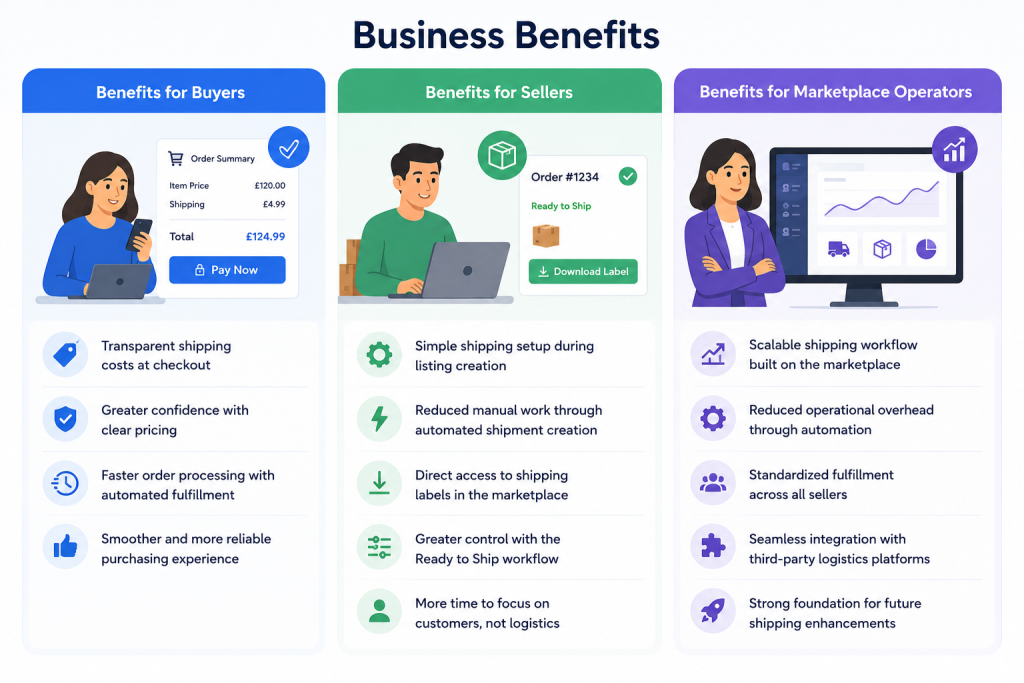
Benefits for Marketplace Operators
- Scalable Shipping Infrastructure The automated workflow provides a fulfillment process that can efficiently support increasing transaction volumes without adding significant operational complexity.
- Reduced Operational Overhead Automation minimizes manual intervention throughout the shipping lifecycle, helping reduce administrative effort while improving operational efficiency.
- Standardized Fulfillment Across the Marketplace Every seller follows the same shipping workflow, creating consistency in shipment processing and improving the overall buyer experience.
- Seamless Third-Party Integration The integration with Zapier and Shiptheory enables the marketplace to connect with external logistics services while maintaining a smooth and reliable fulfillment process.
- Future-Ready Shipping Foundation
The implementation establishes a flexible shipping architecture that can support future enhancements, additional courier integrations, and evolving fulfillment requirements as the marketplace continues to grow.
Conclusion
An efficient shipping process is essential for delivering a seamless marketplace experience. By automating shipping setup, shipment creation, and label generation through Zapier and Shiptheory, Gear Loop has simplified fulfillment for sellers while providing buyers with a transparent checkout experience.
The solution reduces manual effort, improves operational efficiency, and creates a scalable shipping workflow that can support future marketplace growth. It demonstrates how thoughtful automation can enhance both the user experience and day-to-day marketplace operations.
FAQ's
1. Why was this shipping workflow implemented?
To simplify fulfillment by automating shipment creation, shipping label generation, and courier integration while providing buyers with transparent shipping costs during checkout.
2. What shipping details do sellers need to provide?
Sellers only need to configure the package size, package weight, and pickup address when creating or updating a listing.
3. What happens after a seller clicks Ready to Ship?
The marketplace automatically triggers a Zapier workflow, which sends the shipment information to Shiptheory to create the shipment and prepare it for dispatch.
4. How do sellers get the shipping label?
Once the shipment is created, sellers can download the shipping label directly from the marketplace using the Download Label button.
5. What are the key benefits of this implementation?
The solution streamlines fulfillment, reduces manual work, improves shipping accuracy, enhances the buyer experience, and provides a scalable shipping infrastructure for marketplace growth.