
Introduction
What if onboarding a new employee took just 30 minutes instead of an entire week?
For many organizations, employee onboarding still involves a chain of emails, service desk tickets, and manual approvals across HR, IT, Finance, and Operations. While HR completes the hiring process, other teams must manually create user accounts, assign Microsoft 365 licenses, configure applications, and grant the right permissions. The result? A process that often takes 5–7 days and is prone to delays and human errors.
With Agentic AI, Microsoft Entra ID, and intelligent automation, this changes completely. Instead of people coordinating every step, AI-driven workflows automatically provision accounts, assign access, and manage the entire employee lifecycle, reducing onboarding to less than 30 minutes while improving security and compliance.
What is Microsoft Entra ID?
Microsoft Entra ID (formerly Azure Active Directory) is Microsoft’s cloud-based identity and access management (IAM) platform. It helps organizations securely manage user identities and control access to business applications and resources.
Think of it as the digital security gate for your organization. It verifies who users are, determines which applications they can access, assigns the right permissions based on their role, and removes access when it’s no longer needed.
Microsoft Entra ID serves as a central hub for managing access to Microsoft 365 services like Outlook, Teams, SharePoint, OneDrive, and Power BI, as well as thousands of third-party applications. It also supports security features such as Single Sign-On (SSO), Multi-Factor Authentication (MFA), and role-based access control, helping organizations improve security while simplifying user access.
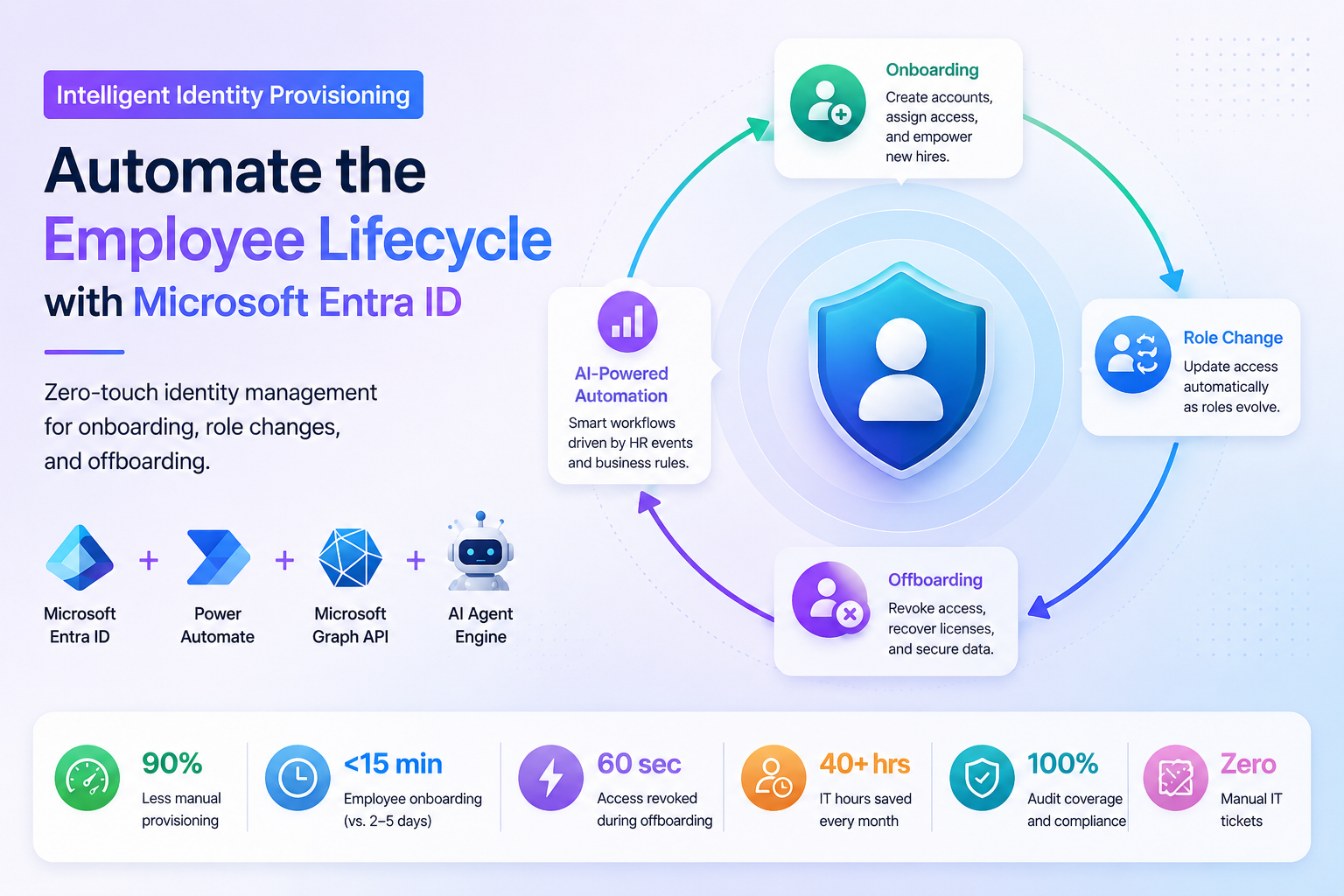
By integrating with Power Automate, Microsoft Graph API, and AI-powered workflows, Microsoft Entra ID enables organizations to automate employee onboarding, role changes, and offboarding with minimal manual effort.
The Challenges of Manual Identity Provisioning
Problem 1: Slow Employee Onboarding
Employee onboarding is often more complicated than it should be. Once HR confirms a new hire, IT teams typically receive one or more service tickets to create user accounts, assign Microsoft 365 licenses, configure email, provide access to Microsoft Teams, SharePoint, VPNs, and other business applications. Since each task is performed manually and often by different teams, the entire process can become slow and inconsistent.
In many organizations, it takes 2–5 days before a new employee has everything they need to start working. During this waiting period, employees cannot access essential tools, managers lose valuable productivity, and IT teams spend significant time responding to onboarding requests instead of focusing on strategic initiatives.
Solution
Microsoft Entra ID, combined with Power Automate, eliminates these manual steps by automating the entire onboarding process. As soon as HR creates a new employee record, the workflow automatically creates the user account, assigns Microsoft 365 licenses, adds the employee to the appropriate security groups, and grants access to business applications based on their role.
Instead of waiting several days, employees receive everything they need in less than 15 minutes, allowing them to be productive from their very first day.
Problem 2: Access Sprawl Creates Security Risks
Employees rarely stay in the same role throughout their careers. They move between departments, join new projects, receive promotions, or take on additional responsibilities. However, in many organizations, their previous permissions remain active because updating access manually is time-consuming and often overlooked.
This results in access sprawl, where employees continue to have access to applications, files, and systems they no longer need. Over time, these unnecessary permissions increase the organization’s attack surface, create compliance issues, and make security audits more difficult.
Solution
An AI-powered identity provisioning system continuously monitors employee lifecycle events from the HR system. Whenever an employee changes roles, departments, or responsibilities, the automation updates their permissions automatically.
Outdated access is removed immediately, while new role-specific permissions are assigned without requiring manual IT intervention. This ensures employees always have the right level of access while significantly reducing security risks.
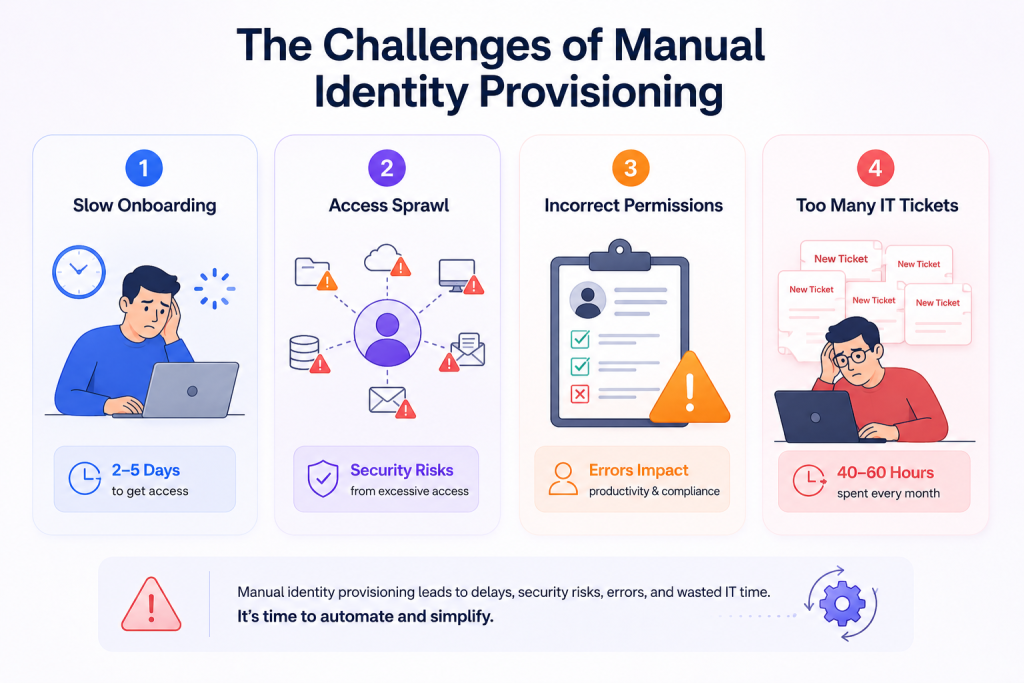
Problem 3: Incorrect Role-Based Permissions
Managing user permissions across dozens or even hundreds of business applications can quickly become overwhelming. When permissions are assigned manually, mistakes are inevitable. Employees may receive access to applications they shouldn’t use, miss access to critical business tools, or inherit permissions from previous roles.
These errors not only reduce employee productivity but also increase the risk of data exposure and regulatory non-compliance.
Solution
The AI Agent Engine intelligently assigns permissions based on predefined business rules, employee roles, departments, and organizational policies. Instead of relying on manual decisions, the system automatically determines which Microsoft 365 licenses, security groups, and business applications each employee requires.
This role-based provisioning ensures employees receive the correct access from day one while maintaining consistent security policies across the organization.
Problem 4: Too Much Time Spent on IT Tickets
Identity management is one of the most repetitive and time-consuming responsibilities for IT administrators. Every onboarding request, role change, password reset, and offboarding activity generates service tickets that require manual effort.
In many organizations, IT teams spend 40–60 hours every month handling routine identity management tasks. This repetitive workload not only slows down response times but also prevents IT professionals from focusing on innovation, infrastructure improvements, and higher-value business projects.
Solution
By automating identity provisioning with Microsoft Entra ID, Power Automate, and AI-driven workflows, organizations can eliminate most routine identity management tasks. User accounts, license assignments, permission updates, and access revocations happen automatically based on HR events.
This automation can save 40+ IT hours every month, significantly reduce service desk tickets, improve response times, and allow IT teams to concentrate on strategic initiatives instead of repetitive administrative work.
Manual vs. Intelligent Identity Provisioning
Traditional identity provisioning involves manual IT tasks that can slow down onboarding, role changes, and offboarding while increasing the risk of errors. Intelligent identity provisioning automates these processes using Microsoft Entra ID, Power Automate, and AI, enabling faster provisioning, stronger security, and reduced IT effort. The table below highlights the key differences between the two approaches.
How Intelligent Identity Provisioning Works
Intelligent identity provisioning connects HR systems, automation tools, Microsoft Entra ID, and AI into a single workflow. Instead of relying on multiple IT tickets and manual tasks, every employee lifecycle event automatically triggers the right actions. Let’s see how the process works step by step.
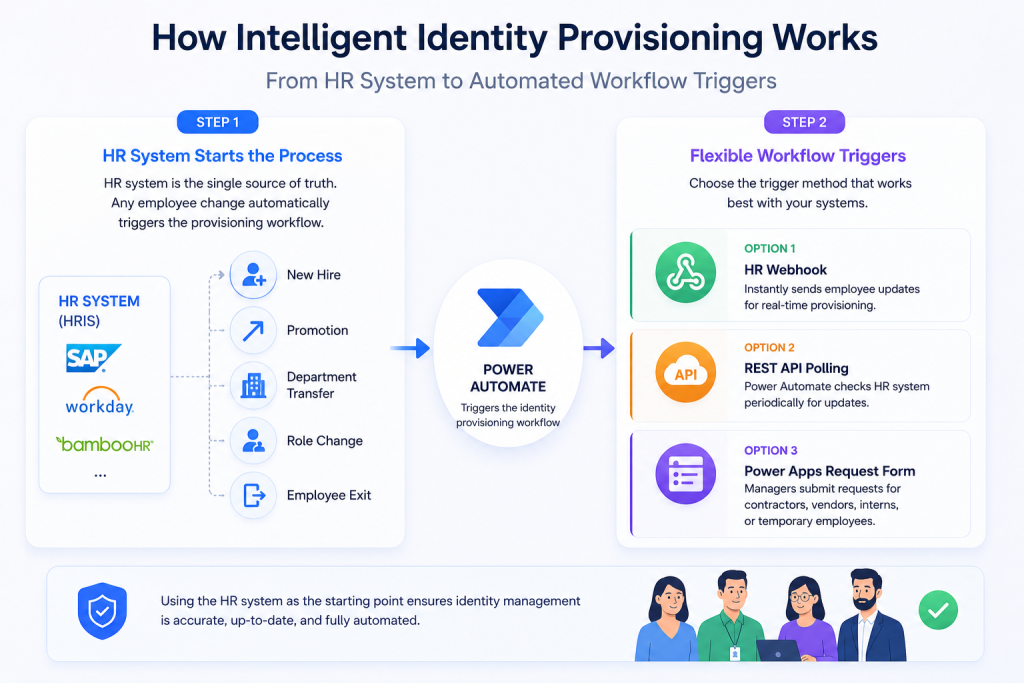
Step 1: HR System Starts the Process
The process begins with the organization’s HR system, such as SAP, Workday, BambooHR, or any other Human Resource Information System (HRIS). These platforms store employee information and act as the single source of truth for identity management.
Whenever HR records a new hire, promotion, department transfer, role change, or employee exit, the system automatically triggers the identity provisioning workflow. This removes the need for HR to manually notify IT or create service desk tickets.
By using the HR system as the starting point, organizations ensure that identity management is always based on accurate and up-to-date employee information.
Step 2: Flexible Workflow Triggers
Every organization has different HR systems and integration capabilities. To support these differences, the solution provides multiple ways to trigger the automation workflow.
Option 1 – HR Webhook
If the HR platform supports webhooks, it immediately sends employee updates whenever a record is created or modified. This allows the provisioning workflow to start in real time, ensuring employees receive access almost instantly.
Option 2 – REST API Polling
Not every HR system supports webhooks. In such cases, Microsoft Power Automate periodically checks the HR system through REST APIs for any new or updated employee records.
Although not real-time, this approach still automates the provisioning process without requiring manual intervention.
Option 3 – Power Apps Request Form
Organizations often need to create accounts for contractors, vendors, consultants, interns, or temporary employees who may not exist in the HR system.
A Power Apps request form integrated with SharePoint allows managers or administrators to submit these requests. Once approved, the same automated provisioning workflow is triggered, ensuring a consistent process for every type of user.
Step 3: Power Automate Validates Employee Data
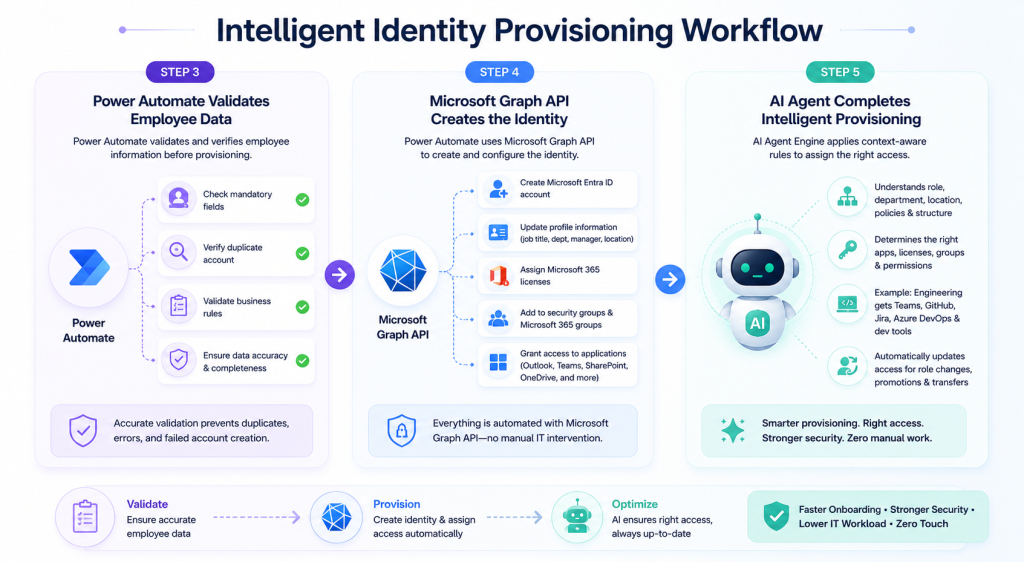
Before creating any accounts, Microsoft Power Automate acts as the workflow engine and validates the employee information.
It checks whether all mandatory fields are available, verifies that a duplicate account does not already exist, confirms that business rules are met, and ensures the employee data is complete and accurate.
Performing these validations before provisioning helps prevent duplicate identities, incorrect user information, and failed account creation, making the automation more reliable and secure.
Step 4: Microsoft Graph API Creates the Identity
Once the employee data is validated, Power Automate uses the Microsoft Graph API to communicate directly with Microsoft Entra ID.
The automation then performs all identity management tasks automatically, including:
- Creating the employee’s Microsoft Entra ID account
- Updating profile information such as department, job title, manager, and location
- Assigning the appropriate Microsoft 365 licenses
- Adding users to the correct security groups and Microsoft 365 groups
- Granting access to applications like Outlook, Teams, SharePoint, OneDrive, and other business systems
Since every action is performed through Microsoft Graph API, the entire process is completed automatically without requiring IT administrators to manually configure each account.
Step 5: AI Agent Completes Intelligent Provisioning
Traditional automation simply follows predefined rules. The AI Agent Engine takes the process a step further by making provisioning intelligent and context-aware.
Instead of assigning the same permissions to everyone, the AI understands the employee’s department, job role, location, business policies, and organizational structure. Based on this information, it determines which applications, licenses, security groups, and permissions are required.
For example, if a new employee joins the Engineering team, the AI can automatically provide access to Microsoft Teams, GitHub, Jira, Azure DevOps, development environments, and other engineering tools. Similarly, someone joining the Finance department would receive access to finance applications and reports instead.
The AI also supports role transfers and promotions by automatically removing outdated permissions and assigning new ones whenever an employee’s role changes. This keeps user access aligned with business policies while reducing security risks and eliminating manual IT requests.
This end-to-end workflow enables organizations to achieve zero-touch identity provisioning, where onboarding can be completed in less than 15 minutes, offboarding in around 60 seconds, and routine identity management tasks are handled automatically with minimal human intervention.
Employee Lifecycle Automation
Employee lifecycle automation ensures that every stage of an employee’s journey, from joining the organization to changing roles and leaving the company, is managed automatically. By responding to HR events in real time, organizations can reduce manual work, improve security, and provide employees with the right access at the right time.
Onboarding
A smooth onboarding experience is essential for employee productivity. Traditionally, IT teams manually create user accounts, assign Microsoft 365 licenses, configure email, and grant access to business applications, a process that often takes 2–5 days.
With intelligent identity provisioning, these tasks happen automatically as soon as HR adds a new employee. Microsoft Entra ID creates the user account, assigns the required licenses, adds the employee to the appropriate security groups, grants application access, and sends a welcome email. As a result, onboarding is completed in less than 15 minutes, allowing employees to start working from day one.
Role Transfer
When employees move to a new department or receive a promotion, their access needs to change as well. Managing these updates manually can lead to delays, incorrect permissions, or security risks.
With automated identity provisioning, the system detects role changes from the HR platform and instantly updates user permissions. Old access is removed, new role-based permissions are assigned, and security groups are updated automatically, ensuring employees always have the right access without waiting for IT support.
Offboarding
Offboarding is critical for protecting organizational data and preventing unauthorized access. If employee accounts are not disabled immediately, they can become a security risk.
As soon as HR records an employee’s departure, Microsoft Entra ID automatically disables the account, revokes access to Microsoft 365 and other business applications, removes security group memberships, reclaims licenses, and maintains audit logs for compliance. The entire process can be completed in around 60 seconds, significantly improving security while reducing manual effort.
Business Impact
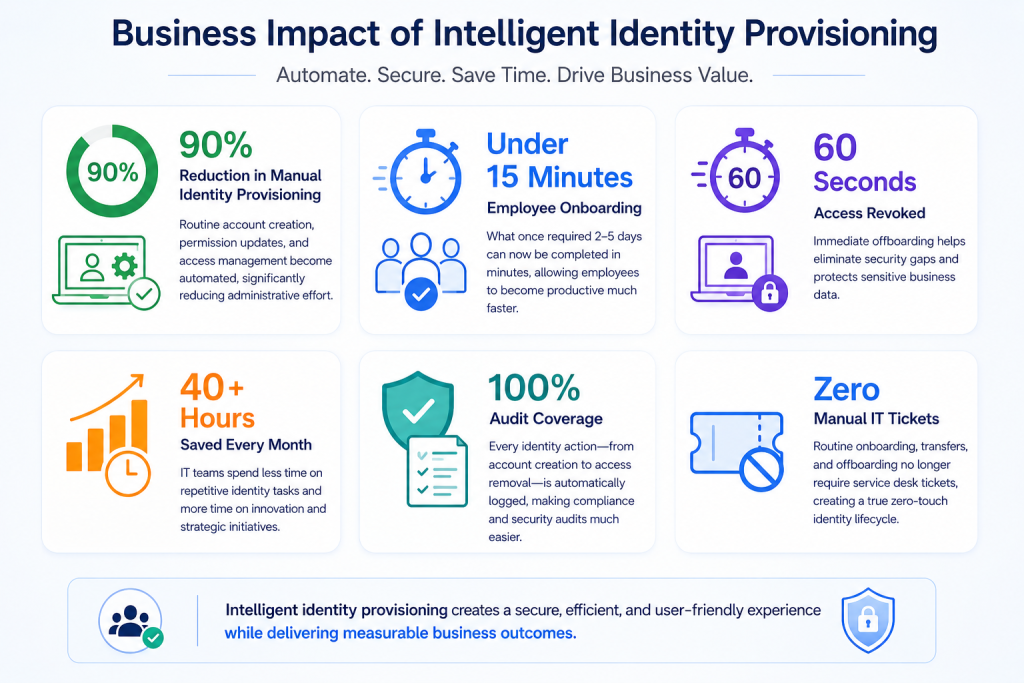
1. 90% Reduction in Manual Identity Provisioning
Automating user account creation, Microsoft 365 license assignments, permission updates, and access management can reduce manual identity provisioning by up to 90%. This eliminates repetitive administrative tasks, reduces human errors, and standardizes the provisioning process. As a result, IT teams spend less time on routine operations and more time driving innovation and business growth.
2. Employee Productivity from Day One
Traditional onboarding often takes 2–5 days, leaving new employees waiting for accounts, licenses, and application access. With intelligent identity provisioning, the entire onboarding process is completed in less than 15 minutes. Employees receive everything they need before they start work, allowing them to become productive from Day One while delivering a smoother onboarding experience.
3. Lower IT Costs & 40+ Hours Saved Every Month
Manual onboarding, role changes, and offboarding generate numerous IT service requests and require significant administrative effort. By automating these processes, organizations can save 40+ IT hours every month, reduce operational costs, and minimize service desk workloads. This enables IT teams to focus on strategic initiatives such as cloud modernization, cybersecurity, and digital transformation instead of repetitive identity management tasks.
4. Stronger Security with Instant Access Revocation
Delayed account deactivation is one of the biggest security risks for organizations. Intelligent identity provisioning automatically disables user accounts and revokes access to Microsoft 365, VPNs, and business applications in around 60 seconds after an employee leaves. This significantly reduces the risk of unauthorized access, protects sensitive company data, and strengthens the organization’s overall security posture.
5. Improved Compliance with 100% Audit Coverage
Every identity-related activity, including user creation, license assignment, permission updates, role changes, and access removal, is automatically recorded in a centralized audit log. This provides 100% audit coverage, making it easier to demonstrate compliance with standards such as ISO 27001, SOC 2, and GDPR. Organizations also gain complete visibility into user access, simplifying security audits and improving governance across the enterprise.
Conclusion
Employee identity management is no longer just an IT task, it’s a critical part of business security, productivity, and compliance. By integrating Microsoft Entra ID, Power Automate, Microsoft Graph API, and AI-powered automation, organizations can build a zero-touch identity lifecycle where onboarding, role changes, and offboarding happen automatically.
The result is faster onboarding, stronger security, fewer IT tickets, complete audit visibility, and a scalable solution that grows with the business. Instead of spending days provisioning accounts, organizations can deliver secure access in minutes while giving IT teams the freedom to focus on higher-value initiatives.
FAQ's
1. What is intelligent identity provisioning?
Intelligent identity provisioning is the automated process of creating, updating, and removing user accounts and permissions based on employee lifecycle events such as onboarding, role changes, and offboarding. It reduces manual effort while improving security and compliance.
2. How does Microsoft Entra ID simplify employee lifecycle management?
Microsoft Entra ID centralizes identity and access management by automatically creating user accounts, assigning licenses, managing permissions, and revoking access when employees leave or change roles. This ensures employees always have the right access at the right time.
3. What role does Power Automate play in identity provisioning?
Power Automate acts as the workflow engine that connects HR systems with Microsoft Entra ID. It validates employee information, applies business rules, and automates tasks such as user creation, license assignment, and application access with minimal manual intervention.
4. What happens if the HR system goes down or synchronization fails?
If the HR system is temporarily unavailable, the provisioning workflow pauses until the connection is restored. Organizations can also configure retries, alerts, and monitoring to detect synchronization failures quickly, ensuring no employee updates are missed.
5. Can the system handle employees with multiple roles or responsibilities?
Yes. Microsoft Entra ID supports role-based access control (RBAC) and can assign multiple security groups and application permissions to users. This makes it suitable for employees with dual roles, cross-functional responsibilities, or matrix organizational structures.
6. What are the biggest business benefits of automating identity provisioning?
Organizations can reduce manual provisioning by up to 90%, onboard employees in less than 15 minutes, revoke access in around 60 seconds, save 40+ IT hours per month, strengthen security, and maintain 100% audit coverage for compliance.