

Introduction
Many organizations continue to manage quote requests through a combination of emails, spreadsheets, shared drives, and manual follow-ups. While these methods may work initially, they often create operational bottlenecks as quote volumes increase. Teams struggle with inconsistent processes, limited visibility, missed deadlines, duplicate efforts, and fragmented communication across departments.
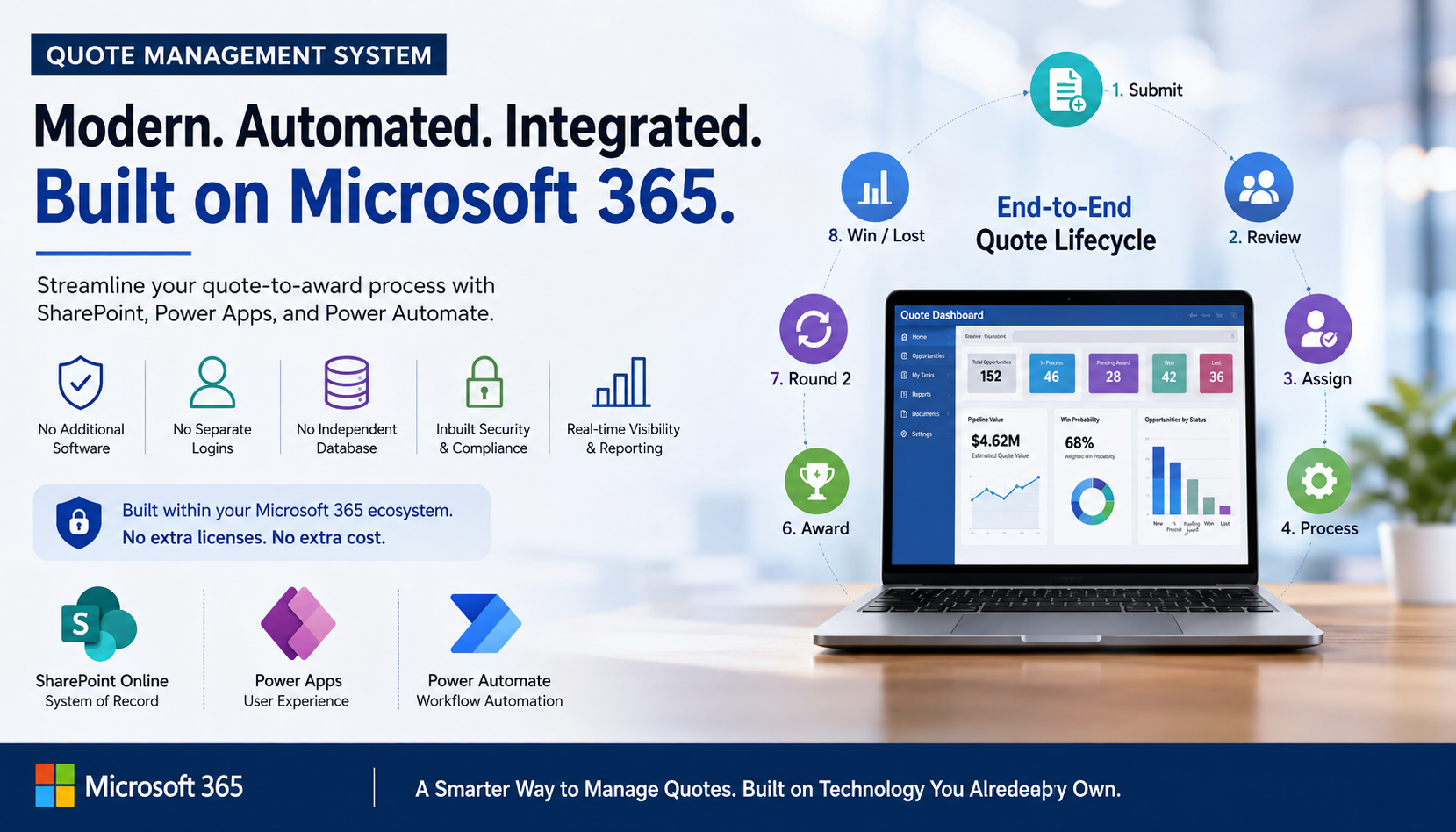
To address these challenges, we developed a comprehensive Quote Management System built entirely within the Microsoft 365 ecosystem using SharePoint Online, Power Apps, and Power Automate. Rather than investing in a separate software platform, additional licenses, or a standalone database, the organization leveraged technology it already owned to create a modern, automated, and scalable quoting solution.
The result is a centralized platform that streamlines quote intake, automates workflow management, improves collaboration, and provides real-time visibility into every opportunity from submission to final customer decision.
Why Build a Quote Management System on Microsoft 365?
For many organizations, improving business processes often means investing in new software and managing additional systems. This Quote Management System takes a different approach by leveraging SharePoint Online, Power Apps, and Power Automate to modernize quote management within the existing Microsoft 365 ecosystem.
Beyond automating workflows, the solution helps modernize a critical part of the sales pipeline. By centralizing quote requests, opportunity data, and customer interactions, organizations gain better visibility into active opportunities, pipeline value, win probability, and quote performance. This enables teams to make faster decisions, improve responsiveness, and better forecast potential revenue.
Because the platform operates entirely within Microsoft 365, organizations benefit from:
- A unified user experience across familiar Microsoft tools
- Existing Microsoft 365 authentication and access controls
- Centralized document management and collaboration
- Built-in security, compliance, and governance capabilities
- Seamless integration with Outlook, Teams, Excel, and Power BI
- Reduced IT administration and support requirements
- Real-time visibility into quote opportunities and pipeline activity
- Improved tracking of quote status, ownership, and customer engagement
- Better forecasting through opportunity value and win probability tracking
By transforming quote management into a structured, workflow-driven process, the solution helps sales and operations teams work from a single source of truth. Leaders gain visibility into active opportunities, pending awards, quote turnaround times, workload distribution, and conversion trends, enabling more proactive pipeline management and stronger business planning.
By building on technology the organization already uses every day, the solution accelerates adoption, simplifies maintenance, and maximizes the value of existing Microsoft 365 investments while delivering a modern quote management experience that supports both operational efficiency and sales pipeline growth.
Business Challenges and Requirements
Before implementing the Quote Management System, the organization relied on manual processes to manage quote requests and RFQs. Opportunities were submitted through emails, tracked in spreadsheets, and supported by documents stored across multiple shared locations. As quote volumes increased, these disconnected processes made it difficult to maintain visibility, consistency, and accountability throughout the quote lifecycle.
Teams often struggled to track opportunity status, locate supporting documents, and coordinate assignments efficiently. Manual workflows introduced delays, while limited reporting capabilities made it difficult for management to monitor performance and identify bottlenecks.
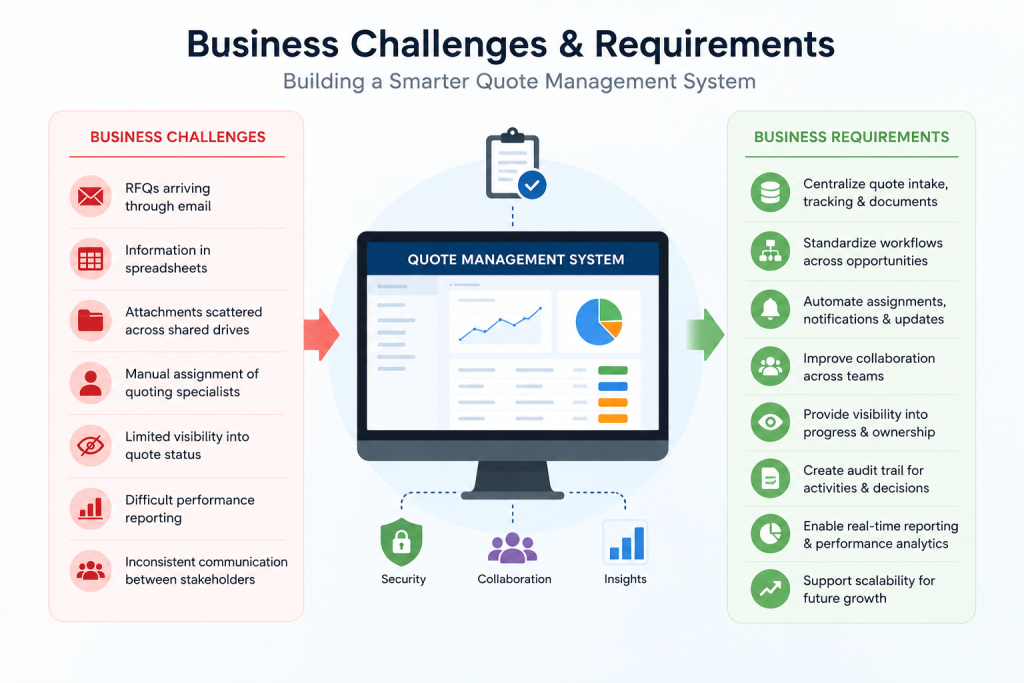
To address these challenges, the organization needed a solution that could:
- Centralize quote intake, tracking, and document management
- Standardize workflows across all quote opportunities
- Automate assignments, notifications, and status updates
- Improve collaboration between stakeholders
- Provide visibility into quote progress and ownership
- Enable real-time reporting and performance analytics
- Scale efficiently as quote volumes continued to grow
The goal was to create a modern, workflow-driven quote management platform that would streamline operations, improve responsiveness, and provide greater visibility across the entire quoting process.
End-to-End Quote Lifecycle Management
Step 1: Opportunity Submission
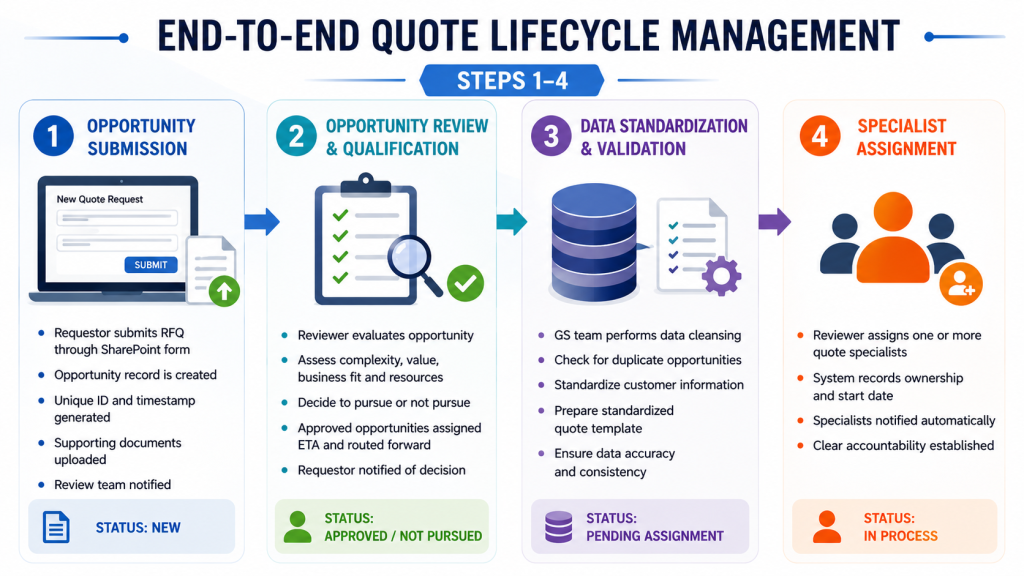
The quote lifecycle begins when a requestor submits a new RFQ or quote opportunity through the SharePoint-based Quote Intake Portal. Rather than relying on email threads or manual forms, the system provides a structured submission process that captures all relevant information upfront, including customer details, opportunity requirements, estimated value, target dates, and supporting documents. Upon submission, SharePoint automatically generates a unique opportunity ID, timestamps the request, creates the opportunity record, and stores all associated documentation in a centralized location.
Power Automate then triggers notifications to the designated review team, ensuring that new opportunities are immediately visible and actionable. This standardized intake process eliminates the risk of requests being overlooked while establishing a consistent starting point for every quote.
Step 2: Opportunity Review and Qualification
Once an opportunity is submitted, a designated reviewer evaluates the request to determine its viability, complexity, and alignment with business objectives. Factors such as RFQ size, estimated value, technical requirements, available resources, and potential business impact are assessed before work begins. Opportunities that do not meet qualification criteria can be marked as “Not Pursued,” automatically notifying the requestor and preventing unnecessary effort.
Approved opportunities are assigned an estimated turnaround timeline and routed to the next stage of processing. This review process helps ensure that resources are allocated efficiently and that quoting teams focus their efforts on opportunities with the greatest potential value.
Step 3: Data Standardization and Validation
Before a quote reaches specialists, the GS team performs a comprehensive data validation and standardization process. This includes reviewing customer information, identifying duplicate requests, validating opportunity details, and preparing a standardized quote template for downstream processing.
By cleansing and organizing the data at an early stage, the organization reduces inconsistencies, minimizes errors, and ensures that specialists have accurate information when preparing quotations. This step creates a strong foundation for efficient quote development while improving overall data quality across the organization.
Step 4: Specialist Assignment
Following validation, the opportunity is assigned to one or more quoting specialists based on expertise, workload, and resource availability. The system automatically records ownership details, assignment dates, and expected timelines while notifying assigned specialists through automated workflows.
This structured assignment process creates clear accountability and ensures that every opportunity has designated owners responsible for moving the quote forward. Managers also gain visibility into workload distribution, helping balance resources and improve operational efficiency.
Step 5: Quote Development
During the quote development phase, specialists perform the detailed work required to prepare an accurate and competitive quotation. This includes cross-referencing customer requirements, identifying suppliers and vendors, validating product availability, reviewing costs, performing pricing analysis, and preparing quote documentation.
Throughout the process, specialists continuously update the standardized quote template stored within SharePoint, ensuring that all stakeholders have access to the latest information. By centralizing collaboration and documentation, the organization reduces communication gaps while accelerating quote preparation.
Step 6: Quote Review and Finalization
After the quote has been prepared, the reviewer conducts a final assessment to verify completeness and accuracy. Operational metrics such as the number of items quoted, No Quote (NQ) items, Need More Information (NMI) items, final quote value, product margin, and supporting documentation are updated within the system.
Once approved, the opportunity status is changed to “Pending Award,” and automated notifications are sent to relevant stakeholders. This structured review process helps maintain quality standards while ensuring that quote outcomes are properly documented for future reporting and analysis.
Step 7: Round 2 Review and Revisions
Many enterprise quoting processes require additional review cycles after the initial quote has been delivered. Customers may request revised pricing, alternative products, additional sourcing options, or clarification on specific items. To support these scenarios, the solution includes dedicated Round 2 workflows that allow requestors to initiate revisions without creating a new opportunity.
Specialists can be reassigned, additional requirements captured, and updated timelines established while maintaining a complete history of all activities. This ensures that revisions are managed efficiently without disrupting the overall workflow.
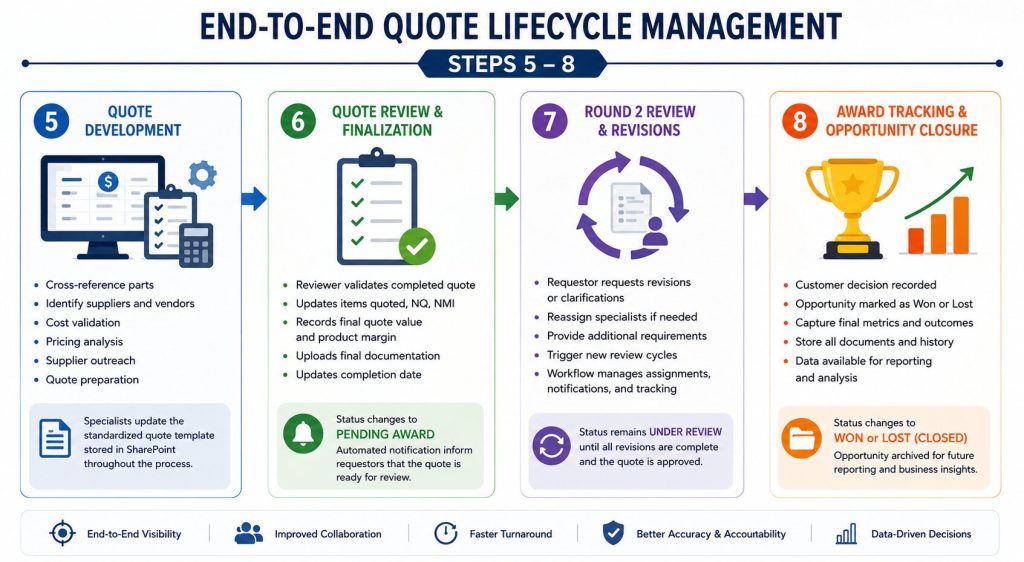
Step 8: Award Tracking and Opportunity Closure
The final stage of the lifecycle occurs when the customer communicates its purchasing decision. Opportunities are marked as either Won or Lost, and final metrics are recorded within SharePoint. Capturing this information provides valuable insight into conversion rates, revenue opportunities, customer behavior, and quote effectiveness.
Because all historical data remains centralized within the platform, organizations can analyze trends, identify improvement opportunities, and use past performance to drive future quoting strategies. This transforms the quote management process from a simple operational workflow into a valuable source of business intelligence.
Security and Compliance Advantages
Because the Quote Management System is built entirely within the Microsoft 365 ecosystem, it benefits from the organization’s existing security, governance, and compliance framework. Rather than introducing a separate application with its own security model, user management, and data storage requirements, the solution leverages trusted Microsoft services that are already integrated into the organization’s IT environment.
Key security and compliance capabilities include:
- Microsoft Entra ID Authentication for secure user access and identity management, providing centralized authentication, single sign-on (SSO), and enhanced account security. This helps ensure that only authorized users can access the system while simplifying user administration and access management.
- Role-Based Access Control (RBAC) to ensure users only access information relevant to their responsibilities. By restricting permissions based on job functions and roles, the organization can strengthen data security, improve governance, and reduce the risk of unauthorized access.
- Audit Logging and Activity Tracking to provide complete visibility into user actions and workflow changes. Detailed audit trails help improve accountability, support compliance reporting, and enable administrators to quickly investigate issues or review historical activities.
- Document Versioning to maintain historical records and support change tracking. Users can view previous versions, compare updates, and restore earlier documents when necessary, ensuring greater transparency and reducing the risk of accidental data loss.
- Data Retention Policies to align with organizational and regulatory requirements. Automated retention controls help ensure important records are preserved for the required period while supporting effective information lifecycle management.
- Compliance Management through Microsoft 365’s built-in governance and security controls. This enables organizations to enforce policies, monitor compliance requirements, and maintain a secure operating environment while reducing administrative overhead.
- Secure Document Storage within SharePoint, eliminating the need for external repositories. Documents benefit from enterprise-grade security, access controls, backup capabilities, and seamless integration with Microsoft 365 collaboration tools, creating a centralized and secure source of information.
By keeping all quote-related data, documents, and workflows within Microsoft 365, the organization reduces security risks, simplifies administration, and ensures that sensitive customer and pricing information remains protected under existing corporate policies.
Business Impact and Results
The implementation of the Quote Management System delivered significant operational and strategic benefits across the organization. By replacing manual processes with a centralized, workflow-driven platform, teams gained greater efficiency, visibility, and control over the entire quote lifecycle.
Faster Quote Turnaround
Automated workflows eliminate delays caused by manual handoffs, email-based coordination, and status follow-ups. Opportunities move seamlessly between requestors, reviewers, analysts, and specialists, enabling teams to respond to customers more quickly and consistently.
Increased Visibility Across the Quote Pipeline
A centralized platform provides real-time visibility into every quote opportunity, including ownership, status, workload, and progress. Stakeholders can easily track active, pending, won, and lost opportunities without relying on spreadsheets or manual updates.
Improved Accountability and Ownership
Every action is recorded through timestamps, assignment history, and status updates, creating a clear audit trail throughout the quote lifecycle. This improves accountability, helps identify bottlenecks, and ensures opportunities progress efficiently through each stage of the workflow.
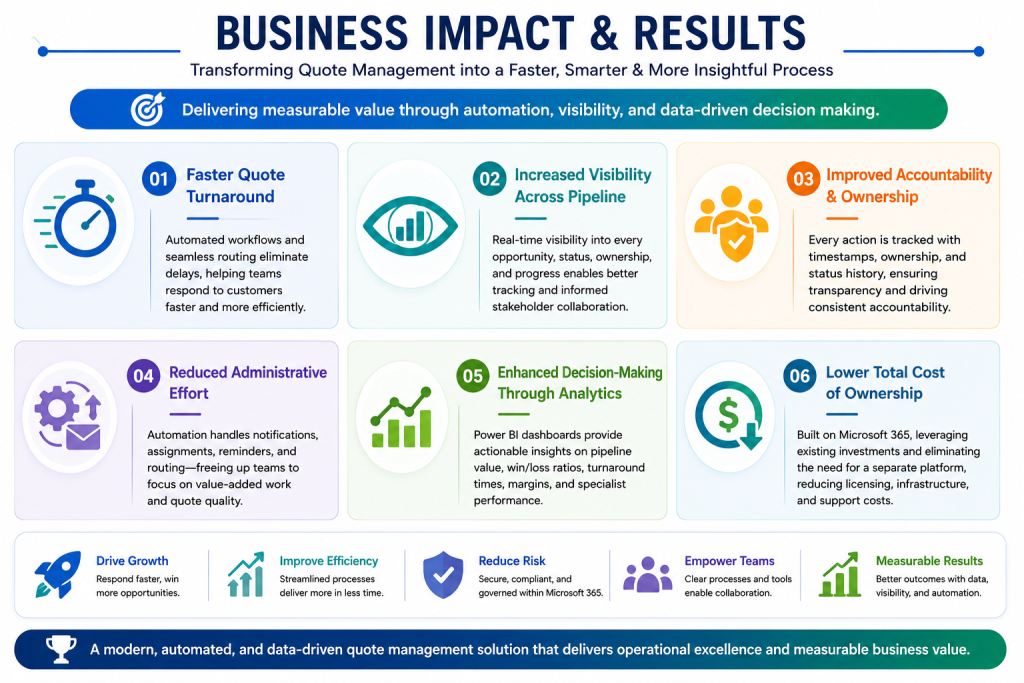
Reduced Administrative Effort Through Automation
Power Automate handles routine tasks such as notifications, assignments, reminders, and workflow transitions. By automating these activities, teams spend less time on administrative coordination and more time focusing on quote development and customer engagement.
Enhanced Decision-Making Through Analytics
With all quote data centralized within SharePoint and integrated with Power BI, leadership gains access to real-time insights into pipeline value, win/loss ratios, turnaround times, specialist workloads, and margin performance. This enables more informed decisions and continuous process improvement.
Lower Total Cost of Ownership
By leveraging existing Microsoft 365 investments, the organization avoided the costs associated with implementing and maintaining a separate quote management platform. The solution delivers enterprise-grade functionality while minimizing additional licensing, infrastructure, training, and support expenses.
Together, these improvements transformed quote management into a streamlined, scalable, and data-driven operation that supports both operational efficiency and long-term business growth.
Conclusion
The Quote Management System demonstrates how organizations can modernize and streamline quote operations using the Microsoft 365 ecosystem. By combining SharePoint Online, Power Apps, and Power Automate, the organization replaced manual processes with a centralized, automated workflow that improves visibility, collaboration, and efficiency throughout the quote lifecycle.
The result is faster quote turnaround, better accountability, reduced administrative effort, and improved access to business insights. Built on existing Microsoft 365 investments, the solution provides a scalable and secure foundation for managing quote operations while supporting future business growth and continuous process improvement.
FAQ's
1. What is a Quote Management System?
A Quote Management System is a centralized platform that helps organizations manage the entire quote lifecycle, from opportunity intake and assignment to quote creation, review, and final award tracking. It streamlines workflows, improves visibility, and reduces manual effort through automation.
2. Why was Microsoft 365 chosen for this solution?
Microsoft 365 provides a powerful foundation for building business applications using tools such as SharePoint Online, Power Apps, and Power Automate. By leveraging existing Microsoft investments, organizations can automate processes, improve collaboration, and maintain enterprise-grade security without introducing additional platforms.
3. How does the system improve quote turnaround times?
The system automates key processes such as opportunity routing, assignments, notifications, status updates, and approvals. This eliminates delays caused by manual handoffs and email-based coordination, enabling teams to process quote requests more efficiently.
4. How are quote opportunities tracked throughout the process?
Every quote opportunity is assigned a unique ID and managed within SharePoint. Stakeholders can track status, ownership, assignments, due dates, attachments, and workflow progress in real time, providing complete visibility across the quote lifecycle.
5. What reporting and analytics capabilities does the solution provide?
The solution integrates with Power BI to deliver real-time dashboards and reports. Organizations can monitor metrics such as quote volume, pipeline value, turnaround times, win/loss rates, specialist workloads, and overall quoting performance.
6. How does the system ensure security and compliance?
Because the solution operates entirely within Microsoft 365, it leverages existing security and governance controls, including Microsoft Entra ID authentication, role-based access control, audit logging, document versioning, data retention policies, and secure SharePoint document storage.