
Introduction
In today’s fast-evolving digital landscape, organizations are constantly looking for ways to improve collaboration, streamline operations, and boost employee productivity. Yet, many still rely on outdated systems, siloed data, and manual processes that limit efficiency and scalability. To stay competitive, modern enterprises need a centralized digital workplace that seamlessly connects people, content, and processes in a secure and scalable environment.
This is where Microsoft SharePoint plays a critical role. More than just a document repository, SharePoint has evolved into a comprehensive collaboration and content management platform that enables organizations to build intelligent intranets, automate workflows, ensure secure collaboration, and manage enterprise knowledge. With the rise of cloud computing, AI, and tools like Microsoft 365 Copilot, SharePoint now serves as a strategic foundation for digital transformation and future-ready workplaces.
What is SharePoint Technology?
SharePoint is a web-based platform developed by Microsoft that enables organizations to store, organize, manage, and share information securely across teams and departments. It acts as a centralized system where employees can collaborate on documents, access important business data, and streamline communication within the organization. Whether used on-premises (SharePoint Server) or in the cloud (SharePoint Online as part of Microsoft 365), it provides a flexible foundation for managing enterprise content.
Beyond basic document storage, SharePoint functions as a comprehensive collaboration and content management platform. It allows businesses to build intranet portals, automate workflows, manage enterprise content, and integrate seamlessly with tools like Microsoft Teams, OneDrive, and Power Platform. Features such as version control, metadata management, and permission-based access ensure that information is both organized and secure.
In modern digital workplaces, SharePoint plays an even bigger role by supporting workflow automation, real-time collaboration, and intelligent search capabilities. With integrations into AI-powered tools like Microsoft 365 Copilot, it can help users quickly find information, generate insights, and improve decision-making. As a result, SharePoint is not just a tool for managing documents, it is a strategic platform that enables digital transformation, enhances productivity, and supports scalable business growth.
Challenges of Legacy SharePoint Environments
Despite SharePoint’s powerful capabilities, many organizations struggle to fully leverage it due to legacy systems, fragmented environments, and lack of structured governance. These challenges not only limit productivity but also prevent businesses from unlocking the full potential of a modern digital workplace.
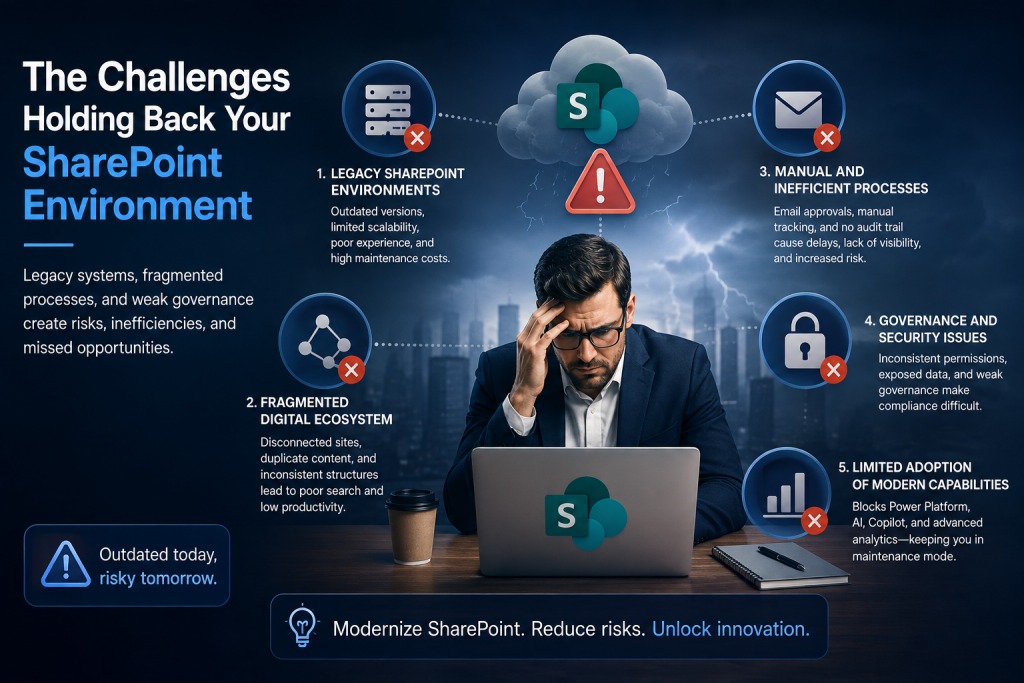
1. Legacy SharePoint Environments
Many organizations continue to operate on outdated SharePoint versions such as 2013, 2016, or 2019. These legacy systems were not designed to support today’s cloud-first, mobile-friendly, and AI-driven work environments. As a result, they often suffer from limited scalability, outdated user interfaces, and high infrastructure and maintenance costs. More importantly, with SharePoint Server 2016 and 2019 reaching end of extended support, organizations face serious risks due to the absence of security updates, bug fixes, and Microsoft support, making these environments increasingly vulnerable and unsustainable.
2. Fragmented Digital Ecosystem
Over time, many SharePoint environments become highly fragmented due to uncontrolled growth and lack of standardization. Organizations often end up with multiple disconnected sites, duplicated content, and inconsistent information architecture across departments. This fragmentation makes it difficult for employees to locate relevant information quickly, leading to a poor search experience and confusion. As a result, employees waste valuable time navigating systems instead of focusing on productive work, ultimately reducing overall efficiency.
3. Manual and Inefficient Processes
In many enterprises, critical business processes are still handled manually or through email-based workflows. Approvals, document reviews, and task tracking are often managed without automation, leading to delays, errors, and lack of accountability. Without proper workflow systems in place, there is little to no visibility into the status of tasks, and audit trails are often missing. This not only slows down decision-making but also increases operational risks, especially in environments where compliance and traceability are essential.
4. Governance and Security Issues
A lack of proper governance is one of the most common challenges in SharePoint environments. Without clearly defined policies and controls, permissions can become inconsistent and difficult to manage, increasing the risk of unauthorized access to sensitive information. Additionally, poor governance can lead to content sprawl, outdated information, and compliance issues. Organizations that fail to implement structured governance frameworks often struggle with maintaining data security, regulatory compliance, and overall system integrity.
5. Limited Adoption of Modern Capabilities
Legacy SharePoint environments significantly restrict the adoption of modern tools and technologies. Features like Power Platform, AI-driven insights, and Microsoft 365 Copilot require a modern, cloud-based foundation to function effectively. Organizations stuck in older systems are unable to leverage automation, advanced analytics, and intelligent search capabilities. As a result, they remain in a “maintenance mode,” focusing only on keeping systems running instead of innovating and driving business growth.
Key Pillars of SharePoint Modernization
To overcome the limitations of legacy systems and unlock the full potential of SharePoint, organizations need to adopt a modern SharePoint strategy built on Microsoft 365. This approach focuses not just on upgrading technology, but on transforming how people collaborate, how processes operate, and how information is managed across the enterprise.
1. Migration to SharePoint Online
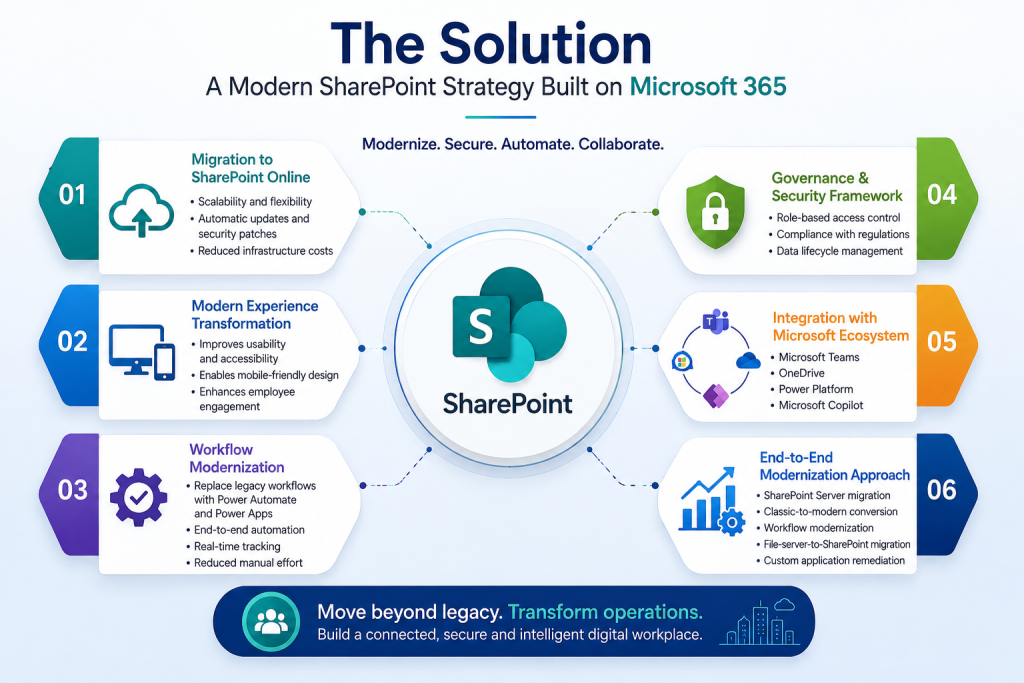
Migrating to SharePoint Online is the foundation of modernization. By moving from on-premises environments to the cloud, organizations gain greater scalability, flexibility, and reliability without the burden of maintaining physical infrastructure. Cloud-based SharePoint ensures automatic updates, continuous security enhancements, and high availability. It also significantly reduces infrastructure and maintenance costs, allowing IT teams to focus more on innovation rather than system upkeep.
2. Modern Experience Transformation
Transitioning from classic SharePoint sites to modern experiences is essential for improving usability and adoption. Modern SharePoint offers a clean, intuitive, and responsive interface that works seamlessly across devices, including mobile and tablets. This transformation enhances employee engagement by making it easier to access information, navigate sites, and interact with content. A better user experience directly leads to higher adoption rates and improved productivity across teams.
3. Workflow Modernization
Replacing legacy workflows with modern automation tools like Power Automate and Power Apps enables organizations to streamline complex business processes. Instead of relying on manual or email-based workflows, businesses can implement automated, end-to-end processes with real-time tracking and notifications. This reduces human errors, accelerates approvals, and ensures better visibility into operations. Workflow modernization ultimately improves efficiency and allows teams to focus on higher-value tasks.
4. Governance & Security Framework
A strong governance and security framework is critical to maintaining control over SharePoint environments. By implementing role-based access control, organizations can ensure that the right people have access to the right information. Governance policies help manage content lifecycle, prevent data sprawl, and maintain compliance with regulatory requirements. This structured approach not only improves security but also ensures long-term sustainability and consistency across the platform.
5. Integration with Microsoft Ecosystem
One of the biggest advantages of modern SharePoint is its seamless integration with the broader Microsoft ecosystem. It works closely with Microsoft Teams for collaboration, OneDrive for personal storage, Power Platform for automation and app development, and Microsoft Copilot for AI-driven insights. This integration creates a connected digital workplace where tools and data are unified, enabling smoother workflows, better communication, and enhanced productivity across the organization.
6. End-to-End Modernization Approach
A successful SharePoint transformation requires a comprehensive, end-to-end approach rather than isolated improvements. This includes migrating from SharePoint Server to SharePoint Online, converting classic sites to modern interfaces, modernizing workflows, migrating file servers, and remediating custom applications. By addressing all aspects of the environment, organizations can move beyond simple upgrades and achieve true operational transformation creating a scalable, secure, and future-ready digital workplace.
SharePoint Modernization Roadmap: Step-by-Step Lifecycle
A successful SharePoint transformation is not a one-time activity but a structured journey that follows a well-defined lifecycle. Each phase plays a critical role in ensuring a smooth transition from legacy systems to a modern, scalable digital workplace.
1. Assessment Phase
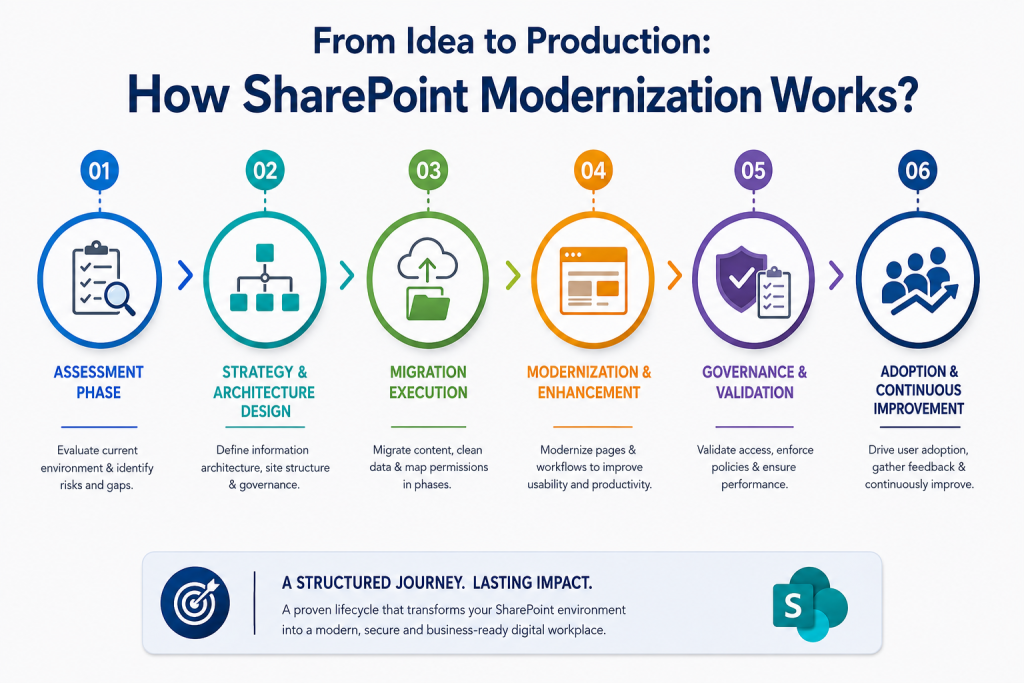
The assessment phase is the foundation of any successful SharePoint modernization initiative. During this stage, organizations conduct a comprehensive evaluation of their existing environment, including all sites, content repositories, and workflows. This involves identifying outdated components, unsupported customizations, and potential risks that could impact migration or performance. Additionally, user experience is analyzed to uncover gaps in usability, navigation, and accessibility. The outcome of this phase typically includes detailed deliverables such as an environment audit, a risk assessment report, and a content analysis, which together provide a clear roadmap for the modernization journey.
2. Strategy & Architecture Design
Once the current state is understood, the next step is to design a robust strategy and architecture that aligns with business goals. This phase focuses on defining a well-structured information architecture that organizes content logically and improves discoverability. It also includes designing site hierarchy, navigation models, and governance frameworks to ensure consistency and control across the platform. A well-planned architecture not only improves usability but also ensures that the SharePoint environment is scalable, maintainable, and ready to support future growth and technological advancements.
3. Migration Execution
The migration phase involves the actual transfer of data, content, and applications from legacy systems to the modern SharePoint environment. This process includes careful content migration, data cleansing to remove duplicates or outdated information, and accurate mapping of permissions to maintain security and access control. Migration is typically executed in phases to minimize disruption to ongoing business operations and ensure continuity. Proper planning and execution during this stage are critical to maintaining data integrity, avoiding downtime, and ensuring a seamless transition for users.
4. Modernization & Enhancement
After migration, the focus shifts to modernizing the environment and enhancing user experience. This includes converting classic SharePoint pages into modern, responsive interfaces that provide a cleaner and more intuitive experience across devices. Organizations also rebuild and optimize workflows using tools like Power Platform to replace outdated or inefficient processes. This phase ensures that the platform is not just migrated, but fully optimized to leverage modern capabilities, improve usability, and increase overall productivity.
5. Governance & Validation
Once modernization is implemented, governance and validation become essential to ensure long-term success. This phase involves validating user access and permissions to ensure security and compliance standards are met. Governance policies are enforced to maintain consistency, control content growth, and manage data lifecycle effectively. Additionally, system performance and usability are tested to ensure that the platform meets business expectations. A strong governance and validation framework helps prevent future issues and ensures the environment remains secure, organized, and efficient.
6. Adoption & Continuous Improvement
Modernization does not end with deployment, it requires continuous improvement and user adoption to deliver real business value. This phase focuses on training employees, onboarding users, and encouraging adoption of the new system. Organizations monitor usage patterns and gather feedback to identify areas for improvement. Over time, they expand capabilities by introducing automation, analytics, and AI-driven features. This continuous evolution ensures that the SharePoint environment remains aligned with business needs and delivers sustained return on investment.
Business Value
1. Enhanced Employee Productivity
A modern SharePoint environment significantly improves employee productivity by providing faster and more intuitive access to information. With well-structured content and intelligent search capabilities, employees spend less time looking for documents and more time focusing on meaningful work. Real-time collaboration features, such as co-authoring and seamless sharing, enable teams to work together efficiently regardless of location. This creates a more connected and productive workforce, reducing delays and improving overall output.
2. Improved Decision-Making
SharePoint centralizes organizational data, ensuring that information is consistent, reliable, and easily accessible. With better visibility into business processes and workflows, leaders and teams can make informed decisions based on accurate and up-to-date data. Integration with analytics tools and dashboards provides real-time insights, enabling faster responses to business needs. This improved decision-making capability helps organizations stay agile and competitive in a rapidly changing environment.
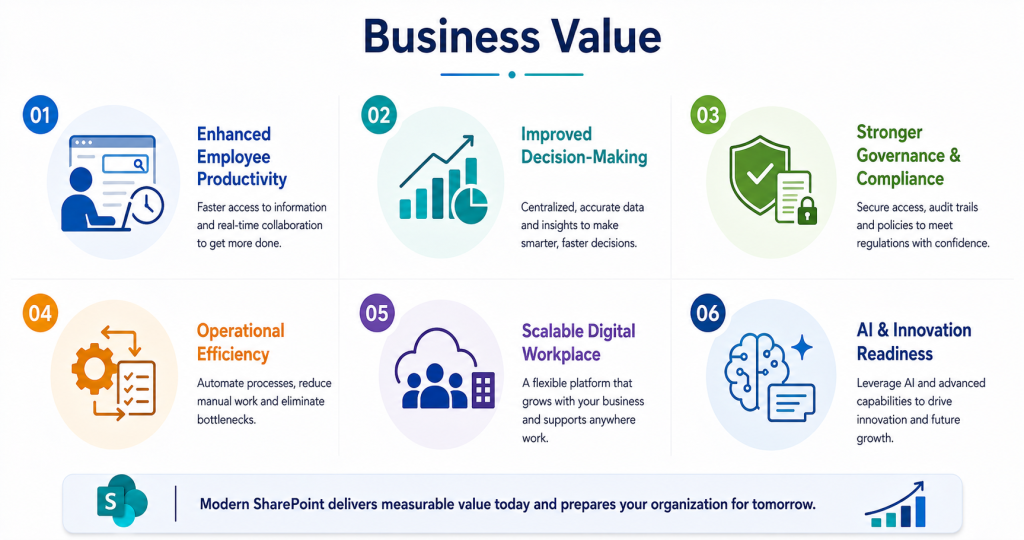
3. Stronger Governance & Compliance
Modern SharePoint environments provide robust governance and compliance capabilities that help organizations maintain control over their data. Structured access controls ensure that sensitive information is only accessible to authorized users, reducing the risk of data breaches. Built-in compliance features support regulatory requirements by enabling audit trails, retention policies, and data lifecycle management. This ensures that organizations remain compliant while maintaining transparency and accountability across their operations.
4. Operational Efficiency
By automating repetitive and manual tasks, SharePoint helps organizations achieve greater operational efficiency. Workflows that were once handled through emails or manual tracking can now be automated, resulting in faster approvals and streamlined processes. This reduces human error, minimizes delays, and eliminates bottlenecks in day-to-day operations. As a result, teams can focus on higher-value activities, leading to improved performance and cost savings.
5. Scalable Digital Workplace
SharePoint provides a scalable foundation that grows with the organization. As business needs evolve, new sites, workflows, and integrations can be easily added without disrupting existing operations. Its seamless integration with Microsoft 365 tools ensures that organizations can adopt new technologies and capabilities as they emerge. Additionally, SharePoint supports remote and hybrid work environments, enabling employees to securely access information and collaborate from anywhere, at any time.
6. AI & Innovation Readiness
Modern SharePoint prepares organizations for the future by enabling AI-driven capabilities and innovation. With integrations like Microsoft 365 Copilot, businesses can leverage AI-powered search, automated insights, and intelligent content generation. This enhances productivity, improves knowledge discovery, and supports smarter decision-making. By embracing these advanced capabilities, SharePoint becomes more than just a collaboration tool it evolves into a future-ready platform that drives continuous innovation and long-term business growth.
Conclusion
SharePoint has become a key platform for modern digital workplaces, enabling better collaboration, automation, and data management. Organizations that modernize their SharePoint environment can improve productivity, strengthen security, and unlock new opportunities for growth.
Ultimately, SharePoint modernization is not just a technical upgrade, it’s a strategic step toward building a scalable, future-ready, and innovation-driven enterprise.
FAQ's
1. What is SharePoint used for?
SharePoint is used for document management, team collaboration, intranet portals, and workflow automation across organizations.
2. What is SharePoint Online?
SharePoint Online is the cloud-based version of SharePoint within Microsoft 365, offering scalability, security, automatic updates, and seamless integration with other Microsoft tools.
3. Why should organizations modernize SharePoint?
Organizations modernize SharePoint to improve security, enhance user experience, enable automation, reduce operational costs, and integrate AI-powered capabilities like Microsoft Copilot.
4. What are common challenges in SharePoint environments?
Common challenges include legacy systems, fragmented content, poor governance, manual workflows, and low user adoption of modern features.
5. How long does SharePoint modernization take?
The timeline varies by complexity, but typically begins with a 2–3 week assessment phase followed by phased migration and modernization activities.
6. Can SharePoint support AI and automation?
Yes. Modern SharePoint integrates with Power Platform and Microsoft Copilot to enable AI-powered search, intelligent workflows, and automated business processes.