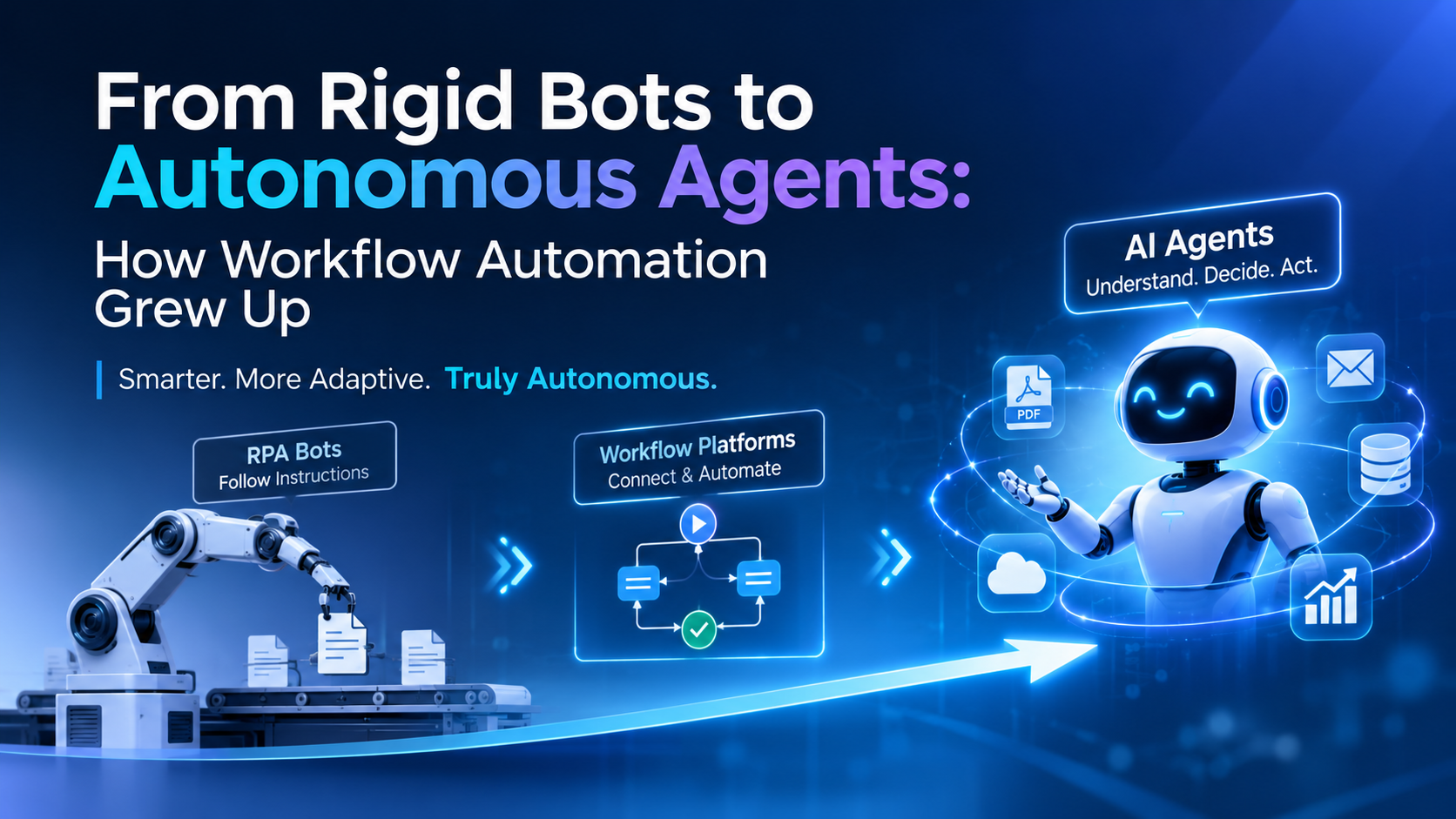

How AI agents are changing the way businesses process information, make decisions, and get work done.
Automation has been part of business operations for years. From processing invoices to updating employee records, organisations have found ways to reduce repetitive work and move information between applications.
For a while, that was enough.
A bot could follow a set of instructions, retrieve information from one system, enter it into another, and complete the task without someone having to do it manually. It worked well as long as the process stayed predictable.
But business processes rarely stay predictable forever.
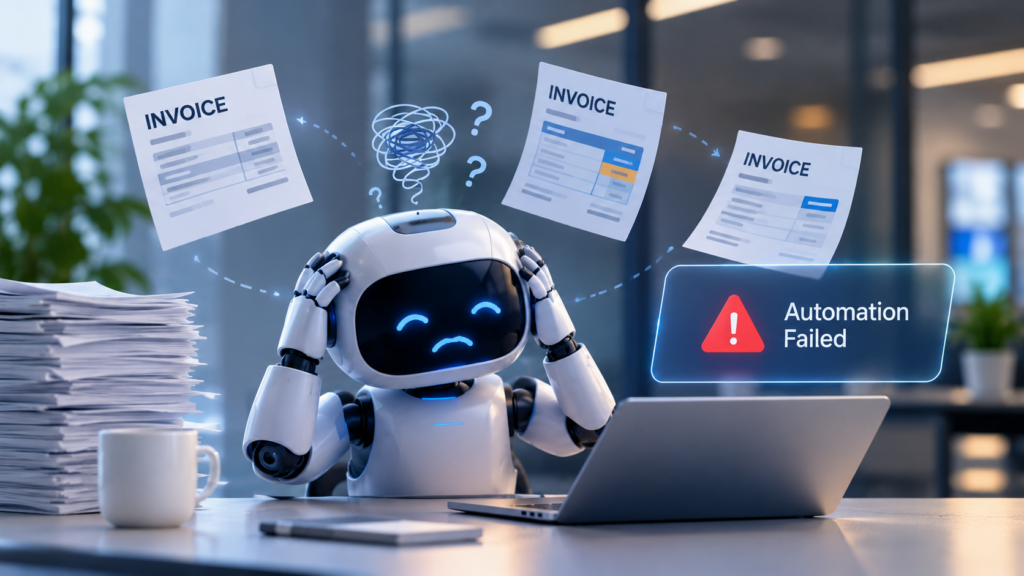
A supplier changes its invoice format. A document arrives with handwritten notes. A purchase order doesn’t match the goods received. Suddenly, an automation that worked perfectly yesterday needs someone to step in and fix it.
This is where traditional automation starts to show its limitations.
Businesses aren’t just looking to automate individual tasks anymore. They want systems that can understand information, work across applications, recognise exceptions, and take action without requiring human involvement at every step.
That’s the shift towards agentic workflow automation.
1. Why Traditional Automation Starts to Struggle
Robotic Process Automation (RPA) solved a genuine business problem. It allowed organisations to automate repetitive computer-based tasks without having to rebuild the applications they already depended on.
A bot could log into a portal, download a file, copy information into another system, and repeat the process hundreds of times. For predictable, rule-based work, it was a practical and often valuable solution.
The challenge begins when businesses try to extend that same approach across more departments, vendors, applications, and document types.
A process that works perfectly in a controlled environment can become surprisingly fragile in the real world.
When a small change breaks the entire process
Traditional RPA bots generally depend on predefined instructions. They know where to click, which field to read, and where to enter the extracted information.
What they don’t necessarily understand is the meaning behind that information.
A supplier might move a column, change an invoice layout, or introduce a new field. A website might receive an interface update overnight. The bot still follows the instructions it was given, even when the screen no longer matches what it expects.
We experienced this during our document-intake project for 7MG.
The initial implementation relied on rule-based parsing, with column specifications defined for individual sections. It worked with the original layouts but struggled when vendors changed their formatting. We also discovered that the reading order of text inside a PDF doesn’t always match the visual arrangement of the document.
In other words, a script could be reading the document in a completely different order from the way a person would interpret it.
The more dangerous problem is an error nobody notices
A failed automation is inconvenient. A successful-looking automation that processes incorrect information is considerably more concerning.
In 7MG’s case, extracted information supports rights-expiration tracking, holding-fee alerts, and use-rights notifications.
A wrongly captured Ad-ID or cycle date could result in a missed renewal or an incorrect payment. The record might look perfectly valid, so the problem may not be discovered until much later.
This is one of the biggest weaknesses of rigid automation: it doesn’t naturally recognise uncertainty.
Whether a value is clearly visible or incorrectly interpreted, the bot can continue processing it with the same confidence.
For businesses handling financial, contractual, or compliance-related information, that’s a risk worth taking seriously.
Maintenance slowly becomes the main workload
As automation expands, maintaining it can become a project of its own.
During the second stage of the 7MG project, we moved from rule-based parsing to trained document models. These models performed well with known layouts, but every new vendor or document format required labelled samples and additional model training.
By the time we reached production, we had eight custom-trained models to maintain.
Multiply that across dozens of suppliers and document types, and the workload becomes difficult to ignore.
Automation teams end up spending considerable time:
Updating scripts whenever application interfaces change.
Collecting and labelling samples for new document layouts.
Retraining models when new formats appear.
Retesting workflows after system upgrades.
Troubleshooting exceptions that should ideally have been handled automatically.
At some point, the team spends more time maintaining automation than improving the underlying business process.
Business information rarely arrives in neat formats
Much of the information businesses work with isn’t structured neatly into rows and columns.
Think about scanned delivery notes with handwritten remarks, supplier invoices with different layouts, or completion reports containing multiple people, projects, rates, and contractual relationships.
One completion report in our 7MG project, for example, could contain more than 15 advertising versions, multiple sessions, and over 25 performers. Each performer needed to be connected to the correct versions, loan-out companies, agents, categories, and rates.
Extracting individual values wasn’t enough. The system needed to understand how those values related to one another, connect each document to the correct records, and identify duplicates.
That’s a very different challenge from copying information between two fields.
Connecting systems isn’t the same as understanding the work
Integration and workflow platforms have made it considerably easier to connect business applications.
A trigger can start a workflow, a connector can retrieve information, and a predefined action can update another system.
These tools remain extremely useful. However, they generally work best when the incoming data is already structured and the business logic is clearly defined.
The difficult part often happens in between.
Someone still needs to read a document, compare it with a purchase order, identify a quantity mismatch, and decide whether the invoice should proceed.
A conventional workflow can automate the surrounding steps, but the interpretation and decision-making may still depend on a person.
Early AI improved document reading, but left questions unanswered
The introduction of language and vision models brought a significant improvement. Unlike traditional scripts, these models could interpret documents with unfamiliar layouts.
However, early implementations introduced their own challenges:
Multiple sequential model calls increased processing complexity.
Free-text outputs needed additional processing before they could be used as structured data.
Extracted values didn’t always have individual confidence scores.
Businesses had limited visibility into why a particular value was extracted.
An AI system might extract information from almost any document, but if it cannot indicate which values are reliable and which need checking, businesses are left with a new version of the same problem.
What organisations need isn’t simply better document reading. They need automation that can understand information, validate it, explain where it came from, and recognise when it shouldn’t proceed.
That’s the foundation of agentic workflow automation.
Traditional Automation vs. Modern AI-Driven Workflow Automation
| Area | Traditional Automation (RPA) | Modern AI-Driven Workflow Automation |
|---|---|---|
| Working approach | Follows predefined rules and instructions | Understands context and works towards a defined goal |
| Data handling | Works best with structured, predictable inputs | Can interpret structured and unstructured information, including documents |
| Adaptability | Often requires rule changes or script updates when processes change | Can handle variations more flexibly within defined boundaries |
| Decision-making | Executes decisions explicitly programmed into the workflow | Uses AI to interpret information and recommend or take permitted actions |
| Exception handling | Often stops or requires manual intervention when unexpected conditions occur | Can identify exceptions, assess uncertainty, and route cases for human review |
| System interaction | Commonly automates repetitive actions across application interfaces | Can work across connected systems through APIs, integrations, and workflow tools |
| Human involvement | People handle exceptions and maintain automation rules | People provide oversight, approve consequential actions, and handle complex decisions |
| Maintenance | Scripts and rules need updates as interfaces and processes change | Still requires governance and monitoring, but schema-based and context-aware approaches can reduce template and rule maintenance |
The difference is not that traditional automation has become obsolete. RPA remains useful for stable, repetitive tasks. Modern AI-driven automation extends those capabilities to processes involving changing inputs, document interpretation, exceptions, and decisions that require context.
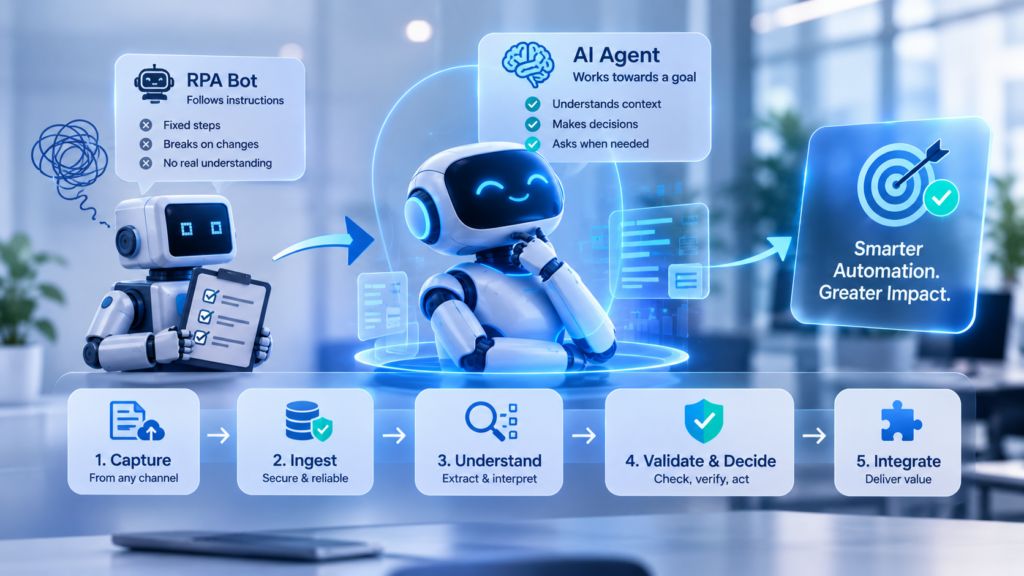
2. From Following Instructions to Working Towards a Goal
The difference between an RPA bot and an AI agent isn’t just the technology underneath. It’s how each one approaches a task.
An RPA bot follows a recorded sequence. An integration workflow responds to triggers and predefined conditions. An AI agent works towards an objective, interpreting the available information and choosing the appropriate next action within its permissions.
Several developments have made this approach more practical for enterprise operations.
Structured outputs that downstream systems can actually use
Early language models were good at generating readable responses, but business applications need predictable data.
If an AI extracts an invoice number, supplier name, date, and total, those values need to arrive in the correct fields and formats.
Modern models can generate structured outputs that conform to a predefined schema. This allows downstream systems to receive expected fields, data types, and lists without relying on an additional step to clean up free-text responses.
The result is a more direct connection between AI interpretation and business applications.
Understanding the document, not just extracting its text
Modern document intelligence goes beyond traditional OCR.
It can interpret page layouts, tables, checkboxes, handwriting, and relationships between different sections of a document. Vision models can also examine the page itself rather than relying entirely on extracted text.
For example, consider a scanned packing slip with a handwritten note indicating that some items were missing.
Traditional OCR might capture the printed quantities but struggle to interpret the handwritten remark. A vision-based system can examine both the document structure and the handwritten information to identify the discrepancy.
This changes how businesses approach document processing. Instead of forcing every document into a predefined template, automation becomes more capable of interpreting the documents businesses already receive.
Every extracted value should have evidence behind it
For enterprise adoption, accuracy alone isn’t enough. Teams need to be able to verify where information came from.
A well-designed agentic workflow can attach a reference to the exact OCR lines supporting each extracted value.
A grounding check then compares the extracted value against its cited source. If the value cannot be verified, it is marked as ungrounded and its confidence is capped.
Model confidence can also be combined with OCR word-level confidence to identify information that needs human review.
This creates a much more useful relationship between AI and the people responsible for business operations.
Rather than asking employees to trust an AI-generated result, the system gives them something they can check.
Adding a new document type shouldn’t mean starting another training project
Traditional trained document models often require labelled examples whenever a new layout or vendor is introduced.
An agentic approach can work differently.
Instead of training a separate model for every new format, businesses can define a schema for each document type and maintain it in a document-type registry.
Adding a new document type then becomes a configuration exercise rather than a model-training project.
This is particularly useful for organisations that regularly receive documents from different suppliers, customers, or business partners.
The practical benefit is straightforward: expanding document coverage no longer automatically creates another model-maintenance responsibility.
The agent loop: From receiving information to completing a task
An AI agent becomes particularly useful when it can do more than interpret information.
A typical enterprise document workflow can be organised into five stages:
1. Capture
Documents and requests enter through the channels employees and business partners already use. These might include email inboxes, scanners, multifunction printers, SharePoint, SFTP folders, customer portals, mobile uploads, or APIs.
2. Ingest
The original document is stored immutably, with a hash and retention policy. It is then placed into a processing queue with retries, at-least-once delivery, and a dead-letter path for items that cannot be processed successfully.
3. Understand
The agent identifies the document type, extracts the required information into a predefined schema, attaches evidence and confidence to each value, and flags potential anomalies.
4. Validate and decide
The extracted information is checked against business rules, master data, arithmetic requirements, duplicate records, and purchase orders.
This can include two-way and three-way matching between purchase orders, invoices, and goods received.
Based on these checks, the workflow determines whether the record can proceed automatically, needs human review, or should be blocked.
5. Integrate
Approved records are sent to the relevant system of record, whether that’s SAP, Microsoft Dynamics 365, Oracle, a manufacturing execution system (MES), warehouse management system (WMS), quality management system (QMS), or another business application.
Posting is idempotent, and each record retains a connection to its original document and the person who approved it.
The same principle applies beyond document processing.
Our Aykan HR Agent, for example, accepts employee requests through Microsoft Teams or Microsoft 365 Copilot, uses secure workflow actions, and works with live Zoho People data under the employee’s own identity.
The important shift is that automation is no longer limited to moving information. It can participate in completing the business process.
RPA, workflow platforms, and AI agents: Where does each fit?
These technologies aren’t necessarily competing replacements. They solve different parts of the automation problem.
| Area | RPA bots | Integration and workflow platforms | Agentic automation |
|---|---|---|---|
| Primary approach | Recorded clicks and fixed rules | Triggers and connectors | Goals, context, and tools |
| Handling layout changes | Often breaks | Primarily suited to structured data | Can interpret variations |
| Unstructured information | Limited | Limited | Handles PDFs, scans, handwriting, and email |
| Decision-making | Hard-coded branches | Conditional logic | Reasoning combined with rules and confidence |
| Adding new cases | New scripts or trained models | New connectors or workflow configurations | Often a schema or configuration change |
| Human involvement | Fixes broken automations | Handles exceptions | Reviews flagged or uncertain cases |
Established automation platforms, including UiPath and Workato, are also incorporating AI agent capabilities.
That’s an interesting development because it shows that enterprise automation isn’t moving towards one technology replacing everything else.
The more practical direction is a combination of tools, each handling the part of the process it is best suited for.
Autonomy isn’t an all-or-nothing decision
One concern businesses often raise is whether introducing AI agents means giving up human oversight.
It shouldn’t.
Autonomy needs to be defined according to the risk and complexity of each process.
Our DocFlow AI demonstrations illustrate three different scenarios:
- Straight-through processing: A supplier invoice from a steel supplier passed the required checks and was posted without human intervention.
- Human review: A scanned packing slip containing handwritten receiving remarks and a short shipment was sent to a person for confirmation.
- Exception handling: A scanned supplier invoice failed both a two-way price match against the purchase order and a three-way quantity match against goods received. The invoice was blocked until someone corrected it or approved an override.
The idea is to begin conservatively.
Businesses can initially route all extracted information through human review, compare accuracy against their existing manual process, and gradually increase automation thresholds where the results support it.
What should businesses look for in an agentic automation platform?
Whether you’re evaluating a platform, developing a solution internally, or working with an implementation partner, a convincing demonstration isn’t enough.
The underlying system should support:
- Structured, schema-valid outputs.
- Source citations and grounding checks for extracted values.
- Calibrated confidence scores to identify uncertain information.
- Business rules and master-data validation.
- Purchase order matching and duplicate detection.
- Human review queues with complete audit trails.
- Records of model versions, human edits, and data sent to target systems.
- Deployment within the organisation’s own environment where required.
- Microsoft Entra ID authentication, secure secret management through Key Vault, and private endpoints for storage and AI services.
- Actions performed under the appropriate user permissions.
- Transparent processing costs measured using actual business documents.
These capabilities are what separate an interesting AI demonstration from something an organisation can confidently put into production.
3. How We Approach Autonomous Business Processes at Aykan
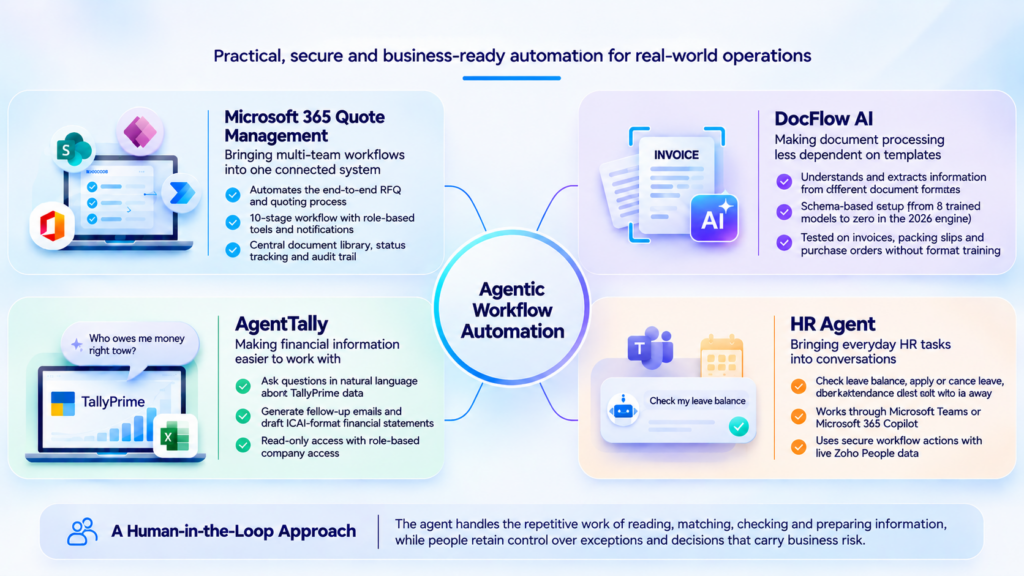
At Aykan, we approach agentic workflow automation through four connected layers: understanding information, establishing trust, taking action, and escalating decisions when necessary.
The technology matters, but the design of the workflow matters just as much.
Here are three examples of how these principles translate into practical solutions.
Microsoft 365 Quote Management: Bringing multi-team workflows into one connected system
We addressed this through a quote management automation solution built on Microsoft 365. The process involved multiple teams handling requests for quotation (RFQs), reviewing requirements, validating product information, gathering supplier pricing, and preparing customer quotes.
Previously, coordination relied heavily on email. Requests, documents, updates, and ownership could become difficult to track across teams.
The solution brought the process into one connected workspace using SharePoint Online, Power Apps, and Power Automate.
Each opportunity received a unique reference number and moved through a structured, ten-stage workflow. Different roles had their own stage-specific screens and responsibilities, while automated notifications directed work to the next person. A fast-track route handled simpler requests, and a separate Round 2 path supported customer-requested revisions.
The system also maintained a central document library, role-based access, status tracking, and a timestamped audit trail of user actions and notifications. It ran within the client’s existing Microsoft 365 tenant, without requiring additional servers or a separate database.
The important takeaway is that automation does not always begin with autonomy. A well-designed workflow creates the structure, visibility, and accountability that businesses need. More intelligent capabilities, such as AI-assisted intake and document extraction, can then be introduced where they add measurable value.
DocFlow AI: Making document processing less dependent on templates
Document processing is one area where the limitations of traditional automation become particularly visible.
Businesses receive invoices, purchase orders, contracts, packing slips, and other documents in different formats. Manually entering the information takes time, while template-dependent automation creates additional maintenance whenever layouts change.
Our DocFlow AI approach addresses this challenge by using document intelligence to interpret information across different formats.
In the 7MG project, the production implementation initially required eight custom-trained models to support different talent-payroll document layouts.
With the 2026 DocFlow AI engine, that requirement dropped to zero. Instead of maintaining separate trained models, document types could be introduced through schema configuration.
The same engine was also tested against scanned supplier invoices, packing slips containing handwritten remarks, and manufacturing purchase orders without training on those specific document layouts.
The objective is straightforward: make document processing more adaptable without creating another model-maintenance project every time a new format appears.
Building trust into every extracted value
One of the most important questions businesses ask about AI-driven automation is simple:
How do we know the system hasn’t made something up?
Our answer is to make validation part of the workflow itself.
DocFlow AI uses several checks:
- Source citations: Every extracted value is linked to the exact lines from the original document.
- Grounding checks: The system verifies that the cited information actually supports the extracted value.
- Confidence evaluation: Model confidence and OCR word-level confidence help identify uncertain fields.
- Business validation: Arithmetic, duplicate detection, vendor matching, and purchase order checks help determine whether a record can proceed.
Consider a supplier invoice showing 500 bolts, while the goods receipt records only 480. The invoice also contains a 5.6% price variance against the purchase order.
Rather than entering the invoice and leaving someone else to discover the discrepancy later, the system identifies the mismatches and blocks the record.
A person can then review the issue, correct the information, or approve an override where appropriate.
This is how AI-driven processing becomes more accountable: the system doesn’t simply provide an answer; it also provides the evidence and checks behind it.
AgentTally: Making financial information easier to work with
Finance teams and chartered accountants often spend considerable time navigating reports, checking ledger entries, and compiling information from accounting systems.
AgentTally connects chartered accountants and finance teams to TallyPrime data through Claude or Microsoft Copilot Studio.
Instead of navigating multiple screens and reports, users can ask questions in natural language.
For example:
“Who owes me money right now, and who hasn’t paid in 60 days?”
The solution can also draft follow-up emails based on the results and generate draft ICAI-format financial statements in Excel.
Importantly, AgentTally doesn’t make changes inside Tally. Each user can only access the companies and capabilities assigned to them.
The value here isn’t simply being able to ask questions in a conversational interface. It’s making financial information easier to access and work with while keeping the underlying accounting system and its controls intact.
Aykan HR Agent: Bringing everyday HR tasks into conversations
HR processes are another area where employees regularly interact with business applications to retrieve information or submit requests.
Our Aykan HR Agent allows employees to interact through Microsoft Teams or Microsoft 365 Copilot using natural language.
They can:
- Check their leave balances.
- Apply for or cancel leave.
- Check attendance.
- See who is away.
The agent uses secure workflow actions to access live Zoho People data under the employee’s own identity. Existing permissions and approval processes remain in place.
Before submitting a consequential request, it restates the relevant information, including dates, leave type, and number of days, and waits for the employee’s explicit confirmation.
For employees, this means fewer steps to complete routine HR tasks. For HR teams, it creates a more accessible way for employees to interact with existing systems without bypassing established processes.
For a closer look at how an AI assistant can work across multiple business applications, read our article, One Question, Four Systems: Why Single-System AI Assistants Fall Short.
Knowing when the agent should stop and ask
There will always be decisions that require human judgement.
We design the handoff as part of the automation rather than treating it as an afterthought.
Across our solutions, this takes different forms:
- In Microsoft 365 Quote Management, RFQs move through a structured, ten-stage workflow. Role-based task assignments, automated notifications, centralised document management, and status tracking help teams coordinate each stage from request intake to quote preparation.
- In DocFlow AI, uncertain values are sent to a review queue before anything is posted. Every human edit is recorded.
- In AgentTally, ambiguous ledger classifications are converted into a short Excel query sheet for the CA to confirm. The confirmed answer can then be reused in future processing.
- In the HR Agent, consequential requests require explicit employee confirmation.
The pattern is consistent. The agent handles the repetitive work of reading, matching, checking, and preparing information. People retain control over decisions that carry business risk.
That’s the kind of autonomy that makes sense in an enterprise environment.
Recommended Blog: One Question, Four Systems: Why Single-System AI Assistants Fall Short
4. What Does Agentic Workflow Automation Change for the Business?
The value of automation shouldn’t be measured by how impressive a demonstration looks.
It should be measured by what changes in everyday operations: processing costs, error rates, turnaround times, manual effort, and the ability to maintain a reliable audit trail.
Here are some of the results and improvements we’ve observed through our deployments and DocFlow AI demonstrations.
Processing costs you can measure
Across our DocFlow AI demonstration set, document processing costs ranged from approximately $0.04 to $0.16 per document, with processing times between 11 and 34 seconds.
The following figures cover OCR, classification, extraction, and validation.
| Document type | Pages | Processing time | Cost | Values extracted |
|---|---|---|---|---|
| Supplier invoice (steel supplier) | 1 | 19 sec | $0.041 | 34 |
| Scanned packing slip | 1 | 25 sec | $0.043 | 37 |
| Customer purchase order | 1 | 11 sec | $0.041 | 39 |
| Completion report (TEAM Companies) | 1 | 12 sec | $0.044 | 24 |
| Completion report (Highland Talent Payments) | 2 | 11 sec | $0.060 | 31 |
| Completion report (Extreme Reach) | 4 | 34 sec | $0.153 | 270 |
These figures are based on list pricing of $2 per million input tokens, $10 per million output tokens, and $10 per 1,000 OCR pages.
They represent processing costs only, not integration or human review time.
The important observation is that processing cost scales with page count and document density, rather than simply how unusual the layout is.
For businesses processing large document volumes, that provides a useful starting point for evaluating the economics of automation.
Catching errors before they reach business systems
Consider the supplier invoice demonstration.
The system identified a quantity mismatch between 500 invoiced bolts and 480 received, detected a 5.6% price variance against the purchase order, and checked that the invoice number had not already been posted.
The invoice was blocked rather than processed automatically.
This is where intelligent automation can make a real difference: identifying inconsistencies before they become downstream problems.
Shorter processing cycles and less repetitive work
Documents that previously required manual entry can now be processed in seconds, with uncertain information routed separately for review.
The same improvement applies to conversational workflows.
With AgentTally, finance teams can move through receivables checks, GST figures, month-end queries, and draft financial statements in minutes rather than spending hours navigating reports and compiling information.
With the Aykan HR Agent, an employee can submit a leave request through a conversation and one confirmation, without having to open a separate HR portal.
The benefit isn’t just speed. It’s fewer interruptions and less repetitive administrative work.
Better auditability and control
Automation becomes much easier to adopt when businesses can see exactly what happened at every stage.
DocFlow AI retains the original document hash, model and version information, extracted values with their supporting evidence, human edits, and the final payload sent to the target system.
The solution is deployed within the client’s own Azure subscription, keeping documents and extracted data within their tenant. Customer documents are not used to train the models.
The HR Agent incorporates per-employee permissions, tenant isolation, encryption at rest, and audit logging for requests.
Aykan is ISO 27001 certified, reinforcing our focus on information security and controlled business processes.
Give employees time for work that requires their expertise
Automation doesn’t need to eliminate human involvement to be valuable.
In our DocFlow AI demonstration set, one document passed straight through, one was blocked as an exception, and the remaining documents were routed for review because of low-confidence values or non-standard Ad-ID formats.
That distribution is intentional.
Instead of asking employees to inspect every document from beginning to end, the system brings their attention to the items that genuinely need it.
People can spend more time resolving exceptions, reviewing discrepancies, and making decisions rather than repeatedly entering and checking information.
Expand automation without expanding the maintenance backlog
The reduction from eight custom-trained models to zero in the 2026 DocFlow AI engine is another important development.
New layouts and vendors can be introduced through configuration rather than separate training projects.
As businesses expand the number of document types they process, this can make automation easier to maintain and extend.
The result is a more scalable approach to autonomous business processes.
5. How Should Businesses Get Started?
Moving towards agentic workflow automation doesn’t mean rebuilding every existing process.
In fact, starting with a complete automation overhaul is rarely the most practical approach.
A better starting point is to identify where manual work, document variation, and repeated decision-making create the biggest operational bottlenecks.
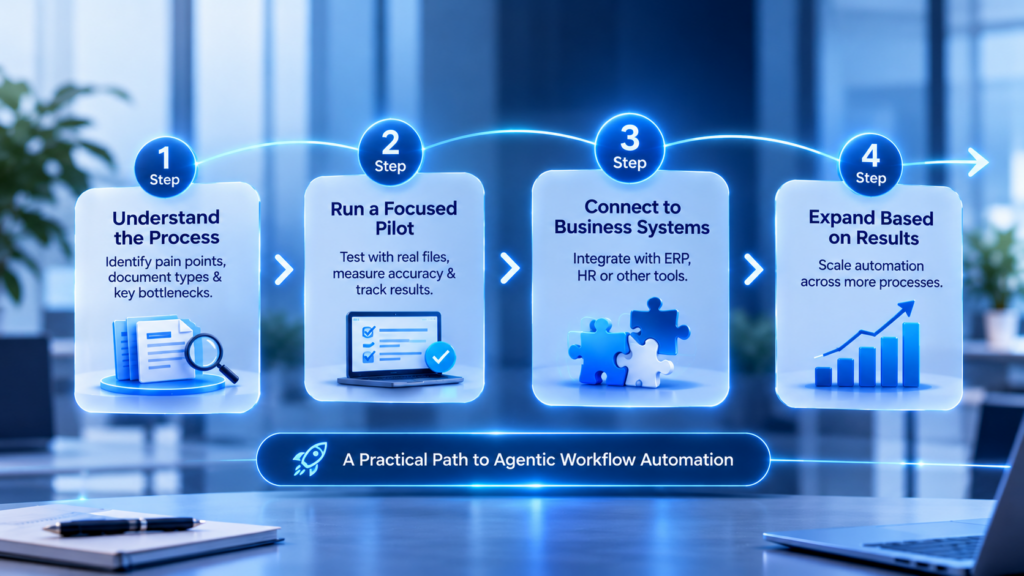
At Aykan, we recommend approaching the process in four stages.
Step 1: Understand the existing process
Start by identifying the documents and workflows that consume the most manual effort.
Look at document volumes, the number of vendors or senders, existing processing times, recurring errors, and the number of people involved at each stage. Pay particular attention to where information is entered more than once, where teams depend on email for updates, and where requests frequently get delayed.
It is also important to understand how the process works in practice, not just how it is supposed to work on paper. Employees often develop workarounds to deal with missing information, inconsistent formats, or disconnected systems. These details can reveal opportunities that may otherwise be overlooked.
Before introducing automation, establish a baseline. Knowing how much time a process currently takes, how often errors occur, and where delays happen makes it easier to measure whether the new approach is actually improving operations.
Step 2: Run a focused pilot
Once the bottlenecks are clear, choose one process where automation can deliver measurable value.
Avoid trying to automate an entire department or business function at once. Instead, start with a well-defined use case, such as invoice processing, document intake, purchase order validation, employee requests, or supplier coordination.
Define what success should look like before development begins. This could include reducing processing time, improving extraction accuracy, lowering manual effort, or reducing the number of exceptions requiring intervention.
The pilot should also include realistic inputs and exception scenarios. Testing only clean documents or straightforward requests will not reveal how the automation performs under actual business conditions.
Keep human review in place for uncertain results and consequential actions. Once the pilot demonstrates reliable performance, the same approach can be extended to additional document types, teams, or workflows.
Step 3: Connect the workflow to business systems
Automation becomes more valuable when it works with the applications employees already use.
Instead of creating another disconnected tool, connect the workflow to existing business systems such as Microsoft 365, SharePoint, ERP platforms, accounting applications, CRM systems, and HR software.
This allows information to move between applications without unnecessary manual transfers. It also helps maintain existing access permissions, approval processes, and business controls.
For example, document processing can be connected to an ERP system so validated invoice information moves into the appropriate workflow. Similarly, an HR agent can retrieve employee information from an existing HR platform and initiate requests through Microsoft Teams.
Real-World Example: Making Enterprise Knowledge Easier to Access
Our AI-Powered SOP Assistant demonstrates how connecting AI capabilities to existing business systems can improve everyday operations.
In a large enterprise with multiple business divisions, employees needed to refer to lengthy Standard Operating Procedures (SOPs) stored across different SharePoint repositories. Finding the right information often meant manually searching through documents, making it difficult to retrieve relevant guidance quickly.
To address this, we implemented two audience-specific AI agents using Microsoft Copilot Studio, integrated with Microsoft Teams and SharePoint Online.
Employees could ask questions in natural language and retrieve relevant SOP information without having to remember document names or locations. The solution also maintained role-based access, ensuring employees could only retrieve information they were authorised to view.
The implementation reduced SOP query resolution time by over 70%.
This example highlights an important part of workflow automation: the goal isn’t always to automate a sequence of tasks. Sometimes, connecting AI to the right business systems and information sources can remove an operational bottleneck altogether.
Read the full story: AI-Powered SOP Assistant
Step 4: Expand based on actual results
Once the initial implementation is working reliably, identify where the same approach can be applied next.
This might mean introducing additional document types, connecting another business application, extending automation to a different department, or allowing an agent to handle more steps within an approved workflow.
Expansion should be guided by actual results rather than the desire to automate everything. Review processing times, accuracy, exception rates, manual intervention, and the overall impact on employees.
Governance also becomes increasingly important as automation expands. Define who owns each workflow, what actions agents are permitted to perform, when human approval is required, and how activities are recorded for auditing.
A successful pilot should provide more than a working demonstration. It should establish a repeatable approach that the business can extend without losing visibility, security, or control.
The objective is not to make every process autonomous. It is to give each process the right level of automation, based on its complexity, business value, and risk.
Conclusion: The Future of Automation Is About Better Decisions, Not Just Faster Tasks
RPA introduced businesses to the value of automating repetitive work. Integration platforms made it easier to connect applications and move information between them. AI agents are taking the next step by making automation capable of interpreting information and working through more complex business processes.
But the real progress isn’t about making every process fully autonomous.
It’s about knowing which tasks can be handled independently, which require validation, and which should remain with a person.
The strongest results we’ve seen come from removing repetitive data entry, unnecessary reconciliation, and manual follow-ups, while giving employees better visibility and control over the work that remains.
That’s what makes agentic workflow automation a meaningful development for enterprise operations.
If you’re exploring how this could work within your organisation, we’d suggest starting with 20–30 representative documents of a single type.
In a working session with the Aykan team, we can demonstrate how those documents are interpreted, how extracted values are validated, where confidence levels stand, and which records would be processed automatically or sent for review.
The best way to understand what intelligent automation can do for your business is to test it against the work your team already handles.
Talk to the Aykan team to explore the possibilities.
FAQ's
1. What is agentic workflow automation?
Agentic workflow automation uses AI agents to work towards a defined business goal rather than simply following a fixed sequence of instructions. An agent can interpret inputs such as PDFs, scanned documents, and emails, apply business rules, interact with connected applications, and escalate uncertain decisions to a person.
2. How is an AI agent different from an RPA bot
An RPA bot follows predefined instructions, such as clicking buttons, copying values, and entering information into specific fields. An AI agent can interpret the information it receives, handle variations in document layouts, use available tools, and identify when something requires human attention.
3. Do businesses need to replace their existing RPA and integration tools?
No. Existing RPA bots and integration platforms can continue handling stable, structured processes. AI agents can be introduced where workflows involve unstructured information, document interpretation, matching, or decisions that are difficult to express through fixed rules.
4. How can businesses prevent AI agents from producing incorrect information?
A reliable agentic workflow combines source citations, grounding checks, confidence evaluation, and business-rule validation. Each extracted value should have supporting evidence. Information that cannot be verified or falls below the required confidence threshold should be sent for human review rather than processed automatically.
5. Is it secure to allow AI agents to access enterprise applications?
It can be, provided the solution is designed with appropriate security controls. These include single sign-on, user-specific permissions, secure secret management, tenant isolation, encryption, and audit logging. In Aykan’s deployments, the HR Agent works under individual employee identities, while DocFlow AI is deployed within the client’s own Azure subscription.
6. Which business processes are good candidates for agentic automation?
High-volume processes involving multiple document formats, repetitive information extraction, and manual validation are good starting points. Examples include supplier invoice processing, purchase orders, packing slips, HR requests, finance queries, and document-based approval workflows. Starting with two or three well-defined processes makes it easier to measure the results before expanding.
7. What is the difference between RPA and agentic workflow automation?
RPA follows predefined rules and instructions to complete repetitive tasks. Agentic workflow automation goes further by understanding context, making decisions within defined boundaries, handling exceptions, and taking action across connected systems. While RPA works best with predictable processes, agentic automation is more adaptable to workflows involving documents, changing information, and business decisions.
8. Can AI agents work with existing enterprise systems?
Yes. AI agents can connect with existing business applications through APIs, connectors, and integration layers. This allows them to work alongside platforms such as Microsoft Dynamics 365, SAP, Oracle, SharePoint, and HR or finance systems without necessarily replacing the existing infrastructure.
9. How do businesses ensure AI agents make accurate decisions?
Accuracy comes from combining reliable data extraction, business rules, validation checks, confidence scoring, and human review. Important actions should also have clear approval requirements and audit trails. AI agents should operate within defined permissions rather than making unrestricted decisions.
10. Does agentic workflow automation eliminate the need for human involvement?
No. The goal is not to remove people from every process. AI agents can handle repetitive tasks and routine decisions, while employees focus on exceptions, approvals, and decisions requiring business judgement. Human oversight remains important, particularly for financial, legal, and operational workflows.
11. Is agentic workflow automation suitable for small and mid-sized businesses?
Yes. Businesses do not need to automate everything at once or invest in a large transformation programme. They can begin with a focused process, such as invoice processing, document intake, employee queries, or customer request handling, and expand once the results are measurable.
12. Can workflow automation be built using existing Microsoft 365 tools?
Yes. Microsoft 365 provides tools such as SharePoint Online, Power Apps, and Power Automate to build structured business workflows. They can support request intake, role-based task assignments, automated notifications, document management, approvals, and audit tracking. Businesses can start with their existing Microsoft 365 environment and introduce AI capabilities where they make sense.