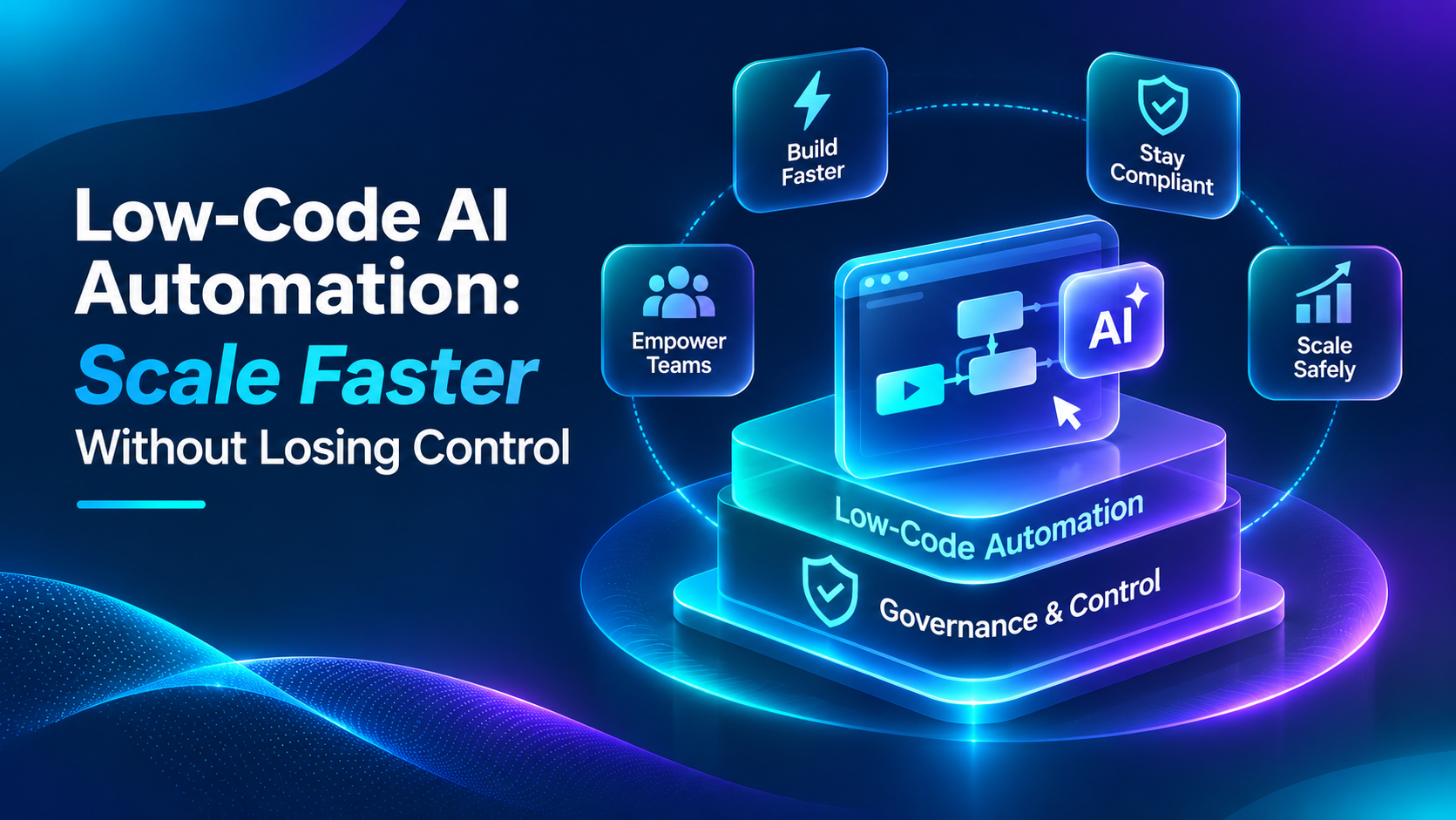

Building an AI agent, automating an approval process or connecting business applications no longer needs to start with a lengthy software development cycle. With low-code platforms, business teams can create workflows, build AI agents and connect everyday applications without writing extensive code.
For organisations looking to improve operational efficiency, this changes how automation can be approached. Sales teams can automate routine enquiries, finance departments can streamline approvals, and operations teams can connect information across different business systems.
But making automation easy to build does not automatically make it easy to manage.
When different departments start creating their own agents and workflows, organisations can quickly lose visibility into what has been deployed, who owns it and what business information it can access. Some automations may duplicate existing processes, while others may rely on unapproved connectors or individual employee accounts.
The bigger concern comes when AI agents move beyond answering questions and begin taking actions: updating records, creating orders, processing requests and communicating with customers.
At that point, automation is no longer just a productivity improvement. It becomes part of the organisation’s operational infrastructure.
The challenge for CTOs, CIOs and Operations leaders is to encourage innovation without creating an environment where nobody knows what their AI agents are doing.
This is where low-code AI automation needs to work alongside enterprise automation governance, identity management and a clear engineering strategy.
The Hidden Cost of Uncontrolled AI Automation
Consider a business where different departments are adopting AI independently.
The sales team builds an agent in Microsoft Copilot Studio to handle routine enquiries. Finance uses Power Automate to simplify internal approvals. Operations connects ChatGPT to a spreadsheet to retrieve information more quickly.
Each solution works independently. Teams are saving effort, and business users are solving problems without waiting for developers.
However, as these solutions become part of everyday operations, a different set of questions starts emerging.
How many AI agents and automations are currently running?
Who is responsible for maintaining each one?
Which business systems and data sources can they access?
Are the connectors approved by IT?
Can an agent update financial records or send external communications without approval?
What happens when the employee who created an important workflow leaves?
Without clear answers, organisations can end up with automation sprawl.
The problem is not necessarily that individual agents are poorly built. It is that there is no consistent way to manage them collectively.
How Automation Sprawl Develops
Automation sprawl rarely starts with a major technology decision. It usually develops through small, independent improvements.
A department creates an agent to answer internal questions. Another team builds a workflow to process documents. Someone connects a spreadsheet to an external AI application because it makes their daily work easier.
Initially, these solutions are useful. But as they become part of regular operations, they start creating dependencies.
An approval workflow may rely on an employee’s account. An agent may have access to information beyond its original purpose. A document-processing workflow may connect to a system that IT has never reviewed.
The problem becomes harder to identify when multiple automations depend on one another. Changing an application, updating permissions or removing a user account can affect workflows that nobody knew existed.
This is why organisations need to treat AI agents and automations as managed business assets, not just individual productivity tools.
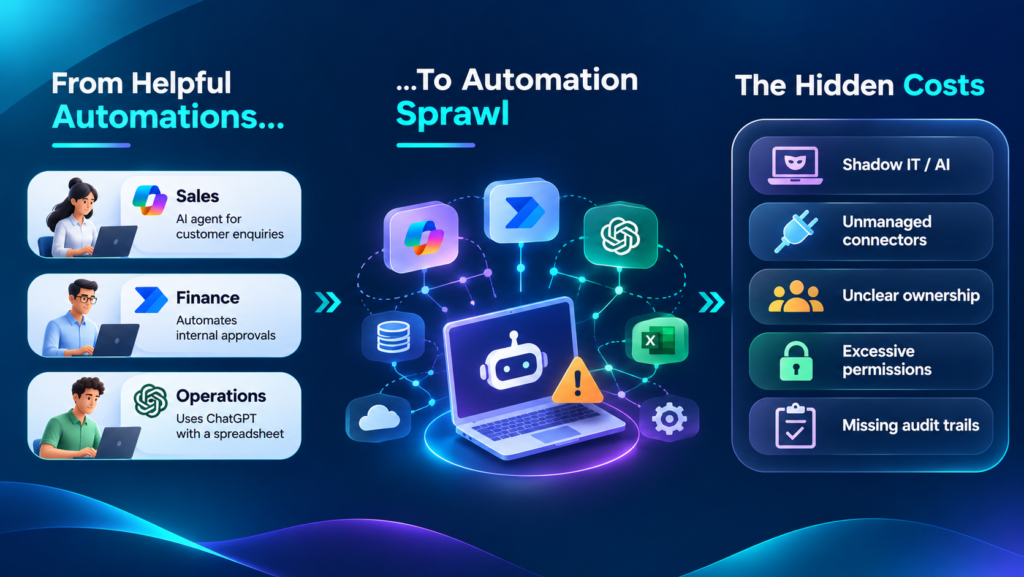
Five Risks That Organisations Need to Address
Shadow IT and shadow AI
Employees may start using external AI applications to complete everyday tasks because approved tools do not meet their immediate requirements. Business documents, customer information and internal data may then move outside approved environments.
Unmanaged connectors
Low-code platforms make connecting applications easier, but every connection creates a data-access decision. Without connector policies, teams may unknowingly establish connections that expose sensitive information or bypass existing security controls.
Unclear ownership
An automation may work perfectly while its creator is part of the organisation. But when that person changes roles or leaves, the remaining team may not know how the workflow was designed, what dependencies it has or how to troubleshoot it.
Excessive permissions
An agent may receive access to an entire application when it only needs to retrieve information from a specific area. If the agent can perform actions as well, excessive permissions can create a much larger operational risk.
Missing audit trails
When an agent updates records, sends communications or initiates transactions, organisations need to understand what happened, which identity was involved and whether the action was authorised. Without appropriate logging and traceability, investigating errors becomes difficult.
The risks become more significant when agents can perform actions rather than simply provide information.
An agent that drafts an email presents a different level of risk from one that sends it automatically. Similarly, an agent that prepares a purchase order should be treated differently from one that can approve and submit it.
For organisations in defence, aerospace, finance and healthcare, auditability, access controls and compliance requirements need to be considered before AI is introduced into critical business processes.
Why Both Complete Freedom and Complete Restriction Fail
When organisations recognise these risks, they often move towards one of two extremes: allowing everyone to build independently or restricting AI adoption altogether.
Neither approach provides a sustainable solution.
Low-Code Without Governance
Giving every department complete freedom to build automations may deliver quick results initially. Over time, duplicated workflows, disconnected integrations and unclear ownership can make the environment difficult to maintain.
IT teams may only discover problems when an automation stops working or an inappropriate action has already taken place.
Locking Everything Down
Restricting access to AI tools might appear to be the safer option. However, employees still have business problems to solve.
When approved tools cannot support their requirements, they may turn to personal accounts, external applications or unapproved integrations.
This creates shadow IT and shadow AI, where business information moves outside the organisation’s visibility.
Using Custom Development for Everything
Routing every automation request through a development team can create unnecessary delays.
A simple document-processing workflow or internal approval process may not require a fully custom application. Using engineering resources for every routine requirement can increase development overhead.
The better approach is to determine which processes can be handled through low-code, which need additional governance and which genuinely require custom engineering.
Low-Code vs. Pro-Code
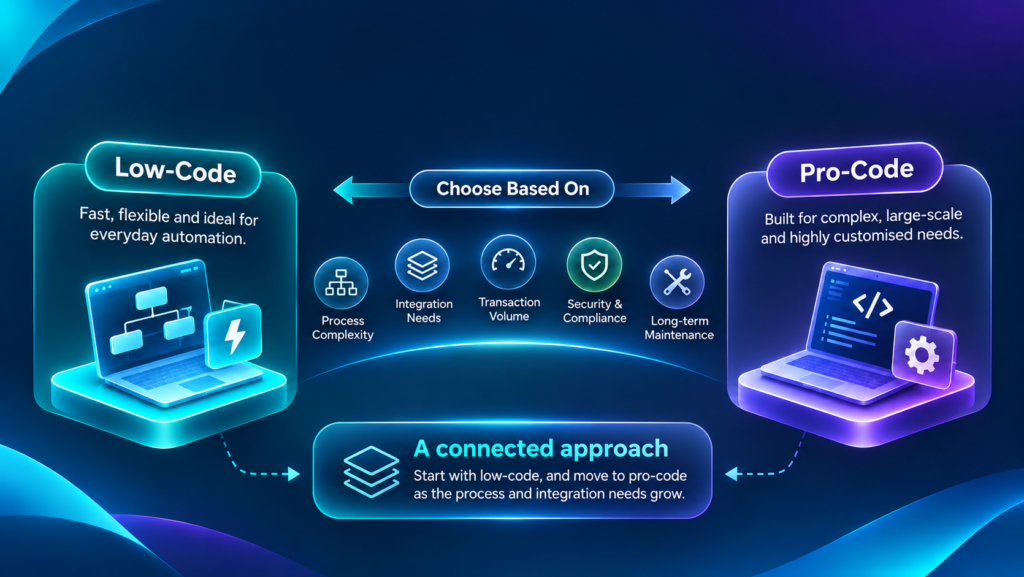
Low-code and pro-code development are not competing approaches. They serve different requirements and can work together as an organisation’s automation needs evolve.
Low-code platforms are particularly useful for everyday departmental workflows, internal approvals, notifications, document processing and straightforward AI agents connected to business applications.
They allow people who understand the business process to participate directly in improving it.
However, as a process becomes more complex, the requirements can change.
An agent that initially retrieves information from a single application may eventually need to interact with multiple enterprise systems, apply specialised business rules and coordinate actions across different departments.
At that stage, organisations may need custom engineering to manage the architecture, integrations, execution logic and security requirements more precisely.
The decision should consider:
Process complexity: Does the workflow involve straightforward tasks or several interconnected business processes?
Integration requirements: Does it use standard connectors, or does it need custom connections across enterprise systems?
Transaction volume: Can the platform support the expected workload and execution requirements?
Security and compliance: Are additional access controls, audit requirements or specialised deployment considerations necessary?
Long-term maintenance: Can the solution be maintained and extended without creating unnecessary technical debt?
For example, a finance team may begin with a low-code approval workflow. If that workflow later becomes part of a larger business process involving ERP, CRM, financial transactions and multiple agents, custom engineering may become more appropriate.
The important thing is to establish a clear path between the two rather than treating every automation as a separate development project.
Building a Governance Framework for Enterprise AI Automation
Governance should not be introduced after an organisation has already deployed multiple agents. It should be part of the automation strategy from the beginning.
At Aykan, we look at enterprise automation through a layered approach that combines low-code development, security, human oversight and custom engineering.
1. Give Business Teams a Controlled Low-Code Environment
Business teams understand their processes better than anyone else. They should be able to improve those processes without depending on developers for every minor change.
Microsoft Copilot Studio and Power Platform provide a practical foundation for building agents, automating approvals and connecting business applications.
However, organisations should distinguish between experimentation and production deployment.
For example, an employee testing an agent that summarises internal documents should not automatically have the same permissions or access as an agent handling live customer transactions.
Managed Environments in Power Platform help organisations establish structured environments and apply governance controls across their Power Platform usage.
Administrators can use these capabilities alongside environment policies and other platform controls to manage how solutions are created, shared and deployed.
The objective is to give business teams room to experiment while ensuring that production solutions follow the organisation’s governance requirements.
This also helps IT teams avoid becoming a bottleneck for every small automation request.
2. Control Which Data and Applications Agents Can Access
An AI agent is only as secure as the access it receives.
If an agent can connect to email, SharePoint, CRM, ERP and finance systems, organisations need to understand what information it can retrieve and what actions it can perform.
This is where Data Loss Prevention (DLP) policies become important.
DLP policies help administrators control which connectors can be used within Power Platform environments. They can restrict combinations of business and non-business connectors to reduce the risk of sensitive information moving into inappropriate services.
Microsoft Entra ID provides the identity foundation for authentication and access management.
Organisations should also consider:
Single sign-on: Allow users to access supported applications through a central identity.
Conditional Access: Apply access decisions based on defined organisational policies and conditions.
Role-based access control: Give users and applications only the permissions required for their responsibilities.
Application authentication: Ensure integrations use appropriate authentication mechanisms rather than relying on personal employee credentials.
Permission reviews: Regularly examine which applications and agents can access sensitive information.
Consider an agent that retrieves financial information from an ERP system. It should not automatically receive permission to modify every financial record simply because it needs to read selected information.
The permissions should reflect the actual purpose of the agent.
This principle becomes particularly important when agents are allowed to perform actions across multiple applications.
3. Maintain a Central Inventory of Agents and Automations
One of the most useful governance practices is maintaining an inventory of what has been built.
An organisation should be able to identify every important application, agent and workflow, along with its owner, purpose, connected systems and operational status.
A useful inventory should capture the following information:
Agent or workflow name and business purpose.
Department responsible for using it.
Business owner and technical owner.
Connected applications and data sources.
Access permissions and authentication requirements.
Actions the agent is allowed to perform.
Approval requirements for sensitive activities.
Deployment status and last review date.
This inventory should not be treated as a document that is created once and forgotten.
When an agent receives a new integration, changes its permissions or starts handling a different business process, its record should be reviewed.
The same applies when an automation is no longer required. Its connections and permissions should be retired appropriately rather than leaving inactive agents with unnecessary access.
This provides IT teams with a clearer picture of the organisation’s automation environment and helps prevent important workflows from becoming unmanaged.
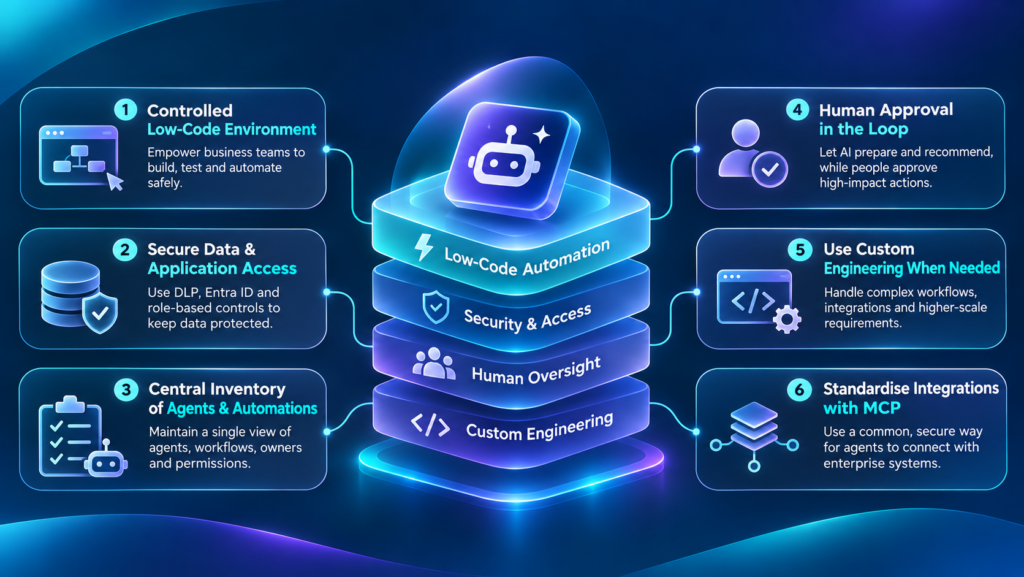
4. Keep Human Approval in the Loop
An AI agent that provides information is different from an agent that changes business records.
Organisations should classify actions according to their operational impact and decide where human approval is required.
Consider a finance workflow.
An agent might retrieve invoice details, compare information, identify missing documents and prepare an approval recommendation. These activities can reduce repetitive work for the finance team.
However, approving a payment or committing funds is a different responsibility.
A practical human-in-the-loop approach allows AI to prepare information and recommendations while keeping important decisions with authorised employees.
This approach can be applied across different business functions:
-
Finance: Agents can prepare payment information and flag discrepancies, while authorised employees approve transactions.
-
Sales: Agents can draft customer communications, while sales representatives review important messages before sending.
-
Procurement: Agents can prepare purchase requests, while designated employees approve submissions.
-
Operations: Agents can identify workflow exceptions and recommend corrective actions, while responsible teams review high-impact changes.
The level of human involvement should depend on the risk of the action.
Low-risk and repetitive activities can be automated where appropriate. Actions involving financial commitments, customer communication or important business records should have stronger approval mechanisms.
The objective is not to remove people from business processes. It is to reduce repetitive work while maintaining accountability.
5. Know When to Introduce Custom Engineering
Low-code platforms are useful, but not every enterprise process fits within their limitations.
Some requirements involve multiple agents, complex business rules, high transaction volumes, cross-system integrations or stricter audit requirements.
This is where Azure AI Foundry and agent SDKs become relevant.
Custom engineering gives organisations more flexibility to design how agents interact with systems, manage complex workflows and implement controls around specific business requirements.
For example, consider a business process involving an ERP system, CRM, document repository and finance application.
The agent may need to retrieve information from several systems, validate business rules, prepare an action and wait for approval before updating a record.
This is more than a simple automation. It requires careful consideration of integration architecture, identity, permissions, error handling and operational monitoring.
A custom-engineered solution can provide a more controlled foundation for these requirements.
The objective is not to move everything into custom development. It is to use the right approach for each process and avoid creating unnecessary complexity where low-code is sufficient.
6. Standardise Enterprise Integrations with MCP
Another important consideration is how AI agents communicate with enterprise systems.
When every agent has its own custom integration, maintaining connections across ERP, CRM and finance applications can become complicated.
The Model Context Protocol (MCP) provides an emerging open standard for connecting AI applications and agents with external tools and data sources.
Instead of building a different integration pattern for every agent, organisations can use MCP to establish structured ways for AI applications to discover and interact with supported tools and resources.
However, standardising the connection does not automatically make it secure.
Each integration still needs appropriate authentication, authorisation, permission boundaries and monitoring.
For example, an organisation exploring AI-powered accounting workflows may need an agent to retrieve financial information from Tally Prime.
Rather than relying on an unmanaged connection or an employee’s personal account, the integration can be designed around a secured MCP server with appropriate authentication.
OAuth 2.0 can provide an authentication and authorisation mechanism for supported integrations.
The advantage of this approach is that the integration can become a reusable component rather than a one-off connection tied to a single agent.
This is particularly useful when several workflows need to interact with the same enterprise application.
What Should Organisations Measure When Scaling AI Automation?
A common mistake is evaluating automation only by the number of workflows or agents created.
The number of agents deployed does not necessarily indicate whether the organisation is becoming more efficient or operating more securely.
An organisation may have several agents running, but if employees still need to correct their outputs manually or IT cannot identify who owns them, the overall value may be limited.
A better approach is to measure automation across four areas.
Operational Efficiency
The first question is whether automation is improving the way work gets completed.
Useful measurements include:
Process completion time: How long does it take to complete a task before and after automation?
Manual intervention rate: How often does a person need to step in and complete or correct the process?
Rework rate: How frequently does an automated output need to be reviewed or corrected?
Task handling time: Is the amount of time employees spend on repetitive activities changing?
For example, a document-processing workflow should be evaluated not just by how many documents it receives, but by how much manual work remains after extraction, validation and review.
Adoption and Usage
A solution can be technically successful but still fail to deliver business value if employees do not use it consistently. Deploying an AI agent or automation is only the first step. Organisations also need to understand whether employees are adopting it, whether it fits into their daily workflows and whether it is genuinely making their work easier.
Instead of measuring success only by the number of agents deployed or tasks automated, organisations should examine active usage, departmental adoption, repeat usage, task completion and employee feedback.
For example, if an AI agent is introduced to help the finance team retrieve invoice information, IT should look beyond whether the agent is functioning correctly. It should understand how frequently finance employees use it, whether they rely on it for their regular tasks and whether the information provided is accurate and useful.
Some important indicators to examine include:
Active users: How many employees are using the agent regularly, rather than simply having access to it?
Departmental adoption: Are different teams adopting the solution, or is usage limited to a small group of employees?
Repeat usage: Do employees return to the agent because it helps them complete tasks, or do they use it only during the initial rollout?
Task completion and effectiveness: Can employees complete the intended task successfully, or do they frequently need to correct the output or switch to manual processes?
Employee feedback: Are users finding the solution helpful? Feedback can reveal issues such as confusing interactions, unreliable responses or workflows that create additional steps.
Low adoption may indicate that the agent does not address the right problem, produces unreliable responses or creates additional work. It may also suggest that employees need better guidance or that the solution needs to be integrated more naturally into their existing processes.
Reviewing these indicators helps organisations identify where an automation is delivering value, where improvements are needed and whether it should be expanded to other teams.
Governance and Accountability
As organisations introduce more AI agents and automated workflows, they need clear visibility into how these solutions are created, who manages them, what information they can access and which actions they are authorised to perform.
Without proper governance, automation can quickly become difficult to manage. An agent created by one department may continue operating without regular oversight, connect to business systems without the right permissions or process information that should remain restricted. These risks become more significant when automations handle financial records, customer information or business-critical operations.
Governance measurements help organisations understand whether automation is operating within approved boundaries and whether someone is accountable for its behaviour throughout its lifecycle.
Useful indicators include:
Documented ownership: Every production agent should have a clearly identified business owner and technical owner. The business owner is responsible for its purpose and expected outcomes, while the technical owner oversees its configuration, integrations, maintenance and technical performance.
Approved access and permissions: Organisations should regularly review which systems, applications and data sources an agent can access. Permissions should be limited to what the agent needs to perform its intended tasks.
Connector and integration visibility: Every connection to an external application or internal business system should be documented and reviewed. This helps IT identify unapproved integrations, understand where business data is moving and prevent uncontrolled access through personal or unauthorised accounts.
Audit trails and activity logs: Organisations should maintain records of important agent activities, including data accessed, actions performed, approvals received and changes made. These records help teams investigate unexpected behaviour and demonstrate accountability during internal or regulatory reviews.
Human approval for sensitive actions: Actions involving financial commitments, changes to important business records, external communications or other high-impact decisions should have appropriate approval controls. Organisations should be able to identify which actions an agent can complete independently and which require human review.
Regular reviews and maintenance: Agents should be reviewed periodically to confirm that their purpose, permissions, integrations and ownership are still valid. When an employee leaves or a business process changes, the organisation should update or transfer ownership rather than allowing the automation to operate without oversight.
For example, consider an AI agent that retrieves overdue invoice information and prepares payment follow-ups. It may be permitted to access approved financial records and draft reminders, but sending external communications or updating payment status may require human approval.
This distinction helps organisations benefit from automation without giving AI systems unrestricted control over business processes.
A strong governance framework should make accountability part of the automation lifecycle, from initial development and deployment to ongoing monitoring and eventual retirement. This allows organisations to scale AI adoption while maintaining control over data, access and business-critical actions.
Reliability and Integration Performance
These questions are important when automation becomes part of a business-critical process.
The measurements should be evaluated against the organisation’s own baseline rather than assumed industry benchmarks.
The key is to measure both business value and operational control. An automation that saves time but introduces uncontrolled access is not necessarily a successful implementation.
How Aykan Approaches Intelligent Operations
At Aykan, our work across enterprise systems, application modernisation, workflow automation and AI integration gives us practical experience in connecting different business processes.
We focus on more than building individual agents. Understanding how information moves across systems, how access is managed and how integrations work together is equally important.
Some of our work demonstrates different aspects of this approach.
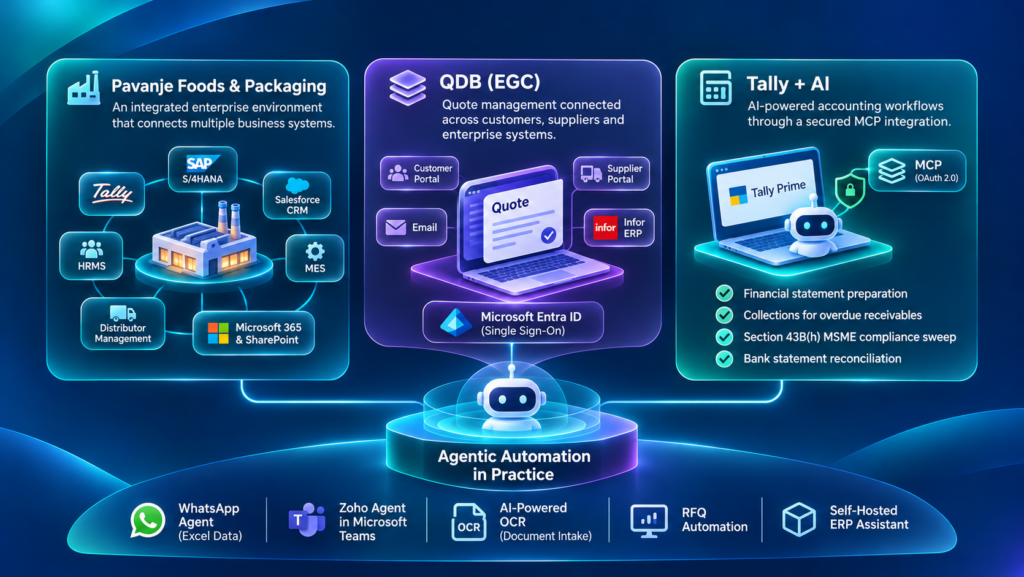
Pavanje Foods & Packaging: An Integrated Enterprise Environment
Pavanje Foods & Packaging is our integrated demonstration company, built around a realistic manufacturing environment.
Rather than relying on isolated mock applications, the environment uses real systems and includes three years of transaction history.
The setup brings together:
SAP S/4HANA: The main company system.
Tally: Subsidiary accounting books.
Salesforce CRM: Customer relationship management.
Custom HRMS: Human resource management.
Custom MES: Manufacturing execution.
Distributor management system: Distributor-related operations.
Microsoft 365 and SharePoint: Collaboration and document management.
Microsoft 365 and SharePoint operate in a separate tenant with their own identities and mailboxes.
This environment demonstrates how different enterprise applications can operate together while maintaining their own system boundaries.
It also provides a practical foundation for exploring AI integration across business functions.
Consider the information involved in a manufacturing operation. Financial records, customer details, employee information, production activity and distributor data may reside in different applications.
An AI agent supporting one of these processes needs to understand which system provides the relevant information and what it is authorised to access.
For example, an agent assisting with a finance workflow may need accounting information from Tally, while an operations workflow may depend on manufacturing information from MES.
These are different requirements, even though both involve AI.
The environment helps demonstrate why enterprise integration and access boundaries need to be understood before automation is expanded across departments.
QDB: Connecting Quote Management Across Business Systems
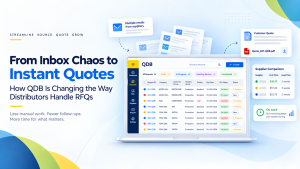
For QDB (EGC), Aykan built quote management software integrated with email, a customer portal, a supplier portal and Infor ERP.
Microsoft Entra ID single sign-on provides controlled access across these systems.
Quote management requires information to move between customers, suppliers and internal teams.
A request may originate through one channel, require information from another system and involve several people before it is completed.
Bringing these interactions into a connected application environment helps establish a more structured process.
This example also demonstrates why identity management and integration architecture matter when building business applications that interact with multiple enterprise systems.
When different stakeholders access the same business process, the organisation needs to understand who can view information, which actions they can perform and how access is managed.
Tally + AI: Connecting Accounting Workflows Through MCP
Aykan has also been exploring Tally Prime integration with AI through a secured MCP server using OAuth 2.0.
The Accountant Co-Pilot concept focuses on practical accounting and finance workflows:
Turning a trial balance into financial statements for Chartered Accountants
An AI-assisted workflow can help organise accounting information and support the preparation of financial statements. The underlying figures and resulting statements still need appropriate professional review.
Collections agent for overdue receivables
A collections agent can help identify overdue receivables and support follow-up activities, reducing the need for teams to manually track every outstanding item.
Section 43B(h) MSME payment compliance sweep
An AI-supported workflow can help identify relevant MSME payment records and highlight items that need attention under the applicable compliance requirements.
Bank-statement-to-books reconciliation triage
An agent can help identify differences between bank statement entries and accounting records, allowing finance teams to focus on exceptions that require investigation.
These use cases show how AI can support accounting activities while interacting with financial data through a secured integration.
They also illustrate why authentication, permissions and human oversight matter when introducing AI into financial workflows.
Demonstrating Agentic Automation in Practice
At the CII Karnataka Port & Logistics Conference 2026, Aykan demonstrated agentic workflow automation through practical showcases.
These included Tally and Zoho Books with AI, an RFQ automation showcase and a self-hosted ERP assistant.
We have also built lightweight agents for specific requirements:
A WhatsApp agent that answers questions using Excel data.
A Zoho agent operating inside Microsoft Teams.
AI-powered OCR for document intake.
These examples represent the quick-win end of the automation spectrum.
A WhatsApp agent retrieving information from Excel addresses a focused requirement. An OCR workflow helps process incoming documents. A Zoho agent inside Microsoft Teams brings access to business information into a familiar collaboration environment.
They do not all require the same architecture or level of engineering.
Some requirements can be addressed through lightweight agents, while others require deeper integration, stronger governance and custom engineering.
Together, these initiatives demonstrate why organisations need a flexible automation strategy rather than trying to solve every requirement with the same technology.
Recommended blog: AI Code Migration Security: How to Let AI Rewrite Legacy Code Safely
Scaling AI Is About More Than Building More Agents
The real measure of automation is not how many agents an organisation has created. It is whether those agents solve meaningful business problems, operate reliably and remain manageable as the organisation grows.
Low-code AI automation gives business teams the flexibility to improve processes without waiting for traditional development cycles. Enterprise automation governance ensures that this flexibility does not come at the cost of security, visibility or accountability.
For CTOs and Operations leaders, the next step should be understanding which processes are suitable for low-code, what controls are needed and where custom engineering can provide greater flexibility.
At Aykan, we bring together application modernisation, Microsoft technologies, workflow automation and AI engineering to help organisations build solutions around their operational requirements.
As a Microsoft Solutions Partner for App Modernization and an ISO 27001-certified company, our Mangalore-based team has been delivering technology solutions for clients in the US, UK and India since 2017.
Looking to scale AI automation without losing control of your business processes?
Get in touch with Aykan to discuss your automation requirements and explore how governance, enterprise integrations and custom engineering can work together to support your business.
FAQ's
1. What is low-code AI automation?
Low-code AI automation allows organisations to build AI agents and automate business processes using visual development tools, pre-built components and integrations. It reduces the need for traditional coding for many everyday business requirements.
2. Why is enterprise automation governance important?
Enterprise automation governance helps organisations maintain visibility over their agents and workflows, control access to business data, establish ownership and ensure that automated processes follow security and compliance requirements.
3. What is shadow IT and shadow AI?
Shadow IT refers to the use of applications, services and integrations without the knowledge or approval of the IT department. Shadow AI is a related challenge where employees use unapproved AI tools or agents that may access business information outside approved environments.
4. How can organisations prevent AI agents from accessing sensitive data?
Organisations can use DLP policies, approved connector configurations, Microsoft Entra ID, role-based access controls and appropriate authentication mechanisms. Agent permissions should be limited to the information and actions required for their assigned purpose.
5. When should an organisation move from low-code to custom AI development?
Low-code is suitable for many departmental workflows and routine automations. Custom engineering becomes more relevant when processes involve complex integrations, high transaction volumes, multiple agents, specialised business logic or stricter audit requirements.
6. What is MCP in AI automation?
The Model Context Protocol (MCP) is an open standard that allows AI applications and agents to connect with external tools and data sources through a structured interface. It can help organisations create reusable integrations with enterprise applications, provided appropriate authentication and access controls are implemented.
7. How should businesses measure the success of AI automation?
Businesses should evaluate automation through process completion time, manual intervention, rework, active usage, ownership coverage, permission reviews, execution failures and integration reliability. These measures help assess both business efficiency and operational governance.
8. Can low-code automation be used in regulated industries?
Yes, but the implementation needs to account for the organisation’s regulatory and security requirements. Identity management, access restrictions, audit trails, human approval and controlled integrations should be considered before deploying agents in sensitive business processes.