
Introduction
HR is no longer just a support function, it has become a strategic driver of business growth, employee experience, and organizational agility. Yet, in many enterprises, HR operations are still slowed down by manual processes, disconnected systems, and repetitive administrative work. From recruitment and onboarding to employee engagement and reporting, teams often rely on emails, spreadsheets, and fragmented tools, leading to inefficiencies, delays, and data inconsistencies.
Organizations using HROne already have a strong digital backbone in place, with a centralized system managing employee data, payroll, attendance, and compliance. However, the real challenge lies not in managing data, but in how that data is used across everyday HR workflows. This is where automation becomes critical.
By leveraging Microsoft 365 as an intelligent automation layer, businesses can transform their HR operations without replacing their existing systems. Instead of introducing new tools or increasing software costs, this approach enhances what already exists, connecting processes, automating workflows, and enabling real-time data flow across the organization.
Why Extend HROne Instead of Replacing It?
HROne already acts as the central system for managing employee data, payroll, attendance, and compliance. Replacing it would be costly, time-consuming, and disruptive, often without addressing the real challenge, which is the lack of automation and process efficiency around it.
Instead, extending HROne with Microsoft 365 allows organizations to enhance existing workflows without changing their core system. By using Microsoft 365 as an automation and interaction layer, every HR activity, from hiring and onboarding to employee engagement, seamlessly connects back to HROne through APIs. This ensures real-time data synchronization, eliminates duplication, and removes reliance on disconnected tools like spreadsheets and emails.
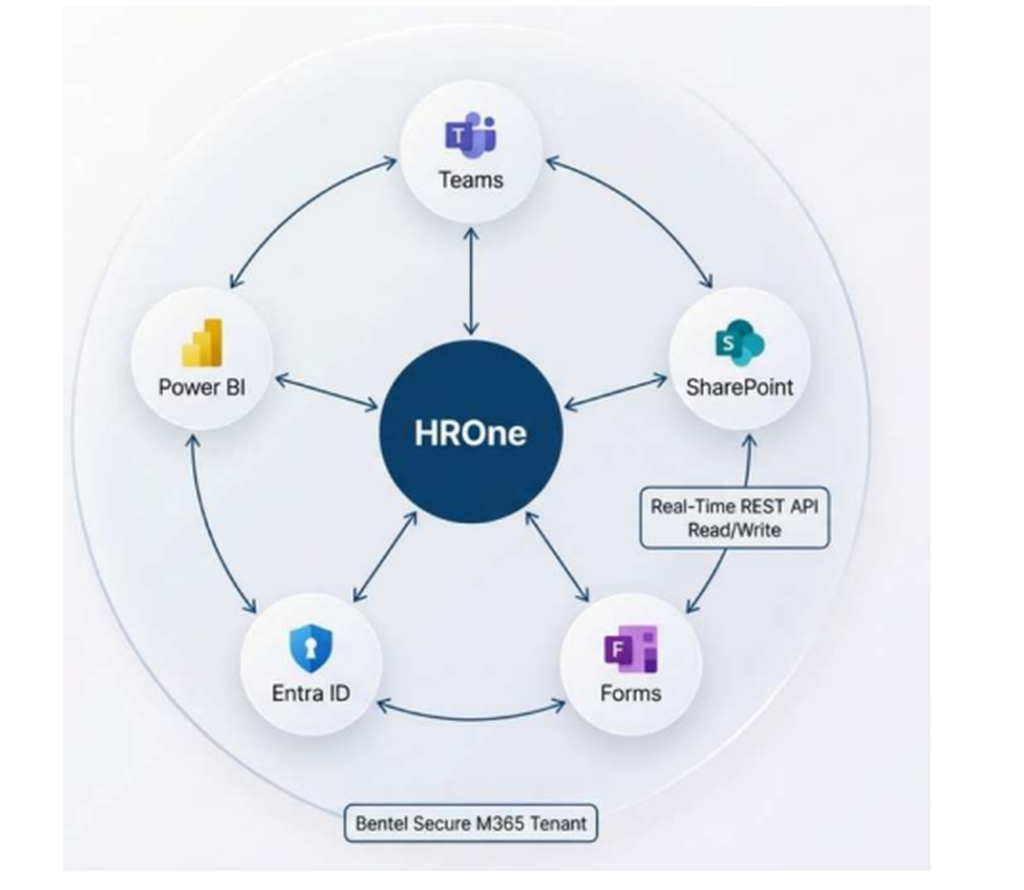
The result is a unified and scalable HR ecosystem where processes are faster, data is always accurate, and teams have complete visibility into operations. Most importantly, HR professionals can shift their focus from manual, repetitive tasks to more strategic initiatives that drive business growth and improve employee experience.
The 4-Phase HR Automation Framework
A phased implementation ensures that organizations can adopt automation gradually while delivering immediate value. Each phase builds on the previous one, creating a cohesive and scalable HR ecosystem.
Phase 1: Hiring & Recruitment
An agentic recruitment platform built on Microsoft 365, seamlessly connected to HROne. The objective of Phase 1 is to eliminate the fragmented and manual nature of traditional recruitment. By integrating AI and automation into every step, from job creation to offer rollout, organizations can create a streamlined, data-driven hiring process. Each activity is orchestrated through Microsoft 365 tools while HROne remains the single source of truth, ensuring consistency, visibility, and efficiency across the hiring lifecycle.
1.1 Job Description Creation & Publishing
Recruitment begins with raising a requisition, which is initiated through a structured form built using Power Apps. Instead of manually drafting job descriptions, recruiters select predefined attributes such as role, department, and grade, which are fetched directly from HROne. This ensures that every job request aligns with approved organizational structures and avoids inconsistencies in role definitions.
AI then plays a key role by generating a complete job description using role metadata. It creates well-structured content that includes responsibilities, required skills, and standardized language, ensuring clarity and inclusivity. This significantly reduces the time spent on drafting while improving the quality and consistency of job descriptions across the organization.
Once generated, the job description goes through an approval workflow powered by Power Automate. HR managers receive approval requests via Outlook, ensuring governance and control before publishing. Approved job descriptions are stored centrally in SharePoint Online, creating a reusable knowledge base.
After approval, the system automatically publishes the job description across multiple channels, including internal portals and Microsoft Teams.
1.2 Application Tracking
Candidate applications are captured through structured digital forms, ensuring that all required information is collected in a consistent format. Instead of relying on emails or external tracking tools, every application flows into a centralized system, improving visibility and control over the hiring pipeline.
When a candidate submits an application, automation workflows immediately create a corresponding candidate record in HROne using APIs. This ensures that all candidate data is stored in the system of record without any manual intervention, eliminating duplication and errors.
Supporting documents, such as resumes, are stored in SharePoint within dedicated folders linked to each candidate. This creates a single workspace where recruiters can access all relevant information, improving collaboration and organization.
Candidates receive automated acknowledgment emails, providing confirmation and setting expectations regarding the hiring process. At the same time, recruiters are notified through Teams, enabling them to take immediate action. This combination of automation and real-time communication significantly enhances both recruiter efficiency and candidate experience.
1.3 AI-Assisted Candidate Shortlisting
Shortlisting candidates is often one of the most time-consuming steps in recruitment. By introducing AI into this stage, organizations can dramatically reduce manual effort while improving decision quality.
As soon as a candidate record is created, an automated workflow triggers an AI service that analyzes the candidate’s resume alongside the job description. Using advanced document processing and natural language understanding, the system evaluates candidates based on criteria such as skills alignment, experience level, education, and role-specific requirements.
Each candidate is assigned a score and a concise summary, which is written back into HROne and the tracking system. This allows recruiters to instantly identify high-potential candidates without manually reviewing every resume.
1.4 Interview Coordination
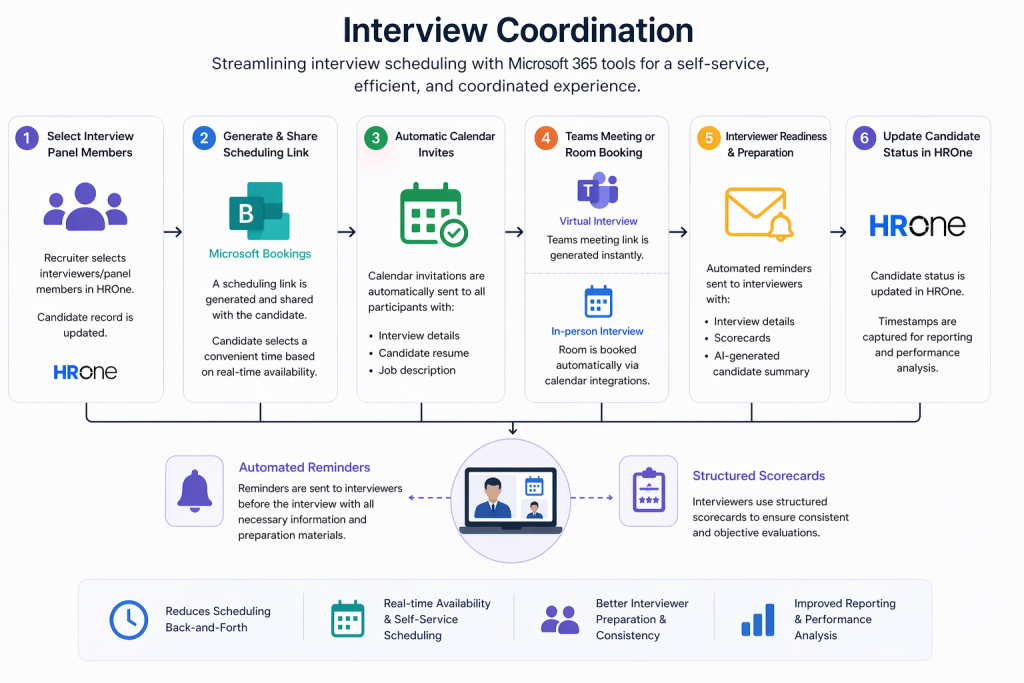
Interview scheduling is often a bottleneck due to back-and-forth communication and availability conflicts. This process is streamlined using tools like Microsoft Bookings and Microsoft Teams, creating a self-service experience for candidates.
Recruiters begin by selecting interview panel members, which updates the candidate record in HROne. A scheduling link is then generated and shared with the candidate, allowing them to choose a suitable time based on real-time availability.
Once the candidate selects a slot, calendar invitations are automatically sent to all participants, including interview details, resumes, and job descriptions. For virtual interviews, Teams meeting links are generated instantly, while in-person interviews trigger room bookings through calendar integrations.
1.5 Structured Interview Feedback
One of the biggest challenges in recruitment is inconsistent feedback collection. This step standardizes the process by using structured scorecards, ensuring that all interviewers evaluate candidates based on the same criteria.
After each interview, interviewers submit their feedback through digital forms, capturing ratings and qualitative insights. This eliminates scattered feedback across emails or informal notes and creates a centralized repository of evaluations.
Automation workflows then consolidate all feedback into a single view, making it easier for hiring managers to review. AI further enhances this process by generating a summary that highlights key strengths, areas of concern, and an overall recommendation.
The hiring decision is facilitated through an approval workflow, where managers can approve, reject, or request further interviews. Once a decision is made, candidates are notified automatically through personalized communication.
1.6 AI-Driven Insights & Reporting
The final component of Phase 1 focuses on transforming recruitment data into actionable insights using Power BI.
Organizations gain real-time visibility into the hiring funnel, including the number of applications received, candidates shortlisted, interviews conducted, and offers extended. This enables HR teams to monitor progress and identify bottlenecks quickly.
Time-based metrics such as time-to-hire and time-to-fill provide insights into recruitment efficiency across departments and roles. These metrics help organizations optimize processes and improve hiring timelines.
AI performance can also be measured by comparing its shortlisting recommendations with actual hiring outcomes. This ensures continuous improvement and builds trust in AI-driven decision-making.
Additional insights, such as interviewer participation, feedback submission rates, and source-of-hire analysis, help organizations refine their recruitment strategies.
Phase 2: Employee Lifecycle Management
Pre-joining to onboarding, identity provisioning, and 90-day feedback cycles
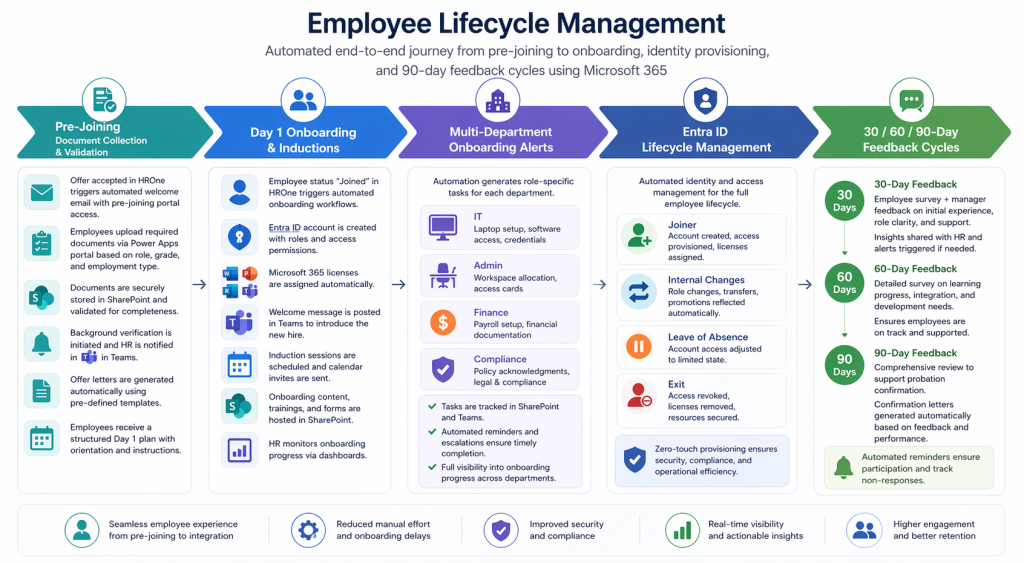
Once a candidate accepts an offer and the status is updated in HROne, Phase 2 automation begins. This phase ensures that every new employee experiences a smooth, structured, and consistent journey from pre-joining formalities to full integration within the organization. By leveraging Microsoft 365, organizations can eliminate manual coordination, reduce delays, and deliver a professional onboarding experience at scale.
2.1 Pre-Joining: Document Collection & Validation
The pre-joining stage is often unstructured, involving multiple email threads, follow-ups, and missing documents. This workflow replaces that complexity with a centralized, self-service experience that is both efficient and user-friendly.
As soon as the offer is accepted in HROne, an automated workflow is triggered using Power Automate. The new hire receives a personalized welcome email via Outlook, which includes joining details and a secure link to the pre-joining portal.
This portal, built using Power Apps, provides a clear checklist of required documents based on the employee’s role, grade, and employment type. Instead of confusion or back-and-forth communication, the employee has complete visibility into what needs to be submitted.
All uploaded documents are securely stored in SharePoint Online under the employee’s profile. Automation ensures that submissions are validated for completeness, and reminders are sent periodically until all requirements are fulfilled. This removes the need for HR teams to manually track document collection.
Once documents are complete, background verification is initiated automatically, with notifications sent to HR teams via Microsoft Teams. At the same time, offer letters are generated dynamically using pre-defined templates, ensuring accuracy and consistency.
As the joining date approaches, the employee receives a structured Day 1 plan, including orientation schedules and onboarding instructions. This ensures that the employee feels prepared and informed even before their first day.
2.2 Day 1 Onboarding & Inductions
The first day of an employee sets the tone for their entire experience. This workflow ensures that onboarding is fully automated and does not depend on manual coordination from HR or IT teams.
When the employee status is marked as “Joined” in HROne, it triggers a cascade of automated actions across systems. One of the most critical steps is account creation in Microsoft Entra ID, where employee credentials, roles, and access permissions are set up instantly based on data from HROne.
Simultaneously, the appropriate Microsoft 365 licenses are assigned automatically, ensuring that the employee has immediate access to required tools without raising IT tickets. This significantly reduces onboarding delays.
A welcome message is posted in Teams, introducing the new hire to the organization and fostering early engagement. Induction sessions are automatically scheduled, and calendar invites are sent with all relevant details.
Each onboarding session is supported by structured content hosted in SharePoint, including training materials, videos, and forms to track completion. HR teams can monitor onboarding progress through dashboards, ensuring that every employee completes required activities.
Additionally, onboarding checklists are triggered for different departments, ensuring that all operational tasks are initiated without delay.
2.3 Multi-Department Onboarding Alerts
One of the biggest challenges in onboarding is coordinating multiple departments. Delays often occur when responsibilities are unclear or communication is fragmented. This workflow ensures that every department receives clear, actionable tasks as soon as a new hire is confirmed.
Each department, including IT, Finance, Admin, and Compliance, operates through dedicated Teams channels and task lists in SharePoint. When a new employee joins, automation reads their profile data and generates role-specific tasks for each department.
For example, IT teams receive tasks related to laptop setup, software access, and credentials. Admin teams handle workspace allocation and access cards, while Finance teams manage payroll setup and financial documentation. Compliance teams ensure that legal and policy requirements are completed.
All tasks are tracked centrally, providing full visibility into progress. If any task is delayed, automated reminders and escalations are triggered, ensuring accountability and timely completion. This eliminates onboarding bottlenecks and ensures that employees are fully equipped from Day 1.
2.4 Entra ID Lifecycle Management
Identity and access management is a critical component of employee lifecycle management, yet it is often handled manually through IT tickets. Automating this process ensures efficiency, accuracy, and improved security.
By integrating HROne with Microsoft Entra ID, all lifecycle events such as joining, transfers, promotions, and exits are handled automatically. When an employee joins, their account is created, access is provisioned, and licenses are assigned within minutes.
During internal changes, such as role transfers or promotions, access permissions are updated automatically to reflect the new responsibilities. This ensures that employees always have the right level of access without manual intervention.
For scenarios like leave of absence, accounts can be temporarily adjusted to limited access states. In the case of resignation or termination, access is revoked immediately, and all associated resources are secured. This reduces security risks and ensures compliance with organizational policies.
Overall, this zero-touch provisioning model eliminates dependency on IT support for routine changes, improves operational efficiency, and strengthens data security.
2.5 30 / 60 / 90-Day Feedback Cycles
Employee engagement during the first few months is critical for long-term retention. This workflow introduces structured feedback mechanisms to monitor employee experience and address issues proactively.
At the 30-day mark, employees receive a short survey capturing their initial experience, including role clarity, team integration, and support received. At the same time, managers provide feedback on the employee’s performance and progress.Responses are automatically collected and analyzed, with summaries shared with HR teams. If any concerns are identified, alerts are triggered, enabling early intervention.
At 60 days, a more detailed survey evaluates learning progress and development needs. This helps HR teams ensure that employees are on track and receiving the necessary support.
The 90-day survey serves as a comprehensive review, contributing to the probation confirmation decision. Based on responses and performance data, HR teams can generate confirmation letters automatically.
To ensure participation, automated reminders are sent for incomplete surveys, and non-responses are tracked. This structured approach provides continuous visibility into employee sentiment and helps organizations improve onboarding and retention strategies.
Phase 3: HR Engagement
Self-service HR, intelligent query handling, and leave management automation
Phase 3 focuses on transforming HR from a reactive support function into a proactive, employee-centric service. Instead of handling repetitive queries and manual requests, HR teams can leverage automation and AI to deliver instant support, streamline processes, and improve overall employee experience. By integrating Microsoft 365 with HROne, organizations can enable seamless self-service capabilities while ensuring all data remains accurate and centralized.
3.1 HR Self-Service Bot (Copilot Studio)
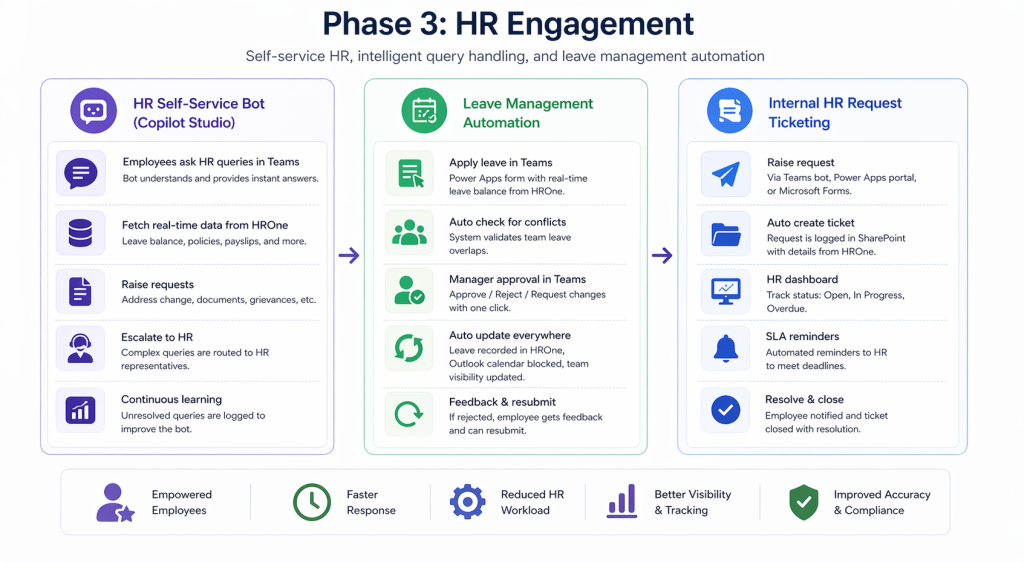
A conversational AI bot built using Copilot Studio and deployed within Microsoft Teams acts as the first point of contact for employees. This bot is designed to handle the majority of routine HR queries without requiring direct HR intervention, significantly reducing workload and response times.
For data-driven queries such as leave balances, the bot connects directly to HROne via APIs and retrieves real-time information specific to the employee. This ensures that employees always receive accurate and up-to-date responses without needing to log into multiple systems.
When employees request documents like payslips, the bot provides direct access links, either from HROne or from document repositories such as SharePoint Online. This eliminates delays and improves accessibility.
For policy-related queries, the bot uses intelligent search capabilities to scan the organization’s policy library and return relevant sections along with links to detailed documents. This makes it easier for employees to find information without navigating through multiple files.
If an employee needs to raise a request, the bot presents structured options such as address changes, document requests, or grievances. Submissions are automatically logged and routed to the appropriate HR personnel, ensuring proper tracking and accountability.
In cases where the bot cannot resolve a query, it seamlessly escalates the request by connecting the employee to an HR representative via Teams. At the same time, unresolved queries are logged for analysis, helping HR teams continuously improve the knowledge base and bot capabilities.
3.2 Leave Management Automation
Leave management is one of the most frequent HR interactions, and simplifying this process has a direct impact on employee experience. This solution brings the entire leave application process into Microsoft Teams, allowing employees to apply for leave without switching platforms.
Employees can access a leave application interface built using Power Apps, where their leave balances are pre-populated in real time from HROne. This ensures complete transparency and eliminates the need for manual checks. Before submission, the system automatically checks for overlapping leave within the team, helping employees make informed decisions and avoid scheduling conflicts. This proactive validation reduces the likelihood of rejections and improves planning.
Once a leave request is submitted, managers receive an interactive approval notification in Teams. With a single click, they can approve, reject, or request clarification, without needing to access emails or separate systems. This significantly speeds up the approval process.
Upon approval, the leave is automatically recorded in HROne, ensuring accurate balance updates. At the same time, the employee’s Outlook calendar is blocked, and the leave is reflected in team schedules, improving visibility for colleagues and managers.
If a request is rejected, employees receive clear feedback and can easily modify and resubmit their request within the same interface. This streamlined approach reduces friction and ensures a smooth end-to-end leave management experience.
3.3 Internal HR Request Ticketing
Not all HR queries can be resolved instantly, especially those that require investigation or manual intervention. For such cases, a structured ticketing system ensures that requests are tracked, managed, and resolved efficiently.
Employees can raise HR requests through multiple channels, including the Teams bot, Power Apps portal, or Microsoft Forms. Regardless of the entry point, each request is automatically converted into a tracked item within SharePoint Online.
Each ticket includes key details such as request type, employee information (fetched from HROne), and a predefined SLA for resolution. This ensures that every request is properly categorized and assigned. HR teams manage these requests through a centralized dashboard, where they can monitor the status of all tickets, whether open, in progress, or overdue. This visibility improves coordination and ensures that no request is overlooked.
Automated reminders are sent to HR personnel as deadlines approach, helping maintain SLA compliance. Once a request is resolved, the employee is notified automatically, and the ticket is closed with a resolution summary. Over time, the system also identifies recurring request patterns, allowing HR leadership to proactively address common issues by updating policies, improving documentation, or enhancing self-service capabilities.
Phase 4: Reporting & Insights
Power BI dashboards delivering real-time people intelligence to leadership
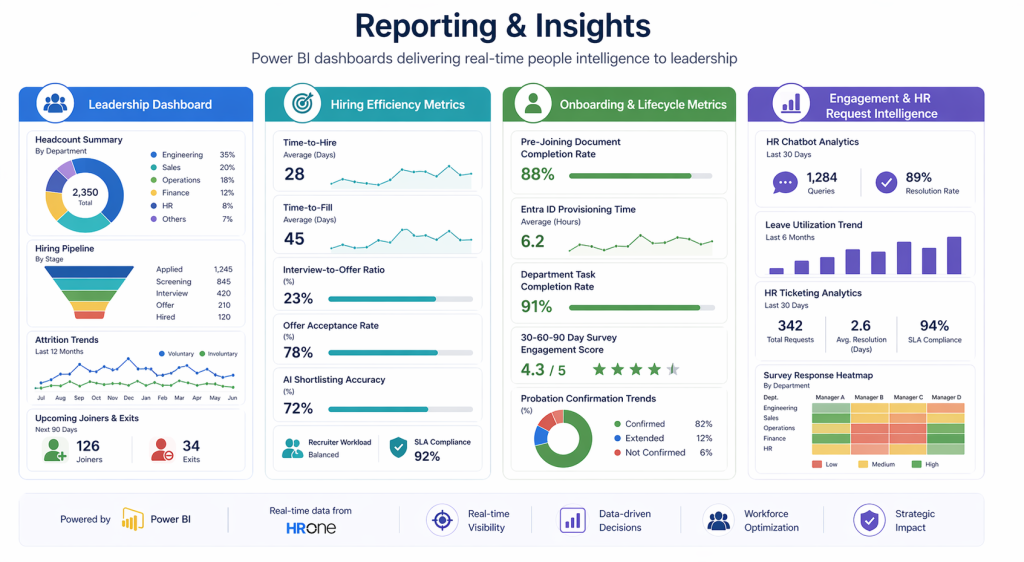
Phase 4 brings together data from all previous phases into a unified analytics layer powered by Power BI. Instead of relying on manual reports or scattered spreadsheets, HR leaders gain a single, real-time view of workforce data. By integrating directly with HROne, this layer ensures that all insights are accurate, up-to-date, and actionable.
4.1 Leadership Dashboard
The leadership dashboard acts as a centralized command center for HR heads, CHROs, and business leaders. It provides a high-level overview of workforce composition and organizational trends, enabling quick and informed decision-making.
One of the key components is the headcount summary, which offers a breakdown of employees by department, location, grade, and employment type. This data is refreshed automatically from HROne, ensuring that leadership always has access to the latest workforce information.The dashboard also provides visibility into the hiring pipeline, including active job requisitions, candidates in different stages, and pending offers. This helps leaders understand hiring progress and identify areas where intervention may be required.
Attrition trends are another critical insight, showing both voluntary and involuntary exits across departments and tenure groups. This helps organizations identify patterns, understand underlying causes, and take proactive measures to improve retention.
4.2 Hiring Efficiency Metrics
Recruitment performance is measured through detailed hiring efficiency metrics, allowing HR teams to continuously optimize their processes. Time-to-hire provides insights into how long it takes to move from requisition creation to offer acceptance. This metric helps identify delays in the hiring process and highlights opportunities for improvement across departments and roles.
Time-to-fill extends this analysis by measuring the total duration from requisition to the employee’s first working day. This gives a complete picture of hiring efficiency, including onboarding readiness. Conversion metrics, such as interview-to-offer ratios and offer acceptance rates, provide deeper insights into the effectiveness of candidate selection and engagement strategies. These metrics help HR teams refine their approach to attracting and converting talent.
AI shortlisting accuracy is also tracked, comparing AI-generated recommendations with actual hiring outcomes. This ensures continuous improvement in AI models and builds confidence in automated decision support. Additionally, recruiter workload and SLA compliance metrics help balance workloads across teams and ensure that hiring processes are completed within defined timelines.
4.3 Onboarding & Lifecycle Metrics
Onboarding and employee lifecycle data provide valuable insights into how effectively new hires are integrated into the organization. Pre-joining document completion rates highlight how efficiently employees complete onboarding formalities before their start date. This helps HR teams identify delays and improve pre-joining processes.
Provisioning metrics track the time taken to activate employee accounts in Microsoft Entra ID after the “Joined” status is updated in HROne. This ensures that employees receive timely access to systems and tools.
Department-level task completion rates provide visibility into how efficiently different teams, such as IT, Finance, and Admin, are handling onboarding responsibilities. This helps improve coordination and accountability across departments.
Engagement metrics from 30-60-90 day surveys offer insights into employee sentiment during the early stages of employment. By analyzing response rates and sentiment scores, HR teams can identify potential risks and take corrective actions.
Probation confirmation trends provide a clear view of how many employees are successfully confirmed, extended, or not retained. This helps organizations evaluate hiring quality and onboarding effectiveness over time.
4.4 Engagement & HR Request Intelligence
This layer focuses on understanding employee behavior, engagement levels, and HR service efficiency through data-driven insights. HR chatbot analytics provide visibility into query volumes and resolution rates, helping identify the most common employee concerns. This allows HR teams to improve self-service capabilities and refine knowledge resources.
Leave utilization trends offer insights into how employees are using their leave across departments and time periods. These patterns can help HR identify potential burnout risks and take proactive measures to improve employee well-being. HR ticketing analytics track request volumes, resolution times, and SLA adherence. This ensures that HR services are delivered efficiently and highlights areas where processes can be improved.
Survey response heatmaps provide a visual representation of employee engagement across departments and managers. Consistently low scores can indicate underlying issues that require immediate attention, enabling HR to act proactively rather than reactively.
Recommended Implementation Roadmap
A structured implementation approach ensures that HR automation is rolled out smoothly while delivering measurable business value at every stage. Instead of attempting a full-scale transformation at once, this roadmap follows a phased strategy, starting with discovery and foundation setup, and then gradually expanding into recruitment, onboarding, engagement, and analytics.
This phased roadmap ensures controlled implementation, quick wins in early stages, and long-term scalability. It allows organizations to progressively modernize HR operations while maintaining stability and minimizing disruption.
Top 5 Benefits of HR Automation with HROne + Microsoft 365
1. Increased Operational Efficiency
Automation removes repetitive, manual tasks from HR workflows, such as resume screening, interview scheduling, document collection, and leave approvals. By leveraging Microsoft 365 tools like Power Automate and Teams, processes that once took hours can now be completed in minutes. This not only reduces administrative workload but also minimizes human errors, allowing HR teams to operate faster and more efficiently.
2. Enhanced Employee Experience
A modern HR experience is built on speed, accessibility, and convenience. With self-service capabilities, employees can apply for leave, access payslips, raise requests, and get instant answers through AI bots all within familiar platforms like Teams. Combined with structured onboarding and timely communication, this creates a smooth and engaging employee journey from hiring to everyday interactions.
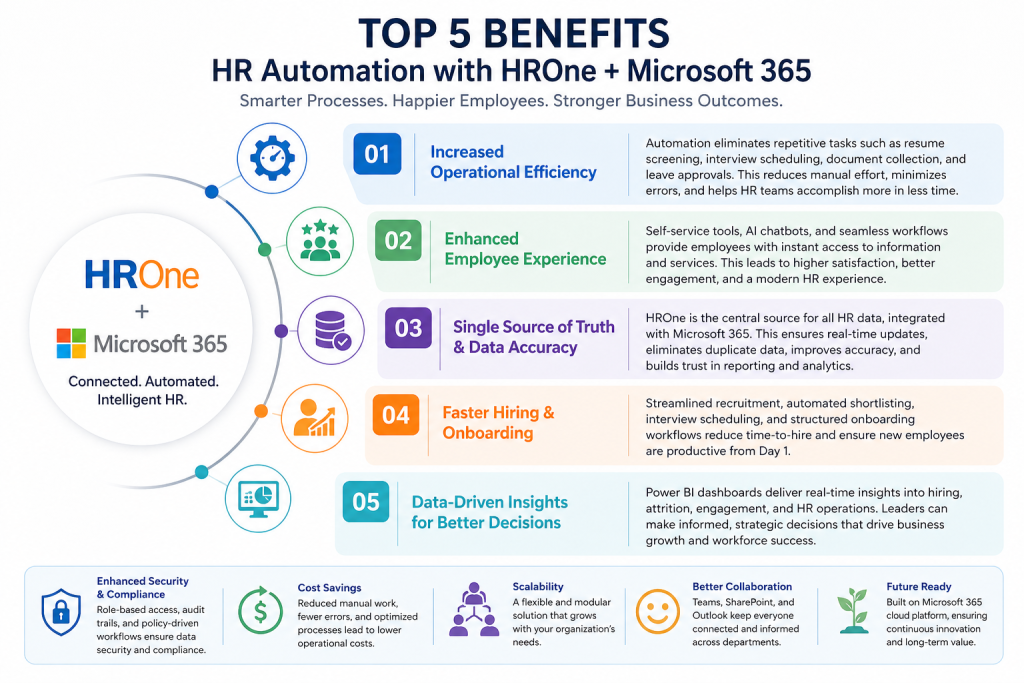
3. Single Source of Truth & Data Accuracy
With HROne acting as the central data repository, all HR processes are connected back to one reliable system. This eliminates duplicate data entry, reduces inconsistencies, and ensures that every department works with accurate, real-time information. As a result, reporting becomes more reliable and decision-making more confident.
4. Faster Hiring & Onboarding
Automation significantly reduces time-to-hire by streamlining job creation, candidate tracking, AI-based shortlisting, and interview coordination. Once a candidate is selected, onboarding workflows ensure quick document collection, system access provisioning, and Day 1 readiness. This not only accelerates hiring cycles but also helps new employees become productive much faster.
5. Data-Driven Insights for Better Decisions
With integrated analytics powered by Power BI, HR leaders gain real-time visibility into key metrics such as hiring performance, employee engagement, attrition, and operational efficiency. These insights enable proactive decision-making, helping organizations identify trends, address challenges early, and continuously improve HR strategies.
Final Thoughts
HR transformation is no longer about adopting new systems, it’s about making existing systems smarter, more connected, and more efficient. By building on top of HROne and extending its capabilities with Microsoft 365, organizations can unlock the full potential of their HR operations without the risks and costs of system replacement. This four-phase approach aligns automation with real business needs, improving hiring, onboarding, and employee experience while reducing manual effort and enabling more accurate, data-driven decisions.
In a competitive business environment, organizations that invest in intelligent HR automation will be better positioned to attract talent, retain employees, and scale efficiently. This is not just an operational upgrade, it’s a foundational step toward building a future-ready, data-driven HR ecosystem.
FAQ's
1. Do we need to replace our existing HRMS to implement this solution?
No, there is no need to replace your current system. This approach is designed to extend HROne by integrating it with Microsoft 365. HROne remains the single source of truth, while Microsoft 365 acts as the automation and interaction layer.
2. How long does it take to implement this HR automation framework?
The implementation is done in phases. A discovery phase typically takes 1–1.5 weeks, followed by gradual rollout of each phase (recruitment, onboarding, engagement, and reporting). Organizations can start seeing value as early as Phase 1 or Phase 2.
3. Is this solution suitable for all organization sizes?
Yes, the solution is scalable and can be tailored for mid-sized to large enterprises. Since it builds on existing systems, it can adapt to different organizational structures, hiring volumes, and HR processes.
4. How does AI improve the recruitment and HR processes?
AI helps automate time-consuming tasks such as job description creation, resume screening, and feedback summarization. It provides data-driven insights, improves decision-making, and reduces manual workload, while still allowing human oversight where needed.
5. Will this reduce dependency on HR and IT teams?
It reduces dependency on manual intervention, not the teams themselves. Routine tasks like leave requests, document collection, and account provisioning are automated, allowing HR and IT teams to focus on strategic initiatives rather than repetitive operations.